Change Email Passwords via cPanel
Strong password security is vital for protecting your cPanel-managed server. Sometimes, however, you may need to change an email password due to your security policy or a compromise – a task you can quickly accomplish right within your cPanel dashboard.
Strong password security is vital for protecting your cPanel-managed server. If you use your server for email, you’ll want to make sure your email passwords are secure and hard to guess (see Best Practice: Creating a Secure Password). Sometimes, however, you may need to change an email password due to your security policy or a compromise – a task you can quickly accomplish right within your cPanel dashboard.
- Log into your domain’s cPanel account.
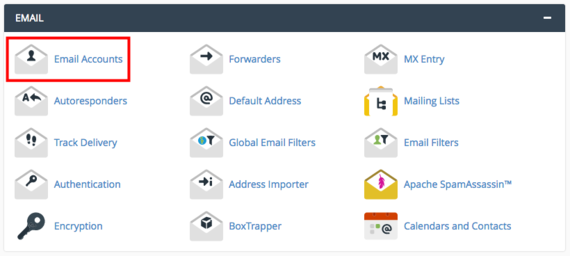
- In the Email section, click on Email Accounts.

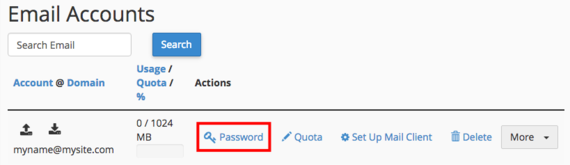
- You’ll see a list of all the email accounts that are associated with your domain. Find the account you need and click Password.

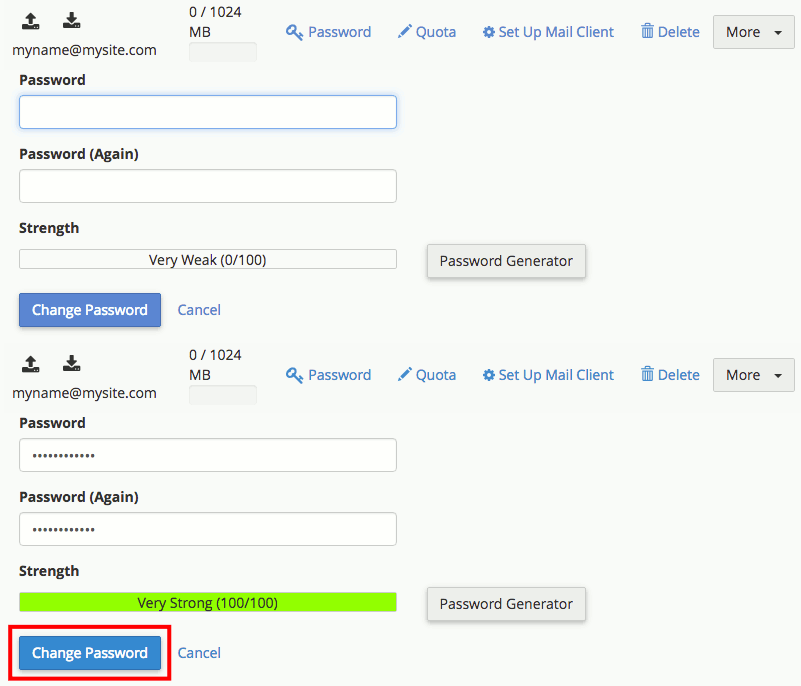
- Enter a new strong password, then confirm the new password and click Change Password. Or just click Password Generator and cPanel will create a secure password for you.