

How to Disable Cart Fragments on your WooCommerce Site
WooCommerce by default will load a front-end script that will be uncached and cause an AJAX request on every load. The cart fragments request can add anywhere from 500-700ms to the load time of your site.
In the most recent version of the Nexcess must-use plugin (1.24.0), there is a new feature that will allow you to disable the cart fragments request being made by WooCommerce. You will need to be in wp-admin on your site and have the WooCommerce plugin active in order to be able to use the feature;
In your sites-portal.liquidweb.com account, go to Dashboard > Settings
Toggle on the disable cart fragments feature and then click on the save settings button.
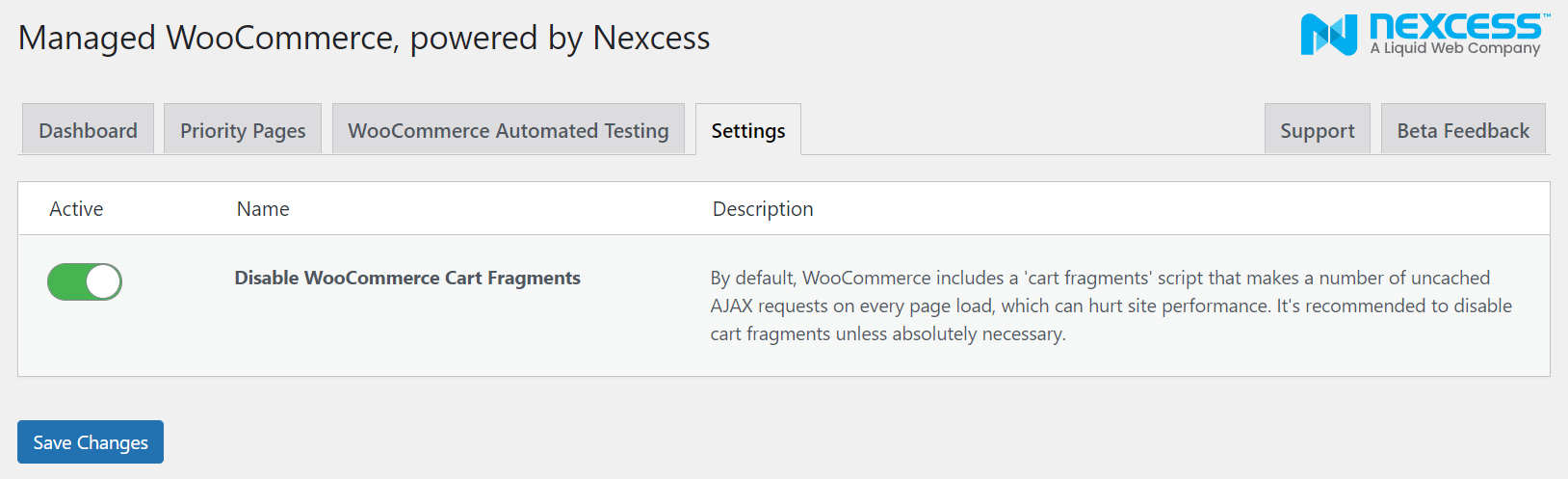
Now when you test the site using GTmetrix or WebPageTest you will notice that the cart fragments request will no longer be loading on every load of pages and products on your site.
If you notice any issues being caused by disabling cart fragments due to the plugins for WooCommerce being used or the active theme on the site then you can disable the feature and then test on a staging site. But keeping cart fragments disabled on your WooCommerce site where possible is recommended for optimal performance.