

Skip to content
Search our site for answers
Login
  • Help Docs
  • API Docs
  • liquidweb.com
  • Hosting Services
    • Cloud VPS Hosting
    • Dedicated Servers
    • GPU Hosting
    • Hosting For WordPress
    • Hosting For WooCommerce
    • Email Hosting
    • VMware Hosting
    • Add-ons
  • Security & Compliance
    • SSL Certificates
    • Firewalls
    • Cloud Hosting
    • Two Factor Authentication
    • DDoS Protection
    • Compliance
    • Malware Protection
  • Domain & DNS
    • Domain Registration
    • DNS Settings
    • Nameservers
    • Subdomains
    • Domain Forwarding
    • Email DNS Setup
  • Account & Billing
    • Account Setup
    • Payment Methods
    • Billing Cycles
    • Refunds Cancellations
    • Invoices Receipts
    • Account Security
  • Email Hosting
    • Email Setup
    • Email Forwarding
    • Spam Protection
    • Microsoft 365
    • G Suite Setup
    • Account Security
    • Email Troubleshooting
  • Performance & Optimization
    • Server Optimization
    • Caching Strategies
    • Content Delivery Network
    • Database Performance
    • Image Optimization
  • Server Administration
    • Server Setup
    • SSH Access
    • Command Line Basics
    • Database Management
    • CRON Jobs
    • Apache Nginx Setup
    • Log Analysis
  • CMS & Applications
    • WordPress
    • WooCommerce
    • Magento
    • Joomla
    • Drupal
  • Backups & Recovery
    • Backup Strategies
    • Cloud Backups
    • Disaster Recovery
    • Restoring Backups
    • Raid Configurations
  • Reseller & Partner Support
    • Reseller Program
    • White Label Hosting
    • Partner Portal
    • Client Management
  • Policies & Compliance
    • Terms Of Service
    • Privacy Policy
    • GDPR Compliance
    • Acceptable Use Policy
Help Docs Control Panel Guides Nexcess Control Panel Nexcess Managed WooCommerce Nexcess Managed WooCommerce Store Management Nexcess: Managing Dev & Staging Environments

Nexcess: Managing Dev & Staging Environments

Development and staging environments serve as unique tiers of test environments for admins to verify that a site is working as expected before it goes live.
Billing Client Portal Nexcess Website Management
6 min read

First, let us discuss what the staging environment is and its significance in website development and management.

What Is a Staging Environment?

A staging environment or staging site is a copy of your production website and is the last step in the deployment process before changes are deployed to your live production website that is visible to the general public.

The main aim of this staging environment is to catch and fix any mistakes or bugs before the changes are published. Thus, changes can be released to your live website without introducing errors.

Testing new changes on a staging environment before deploying them to your live website also reduces the risk of any errors or issues that will affect your users. This cautious plan for ensuring a bug-free production environment effectively means happier users and more uptime for your website.

The development environment and the staging environment are different from each other in their purpose and use in the majority of web development implementations.

However, here in the managed applications division of Nexcess, we treat both in the same way — as test environments for admins to create and verify the working of site before it is published to the live production environment.

Advantages of Using a Staging Environment

There are many advantages of a staging environment with site development. You can use it when you want to:

  • Switch themes
  • Add or remove plugins
  • Change code
  • Test major software updates
  • Reorganize your website
  • Upgrade functionality

After confirming the result in the staging environment, you can deploy the same software code to the live site.

Getting Started With Nexcess Staging Environments

Nexcess offers one free staging environment for each live site under managed WordPress and managed WooCommerce plans only. There is another option for users to create a development environment under the live site for these two packages. But that feature comes with an additional cost.

While for other Managed Applications packages like Managed Magento and Drupal, we provide only a development environment option, and that comes with an extra cost (see the Nexcess Dev Sites Pricing Model).

However, with flexible cloud plans, there is no option to create staging/development environments. Because under a flexible cloud plan you can install any custom site, it is not possible to spin up a staging/development environment for it.

In this article, we will guide you on how to set up a staging environment if you are using of managed WordPress or managed WooCommerce. First, log into my.nexcess.net and select the Plans option:

Then locate your required plan containing the site under which you wish to create the staging environment. To the right of the site name you can find an option called Environments. Click that option:

Upon clicking on the Environments option, the user interface will list two subsequent dropdown options for development environments  and staging environments.

To the right of the Staging Environments option, you can find a Plus (+) button. Click on it.
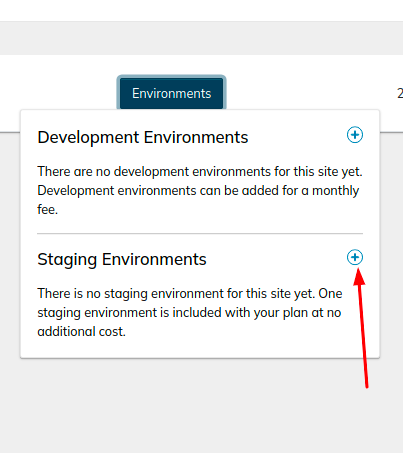
Click on the plus sign next to staging environments

Upon clicking Plus (+), the user interface will display the screen shown below. Make sure you check the checkboxes for “Copy my data to the staging environment” and “Do not anonymize data” as shown in the following screenshot.
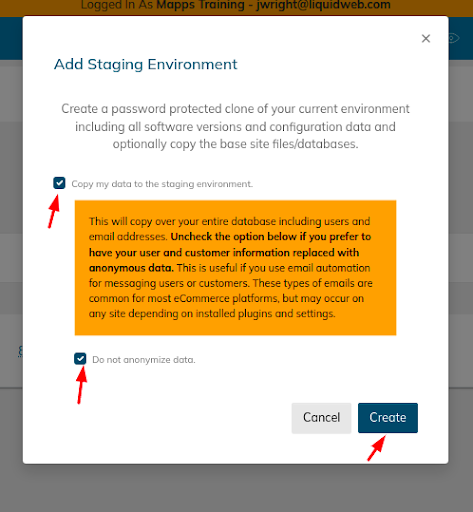
Checkboxes for “Copy my data to the staging environment” and “Do not anonymize data”

And after that, click the Create option. The staging site is created, which is a clone of your live production site. Then, once again, click the Environments (1) option to find your created staging site.

By clicking on the domain name, you will be taken to its management screen. Once there, click on the Access option to find the corresponding SSH/FTP login details.

Using the SSH/FTP details for the staging environment, you can manage the staging site.

Getting Started With Nexcess Development Environments

Above we discussed how to set up a staging environment, and here will see how we can set up a development environment.

In this case, we are taking an example of a site that is created under a Managed Magento Plan. However, the steps are the same for all other plans, including Craft CMS, Drupal, etc.

But as mentioned earlier, Nexcess does not offer development or staging environment feature for sites managed under flexible cloud plans. To create a development environment, following these steps.

Log in to your Nexcess Client Portal, select the Plans option, and locate your required plan containing the site under which you wish to create the development environment.

To the right of the site name, you can find the Environments option. Click on that option.

The user interface will display the Development Environments option. To the right of that Development Environments option, you can find a Plus (+) button. Click on it.

Upon clicking the Plus (+) button, you can select the preferred Development Environment Package and make sure you check the checkboxes for “Copy my data to the Development environment” and “Do not anonymize data.”

Then, click the Create option to complete the process. The development site will be created after a few minutes. You can find its details via the Environments(1) option of the live site.

Click on it, and then click the View option.

Then, within the left menu you can see the Access option. Click Access to obtain your development site SSH/FTP login credentials. When those in your possession, you are free to manage the site accordingly.

Frequently asked questions

The staging environment is where you deploy your software code for the team to review before it goes to the production environment. The development environment is where you work on your new and revised software code, which is constantly being built, refined, and debugged.

The main purpose of a staging environment is to ensure that all new changes deployed from previous environments are working as intended before they are released to the live production website. By reviewing the staging environment and everything working in concert on it before deploying your software code to a public website, you will be able to identify and resolve issues found, so they never impact the end user.

Was this article helpful?
Thank you for your input.
Thank you for your feedback.
Table of Contents
  • What Is a Staging Environment?
  • Getting Started With Nexcess Staging Environments
  • Getting Started With Nexcess Development Environments
  • Frequently asked questions
Essential hosting resources to help your business stay ahead
Get the guides
Related hosting content
  • How to hide a WordPress site while editing
  • What Are Data Center Tiers?
  • The Real Cost of Hosting a Website in 2024

Hosting

  • Cloud Hosting
  • Dedicated Hosting
  • Email Hosting
  • GPU Hosting
  • Magento Hosting
  • Reseller Hosting
  • VPS Hosting
  • Hosting for WordPress

Additional Hosting

  • Add-ons
  • Agency Hosting
  • Application Hosting
  • Database Hosting
  • Ecommerce Hosting
  • Enterprise Hosting
  • Freelancer Hosting
  • High Availability
  • High Performance
  • HIPAA Hosting
  • PCI Compliant Hosting
  • Private Cloud Hosting
  • Server Clusters
  • Small Business Hosting
  • VPS Reseller Hosting
  • Windows Hosting
  • Windows VPS Hosting
  • Linux VPS Hosting
  • Ubuntu VPS Hosting
  • cPanel VPS Hosting
  • KVM VPS Hosting
  • WooCommerce Hosting

Servers

  • Bare Metal Servers
  • Cloud Dedicated Servers
  • Cloud VPS
  • Custom Servers
  • Dedicated Servers
  • Managed Cloud
  • Gaming Server
  • Windows Servers

Managed Hosting

  • Managed ExpressionEngine
  • Managed Craft CMS
  • Managed Cloud
  • Managed Hosting
  • Managed Hosting for WordPress
  • Managed Magento
  • Managed Servers
  • Managed VPS
  • Managed WooCommerce

Studies

  • Every Second Counts
  • Impact of Downtime
  • Hypergrowth Hosting

Resources

  • API
  • Hosting Coupons
  • Blog
  • Customer Stories
  • Ebooks
  • Help Docs
  • Migrations
  • Sitemap
  • SSL Checker
  • Webinars
  • Web Hosting Tools
  • White Papers
  • What is my IP

Hosting Basics

  • Bare Metal
  • Cloud Hosting
  • Dedicated Servers
  • Gaming VPS
  • GPUs
  • Private Cloud
  • VPS
  • Web Hosting

Partnerships

  • Hosting Affiliate Program
  • Partner Programs
  • Refer-a-Friend

Software & Design Solutions

  • GiveWP
  • IconicWP
  • Kadence WP
  • LearnDash
  • MemberDash
  • Modern Tribe
  • Restrict Content Pro
  • SolidWP
  • The Events Calendar

Get Help

  • Chat
  • Sales
  • Support

Company

  • About
  • Careers
  • Data Centers
  • Hosting Prices
  • News
  • Policies
  • Privacy Policy
  • Security
  • Terms and Conditions
  • Web Hosting Deals

Liquid Web, a web hosting company with 18 data centers globally

HostingAdvice.com logo
Liquid Web reviewLiquid Web review

© 2026 Liquid Web, LLC

Privacy Policy

* Promotions may be exclusively available to new customers and cannot be applied to existing accounts. Qualification is at the sole discretion of Liquid Web. Reach out with questions.

  • Solutions
    • Solutions by industry
      Ecommerce

      Secure, compliant infrastructure for regulated online sales

      Financial Services

      High-trust hosting built for security and compliance

      Agencies

      Fast, flexible hosting for high-traffic client projects

      Healthcare

      HIPAA-ready environments for protected health data

      Solutions by outcomes
      Compliance

      Hosting aligned with HIPAA, PCI, GDPR, and audit readiness

      Launch

      Configure a high-performance server in minutes

      Commerce Scale

      Infrastructure built to handle surges, orders, and growth

      Disaster Recovery

      Redundant, resilient systems for rapid recovery and uptime

  • VPS Hosting
    • VPS Packages
      Cloud VPS Hosting
      Windows VPS Hosting
      Linux VPS Hosting
      Add-ons & Backups
      View All VPS Hosting
  • Dedicated Servers
    • Bare Metal Packages
      Bare Metal Servers
      Cloud Metal Packages
      Managed Dedicated
      Gaming Servers
      View All Dedicated Servers

  • Managed Hosting
    • Managed Hosting
      Managed Servers
      Managed Applications
  • WordPress
    • Hosting for WordPress
      Managed Hosting for WordPress
      VPS for WordPress
      Dedicated WordPress
      WooCommerce Hosting
  • GPU Hosting
    • GPU Hosting
      NVIDIA GPU Hosting
      AI Training & Interface

  • Products
    • Compute
      Cloud Servers

      Scalable, high-speed compute

      Dedicated Servers

      Reliability, power, and control

      Private Cloud

      Isolated, enterprise-grade cloud

      GPU

      Accelerated for AI & ML

      Containers

      Portable workloads for any app

      Platform services
      Cloud Storage

      Storage for growing data needs

      Backups & DR

      Protection for critical workloads

      Global Private Fabric

      Unify networks across servers

      Security & Protection

      Advanced defense for data

      Load Balancing

      Optimized traffic distribution

      Applications
      WordPress

      Optimized for fast, secure sites

      WooCommerce

      Performance for scalable stores

      Magento

      Commerce-ready, built to scale

Log in
  • System status
  • Support | Get Help