

How to view website error and access logs
Learn how to view website error and access logs using SiteWorx. There are two methods of viewing error and access logs.
Using SiteWorx
- Log in to your SiteWorx account.
- If you do not know your password, click Forgot your password on the login page.
- On the main menu, click Administration > Logs.
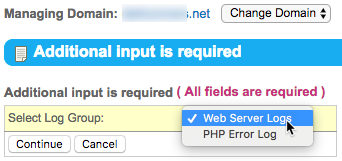
- If necessary, select the desired log group from the Select Log Group drop-down list, then click Continue.

- To download the log file, click Download.
Using SSH
Apache error and transfer logs are stored differently in cluster environments.
Issue the following commands to view error and transfer logs from the server using SSH:
less /home/username/var/domain.com/logs/error.log
less /home/username/var/domain.com/logs/transfer.log
You can also issue the following to view the PHP-FPM error logs:
less /home/username/var/php-fpm/error.log