How to set up Let’s Encrypt in SiteWorx
How to install Let's Encrypt, a type of SSL certificate available for SiteWorx.
What is Let’s Encrypt?
Let’s Encrypt is an automated certificate authority (CA) that provides a free and easy way to generate the SSL certificates required for enabling HTTPS for your website. This method replaces the standard method of purchasing SSL certificates, but it has limitations as outlined in the next section.
SSL certificates: Let’s Encrypt versus traditional
Let’s Encrypt is designed to be easy and free. To accomplish this, it makes several concessions when compared to traditional SSL certificates:
- Let’s Encrypt certificates require renewal every 3 months.
- Let’s Encrypt does not offer as many options for customization, such as premium, and extended validation certificates.
- Let’s Encrypt certificates do not include a warranty; traditional SSL certificates do.
- Most certificate authorities (CAs) provide support with the creation and installation of SSL certificates; Let’s Encrypt does not offer such support.
- More information about how to enable Let’s Encrypt SSL certifications on Managed WordPress and Managed WooCommerce plans click here.
Enabling Let’s Encrypt
You can use SiteWorx to provide the necessary information to Let’s Encrypt.
- Log in to your SiteWorx account.
- If you do not know your password, click Forgot your password on the login page.
- From the SiteWorx main menu, select Hosting Features > Domains > SSL.
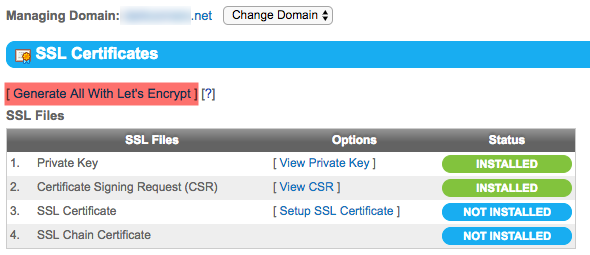
- In the SSL Files section, click Generate All With Let’s Encrypt.

- From the Common Name list, select the domain name to be used by the Let’s Encrypt certificate, then click Generate. If you wish to select multiple domain names, select each by pressing Ctrl or Cmd while clicking the domain name.
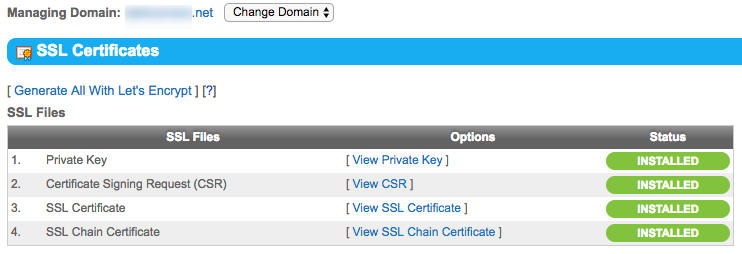
- If successful, your SSL Certificates panel will resemble what appears below: