How to manage firewall whitelists in SiteWorx
Learn how Nexcess clients can use SiteWorx to whitelist an IP address.
A whitelist is used to give authorization to specific IP addresses to gain access to Nexcess servers using services such as SSH, FTP, or remote MySQL access.
Whitelisting your IP alone will not grant SSH access. See How to enable SSH access for more information.
Step by step instructions
- Log in to your SiteWorx account.
- If you do not know your password, click Forgot your password on the login page.
- From the SiteWorx main menu, click Hosting Features > Firewall Rules.
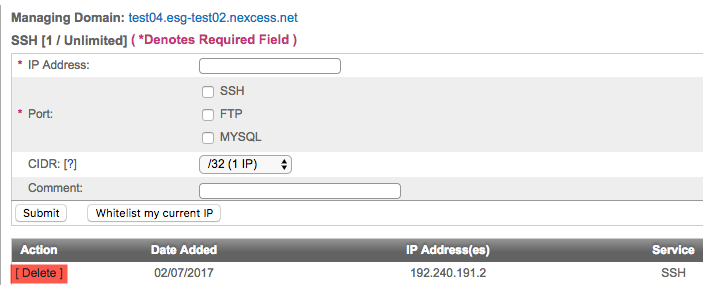
- In the IP address field, enter the IP address to be whitelisted, or select Whitelist my current IP, if appropriate.
- From the Port drop-down list, select the SSH, FTP, or MYSQL check boxes, as desired.
- Click Submit.
- When necessary, you may remove any whitelisted IP by clicking Delete in the corresponding entry.