

How to use webmail to access your email account in SiteWorx
Use webmail to access your email account. SiteWorx provides access to three different web-based email programs, each of which you can use to retrieve and send email from your domain's email account.
- Log in to SiteWorx.
- If you do not know your password, click Forgot your password on the login page.
- From the SiteWorx main menu, click Hosting Features > Email > Webmail.
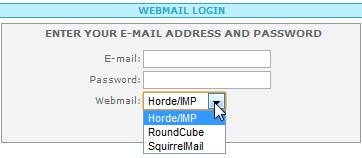
- From the Webmail Login window, enter the login information for your email account and select your preferred email client. If you do not know your login credentials and you created this email account in SiteWorx, see Step 4.

- From the SiteWorx main menu, click Hosting Features > Email > Mailboxes.
- Locate the email account, then click Edit.
- To reset your password, enter the new password in the Change Password and Confirm Password fields, then click Save and retry Step 3 above.
Accessing webmail without SiteWorx
You can directly access your email from the Web by simply entering the Webmail web address in your browser’s address bar. For example, if your domain name was example.com, you enter the following web address:
https://example.com:2443/webmail