Skip to content
Nexcess.comServers.comLiquidWeb.com
Search our site for answers
Login
  • Help Docs
  • API Docs
  • liquidweb.com
  • Hosting Services
    • Cloud VPS Hosting
    • Dedicated Servers
    • GPU Hosting
    • Hosting For WordPress
    • Hosting For WooCommerce
    • Email Hosting
    • VMware Hosting
    • Add-ons
  • Security & Compliance
    • SSL Certificates
    • Firewalls
    • Cloud Hosting
    • Two Factor Authentication
    • DDoS Protection
    • Compliance
    • Malware Protection
  • Domain & DNS
    • Domain Registration
    • DNS Settings
    • Nameservers
    • Subdomains
    • Domain Forwarding
    • Email DNS Setup
  • Account & Billing
    • Account Setup
    • Payment Methods
    • Billing Cycles
    • Refunds Cancellations
    • Invoices Receipts
    • Account Security
  • Email Hosting
    • Email Setup
    • Email Forwarding
    • Spam Protection
    • Microsoft 365
    • G Suite Setup
    • Account Security
    • Email Troubleshooting
  • Performance & Optimization
    • Server Optimization
    • Caching Strategies
    • Content Delivery Network
    • Database Performance
    • Image Optimization
  • Server Administration
    • Server Setup
    • SSH Access
    • Command Line Basics
    • Database Management
    • CRON Jobs
    • Apache Nginx Setup
    • Log Analysis
  • CMS & Applications
    • WordPress
    • WooCommerce
    • Magento
    • Joomla
    • Drupal
  • Backups & Recovery
    • Backup Strategies
    • Cloud Backups
    • Disaster Recovery
    • Restoring Backups
    • Raid Configurations
  • Reseller & Partner Support
    • Reseller Program
    • White Label Hosting
    • Partner Portal
    • Client Management
  • Policies & Compliance
    • Terms Of Service
    • Privacy Policy
    • GDPR Compliance
    • Acceptable Use Policy
Help Docs Control Panel Guides The Ultimate Guide to the InterWorx Control Panel (2025) SiteWorx Email Management in SiteWorx How to create and manage email groups

How to create and manage email groups

How Nexcess clients on SiteWorx can create and manage email groups.
Control Panel Email Sites and Stores SiteWorx
1 min read

Creating groups

While creating a new email account, any existing email groups will be listed on the page. This allows you to easily assign the new email account to an email group.

  1. On the SiteWorx main menu, click Hosting Features > Email > Groups.
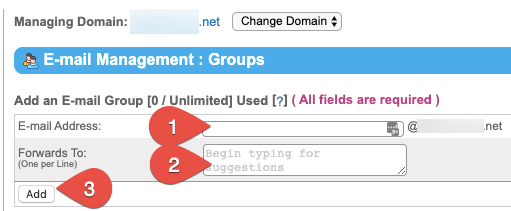
  2. In the Email Address field (1), enter the name for your email group. An email sent to that group will be forwarded to all email addresses listed in the Forwards To field. In the Forwards To field (2) , enter the target email addresses one line at a time, then click Add (3).
Modifying groups

  1. From the SiteWorx main menu, click Hosting Features > Email > Groups.
  2. Click Edit next to the group that you want to modify.
  3. On the Email Group: Edit dialog field, click inside the Forwards To account and add or remove email addresses as needed. Click Save when done.

Deleting groups

  1. From the SiteWorx main menu, click Hosting Features > Email > Groups.
  2. Click Delete next to the email group you wish to remove.
  3. Click Delete to confirm.
Was this article helpful?
Thank you for your input.
Thank you for your feedback.
Table of Contents
  • Creating groups
  • Modifying groups
  • Deleting groups
Get hosting news and tips straight to your inbox
Join our community today.
Loading form…
Essential hosting resources to help your business stay ahead
Get the guides
Related hosting content
  • WordPress Hosting
  • High-Speed Cloud Hosting Services
  • GPU Server Hosting

Solutions

Managed DedicatedCloud DedicatedManaged VPSWordPress ManagedManaged MagentoManaged WooCommerceSignature ServicesAdd-ons

Company

ContactAboutTerms of ServicePrivacy PolicyCustomer StoriesGlobal Cloud Platform

Resources

Help DocsResource CenterWeb Hosting ToolsSitemap

Partnerships

Hosting Affiliate ProgramPartner ProgramsRefer-a-Friend
HIPAA logo.
RedHat logo
cPanel and WHM certified.
SSAE-16 audit compliant hosting provider.
CCNA Cisco certified routing and switching for servers and hosting.
Microsoft Partner Silver Hosting.
AICPA service organization, SOC compliant.
2025 Best Performance and Reliability Award from HostAdvice.com.
Liquid Web reviewLiquid Web review
BBB Accredited Business logo with A+ rating.

©  Liquid Web, LLC by Nexcess Corp.

Privacy Policy

  • Solutions
  • VPS Hosting
  • Dedicated Servers
  • Managed Hosting
  • WordPress
  • GPU Hosting
  • Products
Log in
  • System status
  • Support | Get Help