

How to update cron variables in SiteWorx
Do not modify the cron variables unless you have an understanding of how they work and what they control.
Note that Path is the environmental variable for Path, not the path to your script.
Step by step instructions
Log in to your SiteWorx account.
- If you do not know your password, click Forgot your password on the login page.
On the main menu, click Hosting Features > Cron Jobs.
On the System CRON Management page, under the CRON Options section, click Edit.
In the CRON Options section, type the following information:
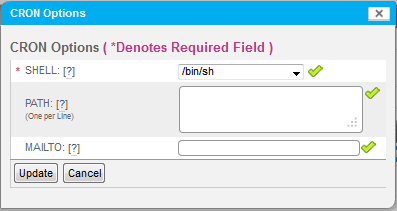
SHELL: Select the linux shell to run the cron jobs.
PATH: Type the search paths for the cron jobs. Attention: PATH is the environmental variable, not the path to your script.
MAILTO: Type the email address to receive all output from the cron jobs.
Click Update.