

Creating Account Packages in Interworx Web Panel
InterWorx Web Panel simplifies user account and quota management with Packages. Packages regulate disk space, bandwidth, and domains, freeing you to focus on business management instead of server resource monitoring.
In the InterWorx Web Panel control panel, managing user accounts and quotas can be accomplished through the use of Packages. Packages can control everything from disk space to bandwidth to domains. Using packages to control how many server resources are allocated to each user frees you to manage your business, rather than monitor your server’s resources.
Add a Package
- Login to your InterWorx Server using the administrator (root) credentials. For help with logging in, see Logging into InterWorx Web Panel.
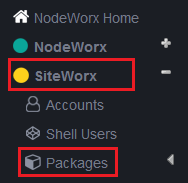
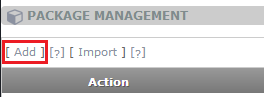
- Click on Packages in the SiteWorx section of the left navigation bar. Then click on Add to create a new package.
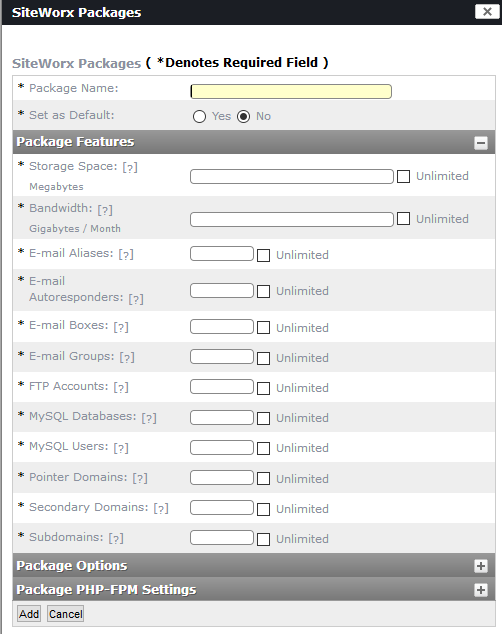
- On the SiteWorkx Packages screen, enter a Package Name, then enter limits for each of the categories that you would like to limit for users of the package (blank entries will be treated as unlimited). Click the Add button to save the new package.
Assign a Package
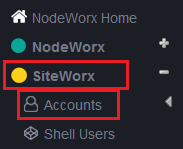
- To assign a package to a user, go to Accounts in the left navigation bar, then click on the Edit link next to the account name.
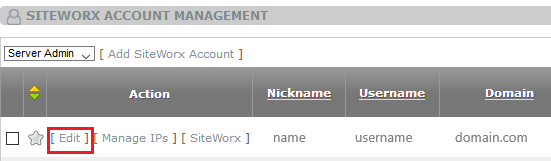
- Choose the package you want to assign to the account from the Package Template drop-down menu. You can also modify the Package Features and Options here if you need to customize the package for only this account.