

Finding Log Files in InterWorx Web Panel
This article includes instructions for finding log files in the Interworx Web Panel, both via the panel and via CLI.
Log files on servers are records of events that have happened on the server. Log files can include login attempts, system warnings, and records of changes made to the server, as well as other important information.
Server Logs
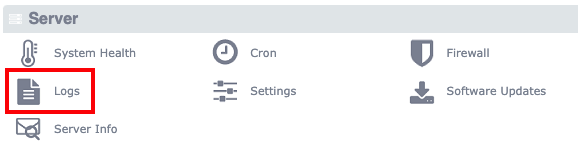
Most of the server logs you will need to find can be accessed from the control panel. Just log in to Nodeworx, scroll to the bottom of the screen, and click on Logs. For more information on logging into the control panel, see Logging into Interworx Web Panel
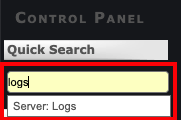
As a shortcut, you can just type “logs” into the search bar at the top of the screen and choose Server Logs.
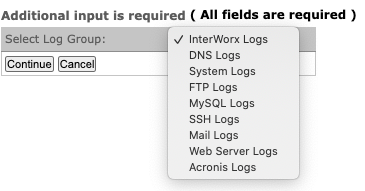
Either method will take you to the Server Logs page. Just choose the category of logs you wish to access from the dropdown and you’ll find all the logs available for that service.
SiteWorx Logs
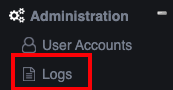
If you need to access the logs for a specific domain (or siteworx account), log in to that account and click Logs under the Administration portion of the menu.
CLI Log Locations
If you need to find the log files via the command line, here are various locations of the log files
InterWorx service logs
Access log:

/usr/local/interworx/var/log/access.log

Error Log:

/usr/local/interworx/var/log/error.log

/usr/local/interworx/var/log/iworx.log

Interworx configuration file:

/usr/local/interworx/iworx.ini

internal DB backups

/usr/local/interworx/var/backups/iworxdb
Apache Logs
Access Logs
Domlogs

/home/user/var/domain.tld/logs/transfer.log

/home/user/var/domain.tld/logs/transfer-ssl.log

Generic Access log (Requests to the IP, hostname, domains that resolve to the server, but don't have a vhost)

/var/log/httpd/access_log

/var/log/httpd/ssl_access_log

Apache Error Logs
Service error log (Server-wide errors, not specific to any vhost)

/var/log/httpd/error_log

/var/log/httpd/ssl_error_log

Vhost Error Logs
Domain-Specific error logs:

/home/user/var/domain.tld/logs/error.log

/home/user/var/domain.tld/logs/error-ssl.log
FTP Logs
/var/log/proftpd
MySQL Logs
error log:

/var/log/mariadb/mariadb.log
Mail Logs
/var/log/dovecot/dovecot.log
/var/log/maillog
/var/log/send/current
PHP-FPM Logs
/opt/remi/php54/root/var/log/php-fpm/error.log
/opt/remi/php55/root/var/log/php-fpm/error.log
/opt/remi/php56/root/var/log/php-fpm/error.log
/var/log/php-fpm/error.log
/var/opt/iworx/iworxphp72/log/php-fpm/error.log
/var/opt/remi/php70/log/php-fpm/error.log
/var/opt/remi/php71/log/php-fpm/error.log
/var/opt/remi/php72/log/php-fpm/error.log
/var/opt/remi/php73/log/php-fpm/error.log