

How to install Vanilla Forums Community Edition
How Nexcess clients on SiteWorx servers can manually install Vanilla Forums Community Edition, an open source discussion forum.
1. Download Vanilla Forums
- Download the Vanilla Forums package from the Vanilla Forums website.
- Extract the file and note its location for later use.
2. Configure FTP credentials
- Log in to your SiteWorx control panel.
- If you do not know your password, click Forgot your password on the login page.
- From the SiteWorx main menu, click Hosting Features > FTP > Accounts
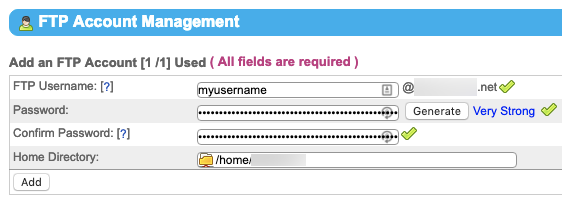
In the Add an FTP Account section, fill the FTP Username, Password, and Confirm Password fields, then click Add.|

3. Transfer Vanilla Forums files to your Nexcess server
Your exact method of transferring files will vary according to your choice of application. Whatever the method, you will need the username and password you created in Step 2C. For detailed instructions and an example using Cyberduck, see How to transfer files to a server with SFTP.
4. Configure your database
- From the SiteWorx main menu, click Hosting Features > MySQL > Databases.
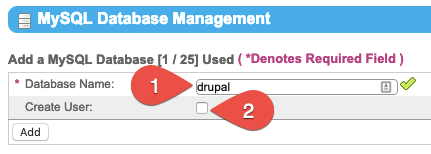
- Fill the DatabaseName field, though we recommend “drupal.” Select the Create User check box.

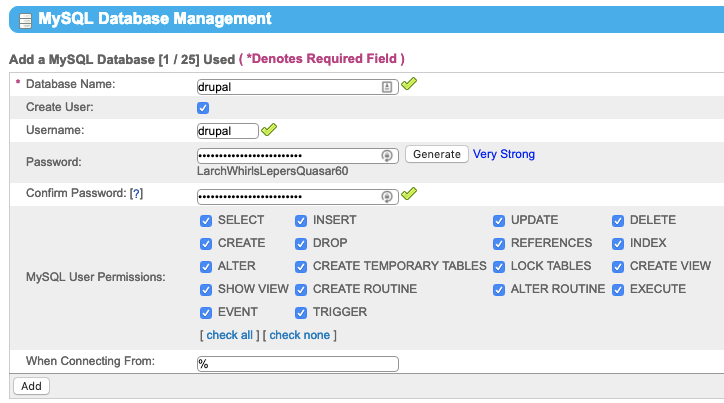
- Fill the Username field, though we recommend “drupal.” Fill the Password and Confirm Password fields, or click Generate. Note this information for use in Step 5. Verify all MySQLUserPermissions are selected, then click Add when ready.
5. Configure Vanilla Forums
- Using your web browser to navigate to your domain and corresponding Vanilla Forums path. For example, if your domain is example.com and your Vanilla Forums installation is “vanilla,” navigate to example.com/vanilla. If your Vanilla Forums installation is at the top level of your domain, then just navigate to the domain.
- Retrieve your database credentials and enter them in the corresponding fields.
- In the next window, enter your forum name, administrator email address, username, and password. Click Continue to finish your installation of Vanilla Forums.