

Activate Cloud Sites Backups
Cloud Sites simplifies backup solutions for sites and databases. Choose your backup plan, enable it for sites and databases, and schedule backup runs in a few steps. After adding your plan, enable backups for each site individually for enhanced data protection.
Cloud Sites offers easy backup solutions for your sites and databases. In just a few steps, you can select your backup plan, enable it on a site and database and schedule when you’d like to have the backups run. Once you add your plan, you will enable backups for each site individually. Let’s take a look at ordering your backup plan first.
The first time you open backups, you’ll be presented with the plan options.
- Login to your Cloud Sites Control Panel.
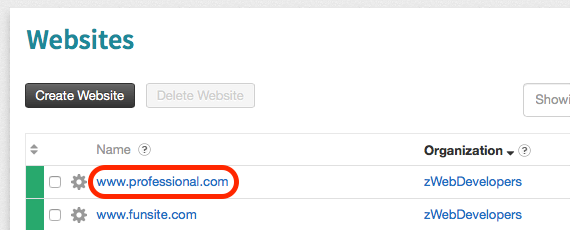
- Select any site from the Websites list on the home page.

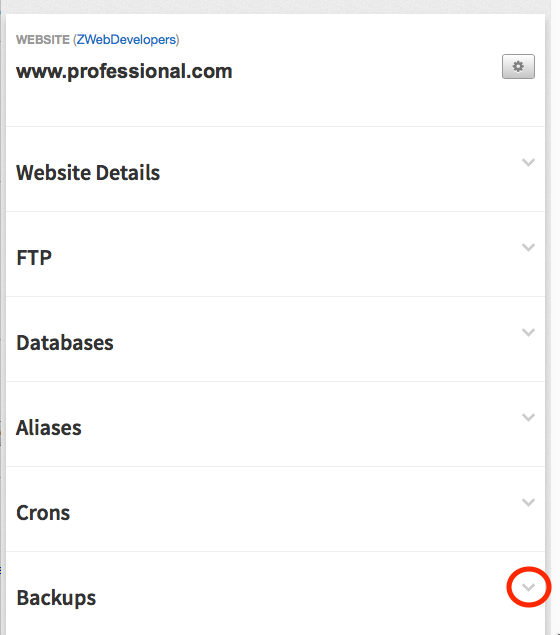
- Scroll down to the bottom of the site page, and click on the down arrow in the Backups section.

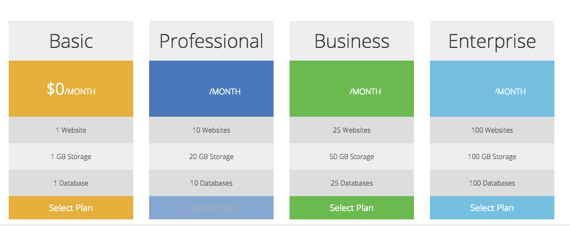
- The section will open and you can choose your backup plan:

- Basic
- The basic backup plan is for one site and one database and provides you with 1G of storage.
- Professional
- A professional backup plan is for 10 websites and databases with 20G of storage available.
- Business
- You get 25 sites and databases and 50G of storage with the business backup plan.
- Enterprise
- The enterprise backup option gives you 100G of storage for up to 100 sites and databases.
- The enterprise backup option gives you 100G of storage for up to 100 sites and databases.
- Basic
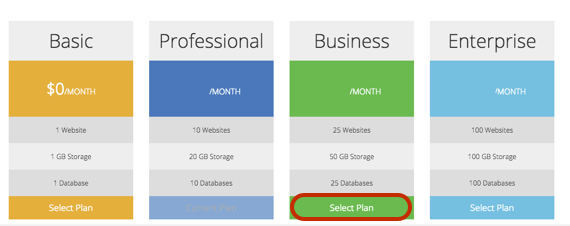
- Click on the Select Plan link in the bottom of the plan selection.
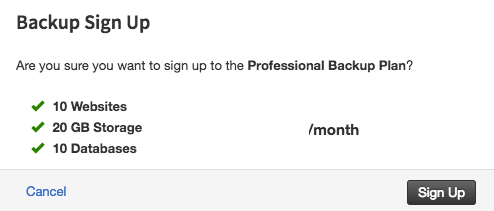
- A pop-up will appear to confirm that you want to add backup to your Cloud Sites plan. Click Sign Up to confirm.

Once you’ve selected your plan, you can now create and schedule backups for your sites and databases. See our article Enable Cloud Sites Backups for more information.