

Accessing your server from the Liquid Web console
Managing your server efficiently is crucial for maintaining optimal performance and security. The Liquid Web console provides an alternative method to access your server, especially useful when standard connectivity options like SSH or Remote Desktop Protocol (RDP) are not viable. This article highlights the benefits of using the Liquid Web console and guides you through accessing it for your server, whether the server is dedicated, VPS, or Bare Metal.
Benefits of Using the Liquid Web Console
- Remote Accessibility
- The console allows you to manage your server remotely without needing physical access or relying solely on network-based connections.
- The console allows you to manage your server remotely without needing physical access or relying solely on network-based connections.
- Troubleshooting Capabilities
- In case of network issues or configuration errors that prevent normal login methods, the console provides a direct interface to troubleshoot and resolve problems.
- In case of network issues or configuration errors that prevent normal login methods, the console provides a direct interface to troubleshoot and resolve problems.
- Secure Access
- The console connection is secured within your Liquid Web account, adding an extra layer of protection against unauthorized access.
- The console connection is secured within your Liquid Web account, adding an extra layer of protection against unauthorized access.
- Comprehensive Control
- You can perform various administrative tasks directly from the console as if you were physically present at the machine.
- You can perform various administrative tasks directly from the console as if you were physically present at the machine.
- No Additional Software Required
- Unlike other remote management tools, accessing your server via the Liquid Web console does not require additional software installations. Some products, like IPMI for your dedicated server, require the use of Java or other third party software that can complicate the connection process.
Accessing your server via Liquid Web Console
- Log in to Your Liquid Web Account
- For help with logging in, see Exploring Your My Liquid Web Account.
- For help with logging in, see Exploring Your My Liquid Web Account.
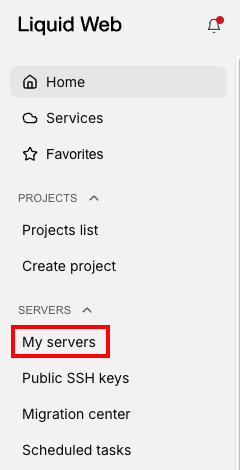
- Click on My Servers in the left side menu.

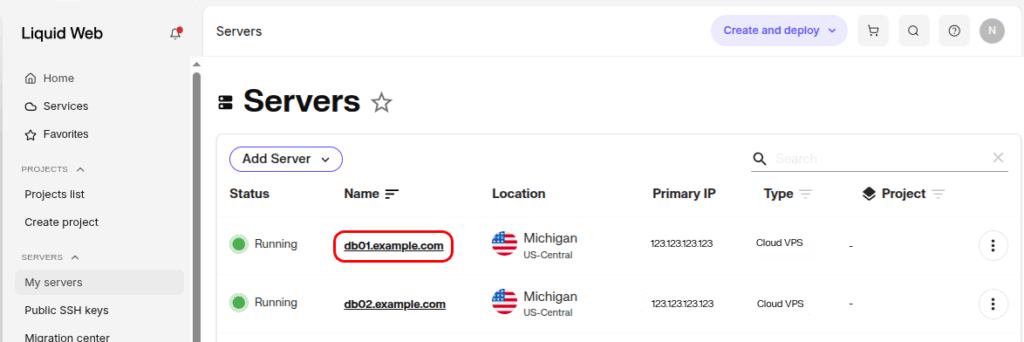
- From the list of servers, click on the name of your server to open its details page.

- On the server details page, locate and click on the Console tab.

- A new window will open with either an SSH command prompt (for Linux servers) or a view of the Windows login page (for Windows servers). You can now manage your server as needed.

Using the Liquid Web Console
The console functions like any standard terminal. After logging in as root or another configured user, you can run commands simply by typing them and pressing ‘Enter’.
Along with a secure connection, we offer the following features to enhance your console experience:
Status
At the left of the console window, you can see the status of your connection, either Connected or Disconnected.

The ‘Send CtrlAltDel’ button
Windows users are familiar with the CtrlAltDel function, as it is a way to launch the task manager in Windows servers, as well as escape out of frozen programs. For Windows servers, that is exactly how this button functions.
However, for most Linux servers, the CtrlAltDel button functions as a Reboot command.

Paste functionality is experimental and may not work as expected.
IP Addresses button
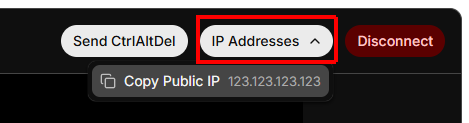
The IP Addresses button in the console allows to you view and copy the public (and private if available) IP address of the server in the console window. Click the stacked boxes icon to copy an IP address.
Disconnect button
Clicking the Disconnect button will disconnect the console window from the server. Clicking anywhere else in your Liquid Web account will also disconnect the console session.
Conclusion
The ability to access your server through the Liquid Web console ensures that you maintain control over your infrastructure regardless of location or network conditions. It is a vital tool for administrators who need reliable and secure remote management capabilities for all your servers: Bare Metal, dedicated, and VPS alike.