Ecommerce SEO: A Complete Guide
Do you run an ecommerce store but aren’t sure how to improve its SEO? This expert guide takes you on a detailed journey from keyword research to technical audits.
Get fast, reliable hosting for WordPress
Power your site with the industry’s fastest, most optimized WordPress hosting
Do you run an ecommerce store but aren’t sure how to improve its SEO? Worry no more, this is your complete guide to ecommerce SEO.
From keyword research to technical audits, this expert guide takes you on a detailed journey through the ins and outs of ecommerce SEO tactics for ranking your products on page one of Google.
What are you waiting for, let’s get started!
Laying the Groundwork for Ecommerce SEO
A concrete ecommerce SEO strategy is exactly that: a strategy. And all good strategies start somewhere.
For ecommerce SEO, that starting point is keyword and category research, upon which you’ll build site structure, on-page and technical SEO, and backlinks.
These, in turn, influence the buyer’s journey. From click to homepage, to checkout, your keyword research should provide a clear rationale for the journey a customer takes, even extending off-site into guest posts and social channels.
Before we launch into a detailed look at implementing or improving your ecommerce SEO, let’s take a look at the groundwork you need to cover, and why it’s important.
Use an ecommerce platform that gives you an SEO boost – Get started with Magento 2 hosting.
Why Ecommerce SEO Matters
Why does ecommerce SEO matter? Is it really just a form of dark magic held by wordsmiths of a digital age?
Let’s break that down.
Firstly, yes, ecommerce SEO matters. It matters because it’s the key to finding customers and selling products organically. This means without having to pay for advertising.
Sound pretty sweet, right?
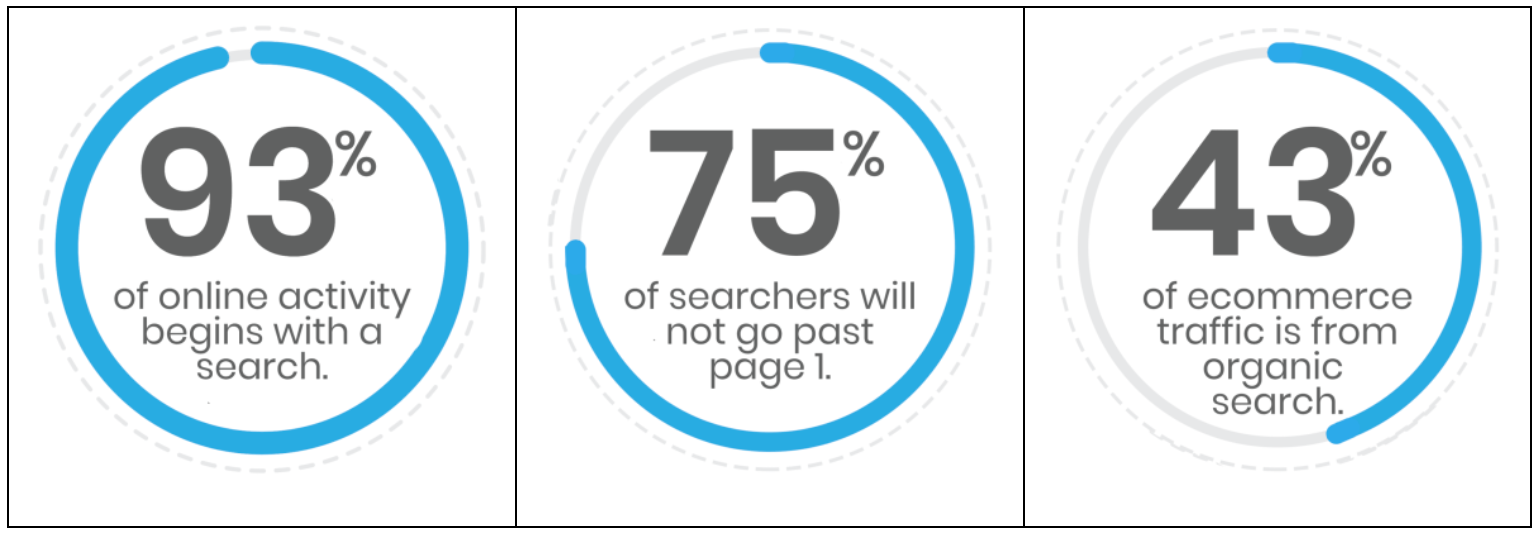
93% of online activity begins with a search, with less than 75% of searchers proceeding past the first page of search results. That means that in order to play the organic game successfully, you’ll need to compete and beat out the competition.
Moreover, as we’ll look at throughout this guide, SEO doesn’t just affect your organic search rankings, it has implications that run throughout your entire site. From UX to structure, SEO is the key to creating buyers journeys that are unforgettable and targeted.
So what about the second question. Is SEO just some form of dark magic?
No.
Despite what some “experts” would like you to believe, SEO is actually a fairly straightforward process (for the most part), that revolves around you proving the relevancy of the pages and content you create.
For ecommerce, that means attributing value to your products and telling a search engine that is the case.
What’s best, it’s all easily done by following a simple formula. That’s what we’re going to be looking at here.
Defining Ecommerce Products and Categories
Ecommerce search engine optimization is a little different than typical content SEO.
Products are different than blog or other content pages; both in terms of goals and purpose. As a result, Google handles product pages differently, buyers expect them to act differently, and the competition is different.
This is especially true if your store offers a large number of products across several categories.
Take, for instance, if you’re opening a store selling headphones.
Simply stating “headphones” when it comes to the product title and description isn’t enough. Going even further, the category “headphones” won’t do much to help either the buyer or your SEO either.
Modern audiences are looking for personalized and detailed buying experiences. These buying experiences mean understanding the differences between, say, “headphones” and “earphones”, “in ear” and “over ear”.
Understanding the Difference Between Ecommerce and Content
Ecommerce and content SEO are not the same.
Why?
To start, visitor intent is different. Content SEO often has the long game in mind. Ecommerce SEO aims to optimize the sales process. Sometimes this means the long game, other times it means more immediate engagement.
Secondly, ecommerce is arguably a lot more competitive. There are a huge number of products which are very similar. Product attributes then become increasingly important, with even the smallest addition or subtraction potentially making or breaking a sale.
Thirdly, Google handles transactional search queries differently. We will look at this in more detail later. However, what’s important to know is that transactional search queries have search features you won’t find with informational or navigational queries.
Finally, site content will be different. Product pages should be treated a little differently than, for example, blog pages. They should still follow the same general rules of focus and relevancy, but they also need to sell a product. This means you’re going to have to intertwine some emotional resonance in that copy.
As we cover pretty much everything you need to know about ecommerce SEO, keep in mind that every store is different and should be treated differently.
To create incredible, future-proof ecommerce SEO, make sure that your copy is relevant, informative, and useful.
Then do the rest.
Your Ecommerce SEO Stack

Your ecommerce SEO stack should be a collection of applications and websites that enable you to quickly and effectively research and/or confirm your keyword and category suspicions.
Your ecommerce SEO stack is your main toolset for laying the groundwork and building your store’s online presence. WIthout a good stack you’ll struggle to implement a proper keyword strategy.
Here’s exactly how you can use a huge range of applications to isolate product differences, find buyer intent, and understand a product’s market.
The Keyword Map
Before you launch any further into this section, you’re going to need a place to store all of your juicy keyword information. Everything you collect needs to be recorded for later!
If you have nothing else available, we recommend pulling up a spreadsheet and creating something which looks like this:
| Keyword | Product | Monthly Volume | Cost Per Click | Keyword Difficulty |
We’ll come back to what all these different sections mean shortly. For now, you can focus on keyword and product. Here you’ll put any of the keywords you find through your research and the product they are associated with.
Secondly, create a smaller table that looks like this:
| Keyword | Category |
This is potential categories. Categories are much larger than keywords. For instance, “Headphones” and “Earphones” may be individual categories as they have large differences. More specific attributes would fall under the keyword sections.
While conducting keyword research, keep an eye on the different keywords that appear and try to gain inspiration on what categories may and may not work.
Once you’ve done that, it’s time to get researching!
When Google Is Replaced by Amazon
The first tool you have at your disposal is Amazon. As the most popular ecommerce outlet, with a huge range of products, did you think we would (could) start anywhere else?
Amazon is to ecommerce SEO as Google is to content SEO.
Optimizing internal search is one of Amazon’s priorities, and contributed significantly to a 2018 revenue number in excess of $230 billion.
9 in 10 consumers use amazon to price check a product before making a purchase elsewhere. By positioning the right products in the right places along a buyer’s journey, they increase the chance of making a sale.
To do this, they have had to optimize and perfect their internal search engine and ecommerce SEO to deliver only the most relevant results.
So, amazon is the perfect place to get started with keyword research.
Since we’re interested in selling headphones, we’re going to start by typing “headphones” into search and taking a look at Amazon Suggest.
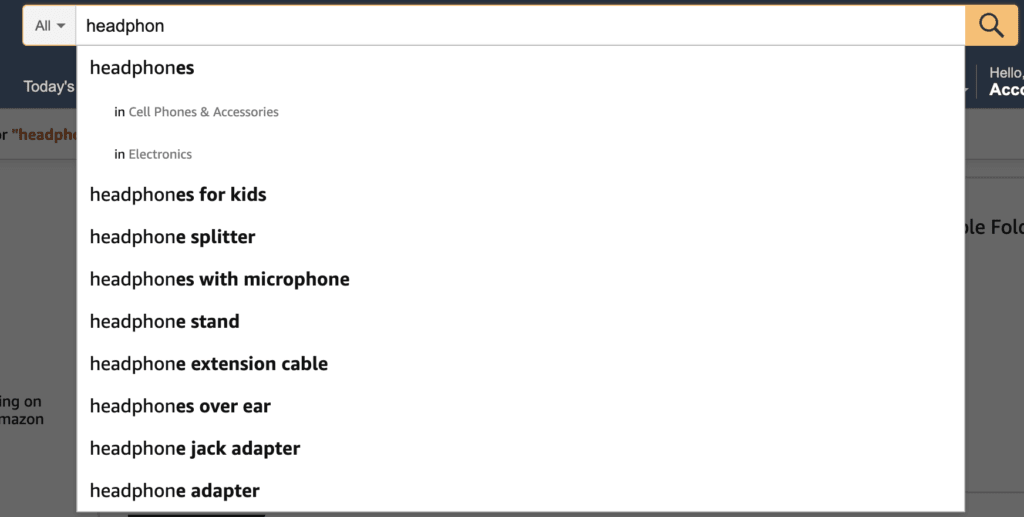
This gives us two different types of information: ideas for keywords, and ideas for categories.
Primarily, the keywords we see above are what we call long tail keywords. They are search terms that are actually being searched by real customers and they provide a lot of insight into what they are looking for.
Taking a quick look, we can see that “headphones for kids”, “headphones with microphone”, and “headphones over ear” are a couple of keywords that stand out.
Since headphones are very close to earphones, we can also take a look at this search result to see if there is any crossover or new long tail keywords we can play with.
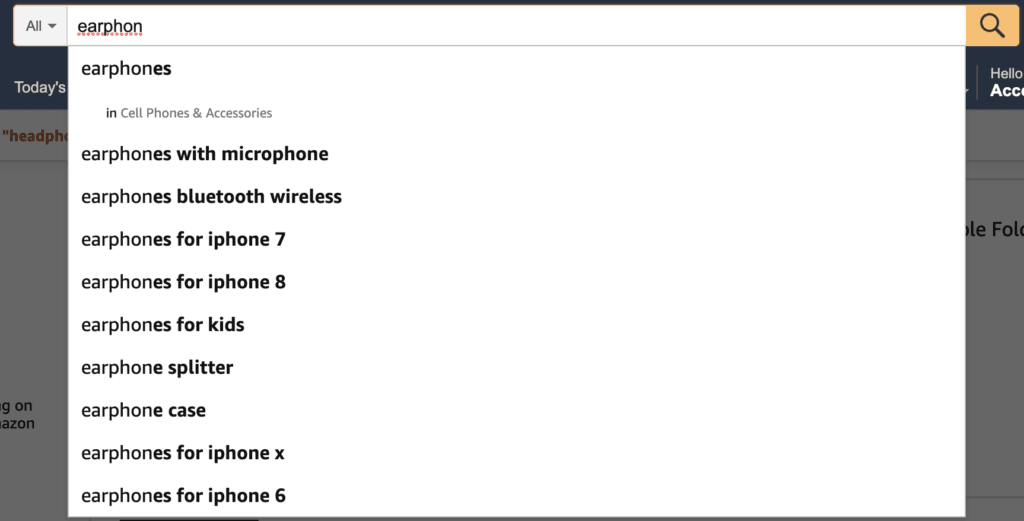
Immediately, “earphones with microphone” stands out, as does “earphone splitter” as a potential upsell product.
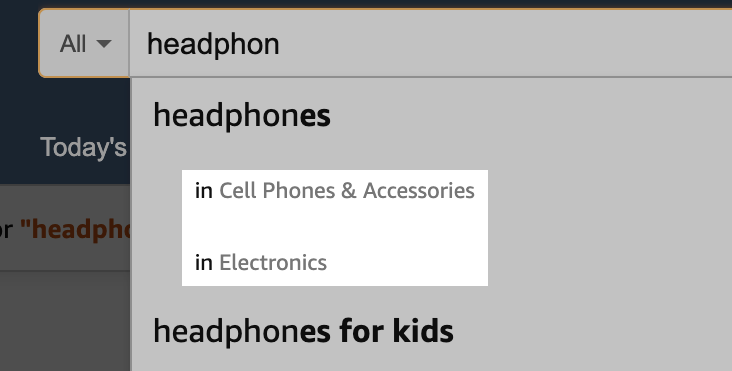
We can also take a look at the categories referenced in these searches. Cell Phones & Accessories appear in both search results, meaning it’s an important category to consider moving forward.
Take this Further
You can take this research even further by using a tool called Keyword Tool Dominator.
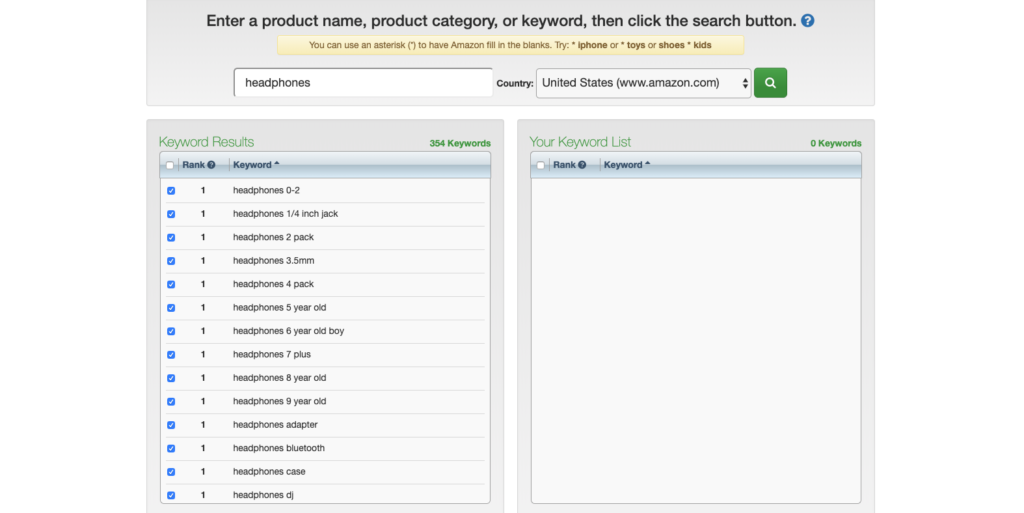
This tool scrapes a huge number of amazon search suggestions for you, providing keywords for you to add to your keyword and category map.
This can help save a lot of time and provides a fairly big long tail keyword base to work from. As you can see above, the results are different than when we used amazon directly, but are still just as valid moving forward.
The Power of Reddit and Wikipedia
Both Reddit and Wikipedia should be used for generating a longer and more complete list of keywords.

Taking a look at how headphones are discussed on Reddit
Reddit should be your first port of call as its community is often teeming with advice and recommendations on what others should or shouldn’t purchase. These posts provide a huge amount of information regarding product market, target audience, and keywords.
Of course, this often depends on what type of product you are looking to sell. However, there is often some kind of online community (whether in reddit or not) which talks about products from the perspective of a buyer.
Wikipedia is also an asset when it comes to keyword research. Just search for any product idea you have: like headphones.
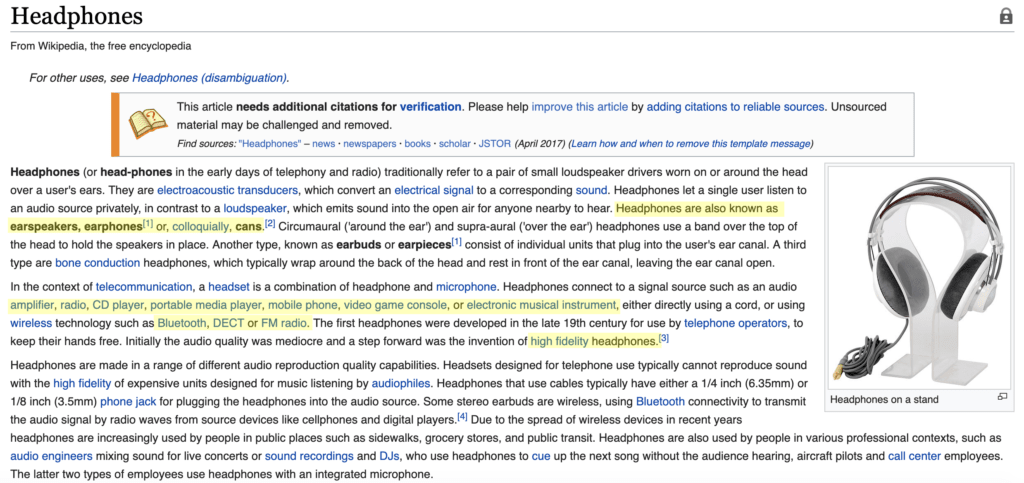
We’ve highlighted a few key things which appear in the wikipedia search. First we have synonyms. These are words with the same or similar meanings, and are great keyword targets. Even the slang term “cans” is a viable search terms.
Second is potential categories. We already know that mobile phones are a viable category from the Amazon suggest results. We can now add musical instruments, radio, and video games.
Finally, we’ve also marked up some words which may be helpful for building out a more complete keyword strategy, including keywords like “bluetooth”, “DECT”, and “high fidelity headphones”.
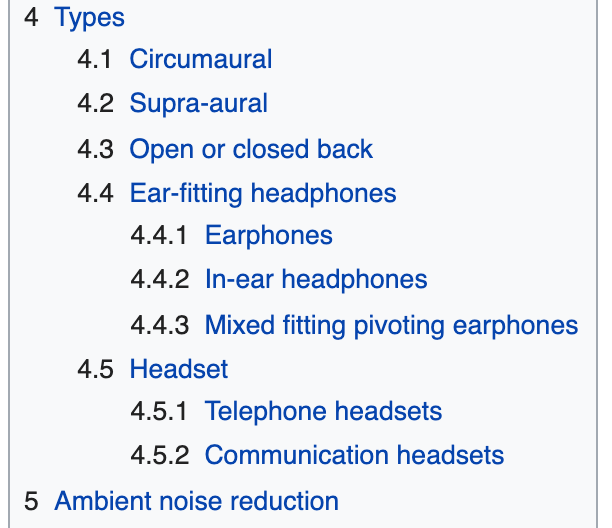
Tip: Don’t forget to take a quick look at the table of contents too. Here you’ll find some good ideas for both categories and keywords. For headphones, we can see a couple of options listed under types.
Identifying Semantic Keywords
Additional bits of language conceptually related to your keywords or products are what are known as semantic keywords (LSI – latent semantic indexing). They are not one of your primary keywords.
Semantic (LSI) Keywords are those that are linked conceptually.
We can also identify these as Qualifiers and Attributes. They are excellent for building our and understanding categories, as well as for bulking up your keyword strategy.
For example, LSI keywords for Headphones may be”
- Bluetooth
- Noise Cancelling
- Beats
- Microphone
- On-Ear
These link conceptually and co-occur with instances of “Headphones” frequently. However, they do not have the same meaning.
In the wikipedia example above, two examples may be “open back” and “closed back”. These are potentially great binary categories, and provide customers with a clear UX path to purchasing the product they want.
Remember, these keywords should always be checked with a keyword tool (which we’ll get to later).
Google Trends
Google trends is useful tool for seeing what kind of trends are taking place in the market currently. In the past, we’ve found this tends to require a lot of sifting of data, but it can help you to find golden SEO opportunities if done right.
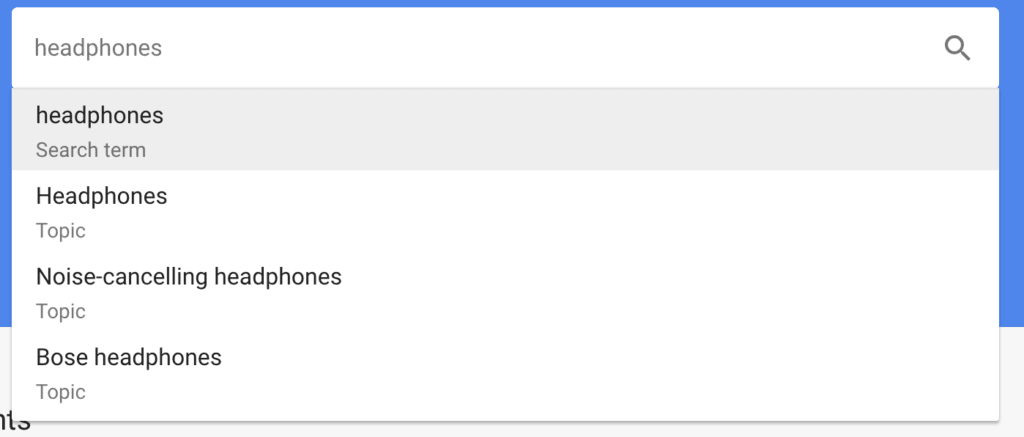
To begin, we’re again going to want to use the auto suggest feature to see what kind of searches are popular. Luckily, there are a few suggestions for headphones, including the popular search term “noise-cancelling headphones”. We can add that to our keyword map.
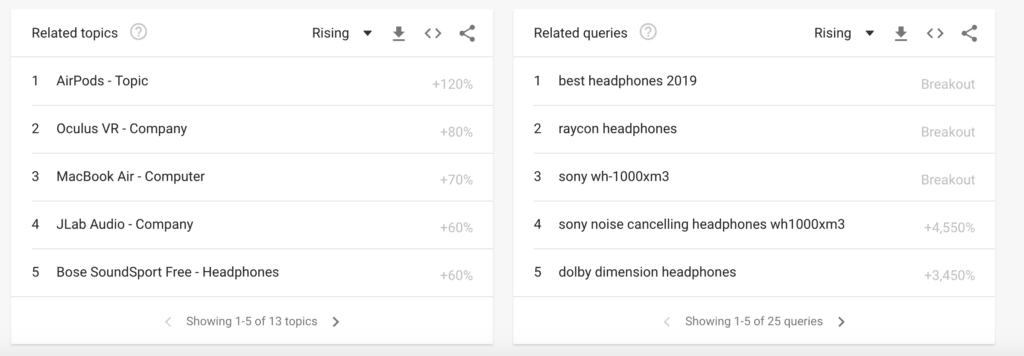
Once we’ve done this, we can scroll down and take a look at the related topics and queries. These can provide us with some good, long tail keywords, and help us to gain deeper insight into the categories we’re looking to create. Oculus VR can probably fall under video game, MacBook Air can fall under computers, and AirPods can fall under mobile phones.
Tip: Sorting through Google trends can take a long time but it really does offer a wealth of information for merchants that are able to act quickly. Remember that trends are exactly that: trends. There is no guarantee that what is popular now will be even 1 month down the road.
Google Keyword Planner
Once you’ve collected all of your keywords, it’s time to run them through a keyword tool to see what kind of buyer/searcher intent exists. There are a lot of options available to merchants, but we’re going to start with good old Google Keyword Planner.
Yes, Google, not Amazon.
The reasons we’re using google is because a large number of ecommerce searches come from search traffic outside of amazon. While Amazon has grown to be larger than Google in terms of ecommerce searches, Google still accounts for over 34% of product searches.
So, taking a look at the list of keywords we’ve found, we’re going to start putting them into the keyword planner to see what it suggests and what we’re looking at in terms of search volume and competition.
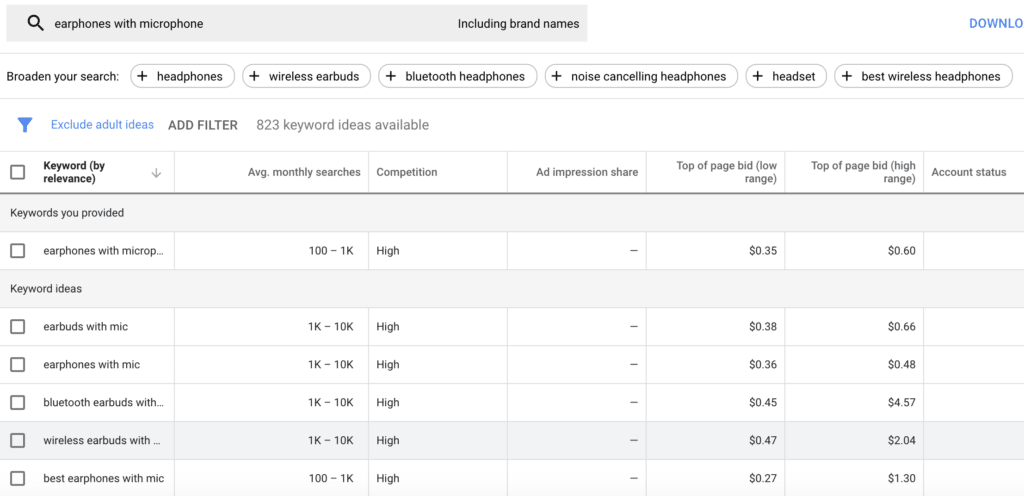
Starting with the keyword “earphones with microphone”, taken from our first look at Amazon suggest, we’re given a deeper look at how that keyword would perform and several additional options.
But what numbers are we really looking at here and what do they mean?
- Avg. monthly searches: This is the average number of searches you can expect each month. Google keyword planner isn’t accurate in this area and we’ll be using another tool later for a better number.
- Competition:This is how hard it is to rank for the keyword. On your keyword map, we’ve called this DIFF.
- Top of page bid (both high and low): These provide a guide to how much an ad would cost per click. This number gives us a really good indication of competition. The higher the cost, the more competition. The lower the cost, the less competition.
Go through your keywords and add the numbers you find here to you keyword map. We’re going to be using them more later.
Other Keyword Tools
Once you’ve completed everything else, we recommend taking your keyword map and exploring it further with a paid keyword tool.
For the purposes of this guide, we’re using Mangools’ KWFinder. It’s lightweight, provides a lot of the information we’re going to need, and we’ve found it to be pretty accurate at predicting success in the past.
Other tools you can use include Ahrefs and SEMRush.
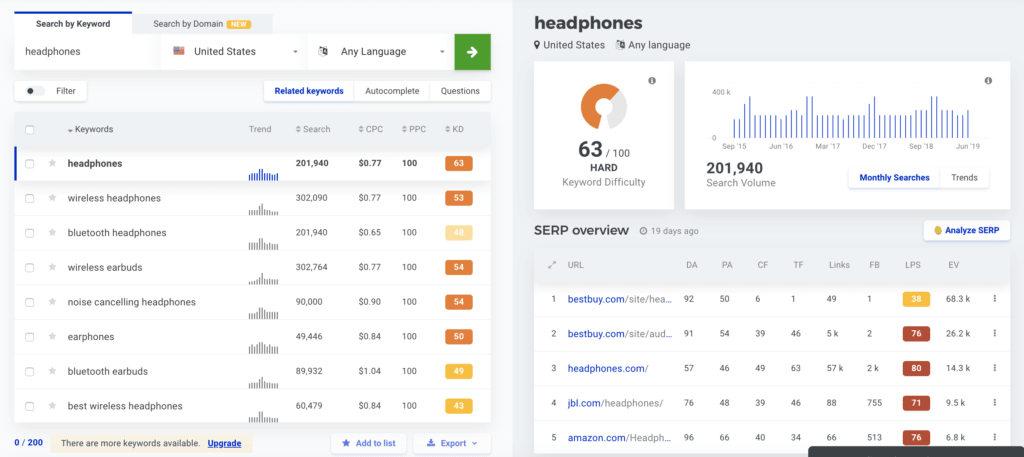
We’re going to start this section of our research just like each of the other ones: by searching for “headphones”.
Here, we’re given a lot of information on how useful our keywords are. We’ve got a lot more detailed information on search volume, a clear idea of the cost per click (CPC) and an easy metric for judging ranking difficulty. We can also see how search volume has changed historically.
All of these metrics are ones we can use.
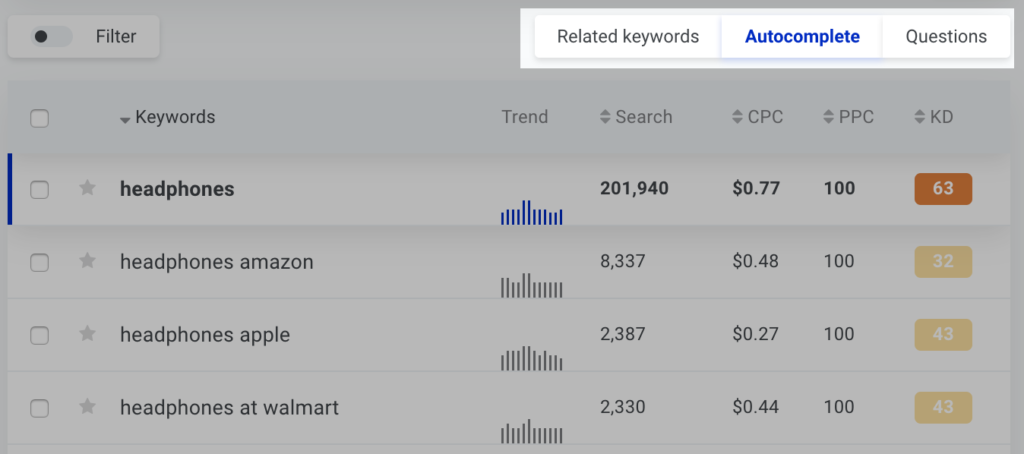
It’s also possible to take a look at autocomplete suggestions and questions that are asked using the keyword. These sections also provide detailed information on search volume, CPC, and difficulty.
Once you’ve looked through all of this information and moved what you think is relevant into your keyword map, you’re ready to start sifting through and putting together your primary keywords.
Sifting Through Keywords
Well done on getting this far. If you’ve proceeded through each of the previous steps, you should now have a fairly expansive list of keywords, potential categories, and metrics available to you.
But it’s probably too much. How are you going to take that list and shorten it to create a clear idea of what keywords to use and where to use them? After all, you can’t just stuff it all onto one page.
To solve this problem, we’re going to need to take a deeper look at those metrics we pulled earlier.
When looking at keywords and metrics, it’s important to remember three general rules:
Higher search volume means more potential
Lower difficulty means easier ranking
Lower CPC means less competition
Without further ado, let’s take a look at the types you metrics you’ve gathered and what they mean.
Don’t forget to check the semantic keywords you found as well. These can come in handy during category creation.
Search Volume
Search Volume is a good indicator of how much traffic you could potentially see to your product. Know that this is searches, not click throughs. Even result number 1 doesn’t receive all of that traffic (but a fairly significant portion of it).
Knowing what number is good here is really about understanding how niche your target audience is. Clearly, headphones are a large consumer market (who doesn’t own a pair in the mobile phone age?).
As a result, large numbers are going to be good here. We would say anything with over 1,000 searches per month is going to net you a return. If you’re looking to sell more specific or specialized headphones or products, such as headphone amplifiers, a smaller search volume is ok.
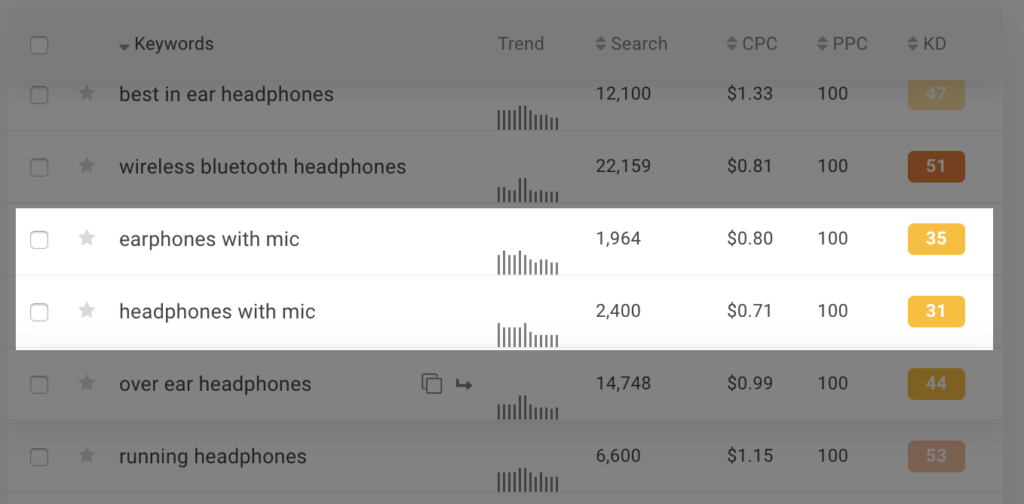
“Headphones with mic” has a search volume of 2,400. This is pretty high and means that if you make it to the first page, you’re probably going to get a good amount of traffic. For merchants who stock this product, they would probably want to add priority to this keyword.
Keyword Difficulty
Before looking at CPC, we’re going to take a quick peek at keyword difficulty.
Different tools measure difficulty in different ways. KWFinder measures it in terms of the link profile strength from other competitors on the first search engine results page. We like this method as it provides a nice understanding of page 1 ranking competition.
Additional resources
What is managed WordPress hosting? →
Get details and decide if managed WordPress hosting is right for you.
Must-have web development plugins to create WordPress websites at scale →
Explore the best web development plugins to enhance functionality, improve performance, and streamline your WordPress site.
A complete guide to WordPress shortcodes →
Shortcodes make life easier. Learn how to get started!
