


New WordPress plugin and theme vulnerabilities were disclosed during the last half of the month, so we want to keep you aware.
We divide the WordPress Vulnerability Roundup into four different categories:
- 1. WordPress core
- 2. WordPress Plugins
- 3. WordPress Themes
- 4. Breaches From Around the Web
*We include breaches from around the web because it is essential to also be aware of vulnerabilities outside of the WordPress ecosystem. Exploits to server software can expose sensitive data. Database breaches can expose the credentials for the users on your site, opening the door for attackers to access your site.
WordPress Core Vulnerabilities
WordPress Plugin Vulnerabilities
Several new WordPress plugin vulnerabilities have been discovered. Make sure to follow the suggested action to update the plugin or completely uninstall it.
1. Live Chat with Facebook Messenger

The Live Chat with Facebook Messenger plugin, version 1.4.6 and below, is vulnerable to a�cross-site scripting attack.
What You Should Do
2. Newsletter Manager

The Newsletter Manager plugin is vulnerable to an unauthenticated open redirect. The event input wasn’t being sanitized, creating an XSS exploit.
What You Should Do
3. ConvertPlus

Convert Plus version 3.4.2 and below is vulnerable to an Unauthenticated Arbitrary User Role Creation attack.
Using the exploit, attackers can create new Admin users without even needing to log into your website. Once a bad actor has admin access to your site, they can redirect your site’s visitors to malicious sites, block your access, and add malware to your site.
What You Should Do
4. WP Booking System

The WP Booking System plugin version 1.5.1.1 and below is vulnerable to a Cross-Site Request Forgery attack. WP Booking Systems didn’t include CSRF nonces which could have led to an attacker to bypass the admin privilege requirement and perform a SQL injection.
What You Should Do
5. FV Flowplayer Video Player
 FV Flowplayer Video Player version 7.3.14.727 and below had three different vulnerabilities disclosed this month. The plugin was vulnerable to an Unauthenticated Stored XSS, SQL Injection, and CSV Export attacks.
If an attacker took advantage of the vulnerabilities, it would have allowed them to provide an email input and render it in on the email export screen. The SQL Injection vulnerability was related to the email subscription, and third vulnerability allowed guest users to create a CSV export of the email subscription.
What You Should Do
6. Slimstat Analytics

Slimstat Analytics version 4.8 and below is vulnerable to an Unauthenticated�Stored XSS attack. The vulnerability would allow any visitor of the site to inject arbitrary JavaScript on the plugins access log. As reported by Sucuri:
A malicious user could forge an analytics request by pretending his browser has a specially crafted plugin to inject arbitrary code on the plugin access log. This will be executed once an admin logs in.
What You Should Do
7. Form Maker by 10Web
 Form Maker by 10Web version 1.13.2 and below is vulnerable to an Authenticated SQL Injection. As reported by Daniele Scanu, it would be possible to perform a SQL injection in the function
 get_labels_parameters in the file `form-maker/admin/models/Submissions_fm.php` with a crafted value of theasc_or_desc parameter.
What You Should Do
8. Simple File List Plugin

Simple File List Plugin version 3.2.4 and below is vulnerable to an Unauthenticated Arbitrary File Download attack. The vulnerability allows any user who knows the request to download the file list, which can expose sensitive information.
What You Should Do
9. Slick Popup
 Slick Popup is vulnerable to a Privilege Escalation attack. The vulnerability allows subscribers to create an administrator account with hardcoded login credentials. You can use this HARDCODED USERNAME and PASSWORD combination.
Username: slickpopupteam (More like not-slick)
Password: OmakPass13#
What You Should Do
10. Hustle Pop-Ups, Slide-ins and Email Opt-ins

Hustle version 6.0.7 and below is vulnerable to an Unauthenticated CSV Injection�attack. The exploit allows an attacker to inject malicious code into a pop-up window. The malicious actor could then inject malicious code on the admin’s computer through an excel function.
What You Should Do
1. Traveler

Traveler�theme version 2.7.1 is vulnerable to a Reflected & Stored XSS attack.
What You Should Do
How to Be Proactive About WordPress Theme & Plugin Vulnerabilities
Running outdated software is the number one reason WordPress sites are hacked. It is crucial to the security of your WordPress site that you have an update routine. You should be logging into your sites at least once a week to perform updates.
Automatic Updates
Using the�iThemes Security Pro�plugin�s Version Management feature, you can enable automatic WordPress updates to ensure you are getting the latest security patches.
Automatic updates are a great choice for websites that don�t change very often. The lack of needed attention often leaves these sites neglected and vulnerable to attacks.
Version Management Updates
- WordPress Automatic Updates�� All WordPress updates are automatically installed when available.
- Plugin Automatic Updates�� All plugin updates are automatically installed when available.
- Theme Automatic Updates�� All theme updates are automatically installed when available.�Use this if you�ve put your theme customizations in a child theme, to not override your customizations by updating the�parent theme.
- Granular Control over Plugin and Theme updates�� You may have plugins/themes that you�d like to either manually update, or delay the update until the release has had time to prove stable. You can choose�Custom�for the opportunity to assign each plugin or theme to either update immediately (Enable), not update automatically at all (Disable) or update with a delay of a specified amount of days (Delay).

Strengthening and Alerting to Critical Issues
- Strengthen Site When Running Outdated Software�� The iThemes Security plugin will automatically enable stricter security when an update has not been installed for a month. First, it will force all users that do not have two-factor enabled to provide a login code sent to their email address before logging back in. Second, it will disable the WP File Editor (to block people from editing plugin or theme code), XML-RPC pingbacks and block multiple authentication attempts per XML-RPC request (both of which will make XML-RPC stronger against attacks without having to turn it off completely).
- Scan for Other Old WordPress Sites�� This will checks for other outdated WordPress installs on your hosting account. A single outdated WordPress site with a vulnerability could allow attackers to compromise all the other sites on the same hosting account.
- Send Email Notifications��� For issues that require intervention, an email is sent to admin-level users.
Breaches From Around the Web
1. Attackers Exploit Oracle WebLogic Servers

Last month, it was disclosed that WebLogic Servers were vulnerable to a Sodinokibi ransomware exploit. Oracle has issued a patch for the vulnerability.
Victims of the attack were greeted with a demand of payment to release decrypt their files.
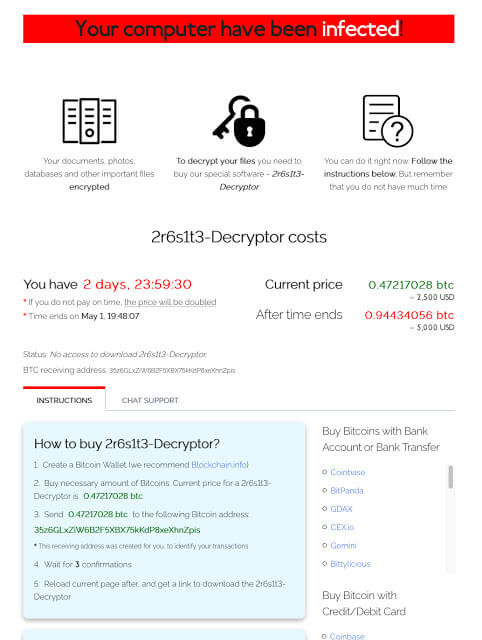
What made this attack unique is that it required no user interaction. Typically, a malicious attachment needs to be opened or a malicious link needs to be clicked. This vulnerability is easy for attackers to exploit, as anyone with HTTP access to the WebLogic server could carry out an attack.
2. The City of Baltimore is Hacked Using N.S.A. Tool

The city of Baltimore was the victim of a malware attack costing the city an estimated 18.2 million dollars. To add insult to injury, they were attacked using EternalBlue. EternalBlue is a tool that was developed by the N.S.A. using United States tax dollars.
3. Google Blogs About Storing Passwords in Plain Text

Google disclosed that they patched a bug that has been ongoing since 2005. The bug that only affected G Suite business users, would store some passwords in plain text. This means anyone who gained access to the stored passwords would be able to view your password.
4. Google Discloses Titan Bug

Google disclosed a security bug in its Titan security keys.
Due to a misconfiguration in the Titan Security Keys� Bluetooth pairing protocols, it is possible for an attacker who is physically close to you at the moment you use your security key — within approximately 30 feet — to (a) communicate with your security key, or (b)�communicate with the device to which your key is paired.
If you own a compromised security key, they are offering to replace it.
5. Slack for Windows Vulnerability

If you are using Slack on Windows, be sure you update to version 3.4.0 immediately. Prior to version 3.4.0, hackers could post a malicious link that when clicked that would have allowed them to redirect a user’s downloads to a file server belonging to the attacker. Next, the attacker could infect the machine with malware or could have gained access to sensitive files.
It is worth mentioning that Slack was able to patch the exploit before it was ever used maliciously.
Vulnerability Roundup Wrap Up: May 2019, Part 2
Check out Part 1 of the WordPress Vulnerability Roundup for May 2019 here.
Keep in mind that outdated software is the number one reasons sites get hacked. Every vulnerability that was disclosed so far this month has been patched. Leaving outdated software on your site will leave you vulnerable to attack.

A WordPress Security Plugin Can Help Secure Your WordPress Website
iThemes Security Pro, our�WordPress security plugin, offers 30+ ways to secure and protect your website from common WordPress security vulnerabilities. With WordPress two-factor authentication, brute force protection, strong password enforcement and more, you can add an extra layer of security to your website.