 Liquid Web
 Kali Linux (formerly known as BackTrack) is an open-source, Debian-based OS built for advanced penetration testing and ethical hacking. Maintained by Offensive Security, it’s packed with tools for vulnerability assessment, digital forensics, and reverse engineering.
Unlike general-purpose distros like Ubuntu, Rocky Linux or Alma Linux, Kali is designed for experienced users.
Note: Kali Linux should only be used on systems you own or are authorized to test. Unauthorized use—even just “exploring”—can result in serious legal consequences. Always hack ethically.
Key features of Kali Linux
Originally developed by Mati Aharoni and Devon Kearns, Kali Linux has the go-to features for cybersecurity professionals.
- Hundreds of preinstalled tools. Penetration testing tools like Metasploit, Nmap, and Wireshark.
- Free and open source. Kali Linux is free to use and downloadable under the GNU GPL license.
- Live boot options. Users can run the operating system directly from a USB drive or DVD.
- Multilingual support. Global users can navigate the system in their native languages.
- Highly customizable. Users can customize the OS, tools, and desktop.
- Cross-platform support. Available for ARM devices, VMs, and WSL.
Top advantages
- Extensive toolkit for network security and penetration testing.
- Multi-language support for global usability.
- Optimized for command-line experts.
- Completely free and open source.
- Modular and fully customizable.
Top disadvantages
- Tools can be buggy and may require manual updates.
- Sometimes slower on minimal hardware.
- Steep learning curve for beginners.
Kali Linux versions
Kali Linux deploys several releases per year to adapt to modern environments. Here’s a brief version history:
| Version | Year | Top improvements |
|---|---|---|
| 2020.x | 2020 | Non-root user by default, KDE Plasma added as desktop option, default shell changed to ZSH |
| 2021.x | 2021 | New tools and visual updates, accessibility improvements, OpenSSL updates, Apple M1 support added |
| 2022.x | 2022 | New visual theme and VM support, GNOME 42 and KDE updates, improved ARM tools, support, and environments |
| 2023.x | 2023 | Introduced Kali Purple, Kernel 6.3, 6.4, and 6.5 stability fixes and updates, tool enhancements |
| 2024.x | 2024 | Improved hardware support, updated tools, desktop and kernel improvements, Python 3.12 default interpreter |
| 2025.x | 2025 | Annual theme refresh and KDE Plasma 6.2 |
User interface and terminal overview
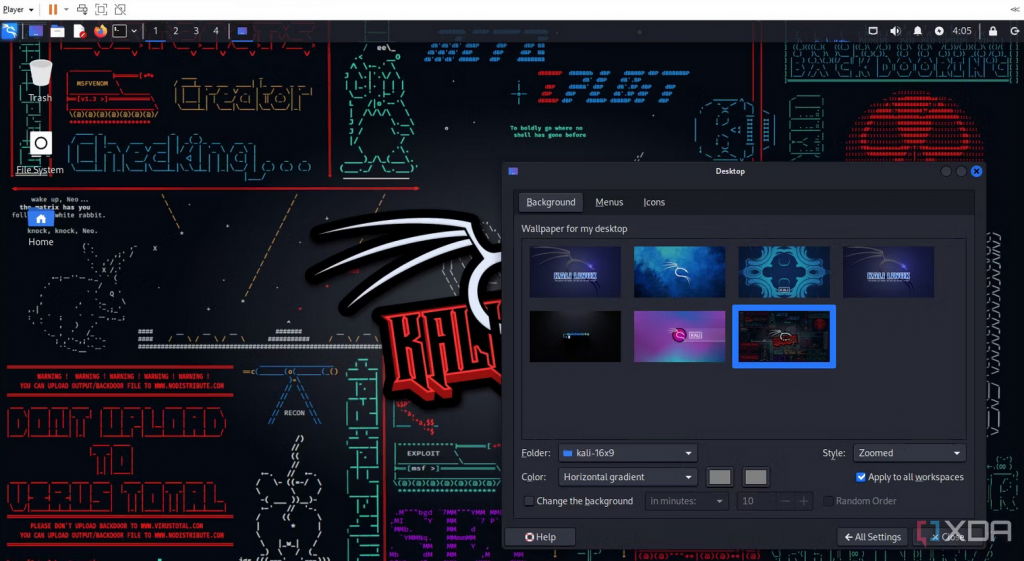
At first glance, Kali Linux’s interface resembles the Windows environment. The taskbar at the top pinned icons for the file manager, terminal, and other features contains the main functionality.
It also has an applications icon at the left side of the taskbar to display all installed applications, akin to the old Windows menu button.
Popular terminal emulators
Terminal emulator packages for CLI-based operations and desktop environment packages for GUI-based functions are typically included in Linux operating systems. These include:
- GNOME Terminal
- MATE Terminal
- QTerminal
- Konsole
Popular commands
Working with Kali Linux demands the use of the command line because many of its tools lack a graphical user interface. In Kali Linux, we utilize these commands often:
pwd– Print current directorymv, cp– Move or copy filesgrep– Search within filescd– Change directoryls– List files
Top Kali tools
Hashcat – Password cracking tool tutorial
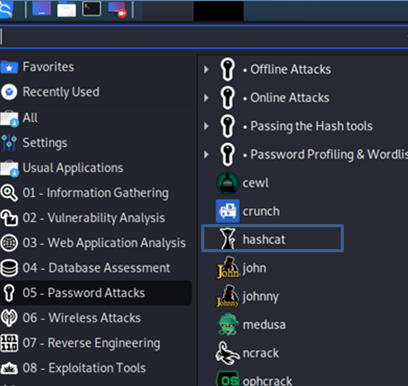
Hashcat is well-known as one of the fastest password recovery and cracking tools. Hashcat’s design lets it quickly break or crack even the trickiest passwords. You can find it under Password Cracking Tools:
Below are a few password hashes that can be decrypted with Hashcat:

Crunch – Wordlist generator tutorial
Kali Linux has a tool called Crunch, a preinstalled wordlist-generating utility to accomplish this. It is used to produce unique keywords by using wordlists and generates a list with permutations and combinations.
Wireshark – Packet sniffer
Kali Linux includes Wireshark for network analysis, along with tools like MITMProxy and Burp Suite for sniffing, spoofing, and inspecting traffic.
Vulnerability analysis tools
There are several vulnerabilities in the cyber world that hackers might use to launch an assault. More than 300 tools are included with Kali Linux for vulnerability checks, such as Nikto and ZenMap.
Forensics tools
Kali Linux forensics tools assist us in analyzing ransomware, spyware, and digital viruses. Some of the tools include Binwalk, Bulk-Extractor, and Autopsy.
Kali Linux in action: Famous examples
Mr. Robot
Kali Linux made a few appearances in the show, which is praised for its realistic portrayal of hacking. The protagonist, Elliot, uses Kali tools like Nmap and Metasploit.
DEF CON
Global capture the flag (CTF) hacking competitions like DEF CON CTF attract thousands of participants using Kali Linux.
Leading brands
Many internal red teams at companies like IBM, Cisco, and government agencies use Kali for network and app vulnerability testing.
Kali Linux is ready when you are
Kali Linux remains the gold standard for cybersecurity professionals and ethical hackers. Whether you’re investigating system vulnerabilities, testing firewalls, or recovering encrypted data, Kali Linux equips you with the tools and flexibility you need.