


Key takeaways
- PHP workers are backend processes managed by PHP-FPM that handle one uncached PHP request at a time.
- Too few PHP workers create queues, slower load times, and can lead to timeouts or 504 errors.
- Cached pages reduce PHP worker demand, while dynamic traffic, slow queries, and inefficient code increase it.
- PHP worker count should match concurrency, server resources, and site behavior under load.
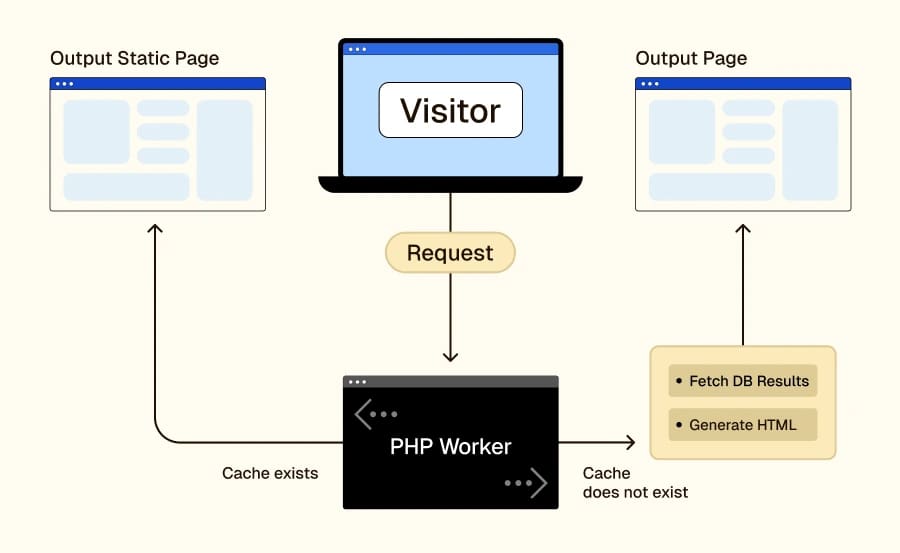
When someone visits a dynamic website, the server has to do more than hand over a saved HTML file. It may need to run PHP code, query the database, build the page, and return the response. PHP workers are backend processes that handle that work.
For WordPress and other PHP-based applications, PHP workers directly affect performance. When enough workers are available, requests keep moving. When all workers are busy, new requests wait in a queue until one frees up.
How PHP workers work
PHP workers are managed by PHP-FPM, which controls how PHP processes are created, reused, and assigned to incoming requests. Each PHP worker handles one uncached request at a time.
Concurrency works like this: one worker processes one uncached request at a time, four workers process four uncached requests at a time, and any additional uncached requests wait in a queue.
Think of it like a grocery store checkout lane. Each cashier is a PHP worker. If there are enough open lanes, customers move through. If every lane is busy, the line grows. Your site behaves the same way under load.
What PHP workers do on a WordPress site
Not every visit uses a PHP worker for the same amount of time. Cached pages place much less pressure on workers. Dynamic requests use them more heavily because the server has to build the response in real time.
Common actions that use PHP workers include logging in, submitting contact forms, searching the site, filtering products, adding items to cart, checking out, viewing account pages, loading membership or LMS content, and pulling data from slow external APIs.
This is why PHP workers matter so much on dynamic WordPress sites. A brochure site with strong caching may use very few workers. A WooCommerce store, membership site, or LMS can use them constantly.
Why PHP workers matter for performance
PHP workers affect how many uncached requests your site can process at one time. If you do not have enough workers, requests start to stack up. At first that may show up as slower page loads. Under heavier demand, the queue gets longer, requests time out, and users may run into 504 errors or similar failures.
Too few workers can hurt performance long before the site fully crashes; requests wait, server load climbs, and the user experience gets worse.
Caching and PHP workers
Caching is one of the best ways to reduce PHP worker pressure. If a page is already cached, the server can return it much faster without rebuilding it from scratch, which means fewer PHP workers stay tied up on repetitive requests.
Cached traffic helps by reducing repeated PHP execution, repeated database queries, and unnecessary queuing during busy periods.
Worker demand rises fastest on logged-in sessions, carts and checkout, account pages, search, personalized content, and API-driven requests. Improving caching typically does more to reduce worker demand than raising the worker count, because it cuts down on how often workers need to do the same work in the first place.
Common causes of PHP worker exhaustion
PHP worker exhaustion usually comes from one or more of these issues.
- Traffic spikes. A sudden increase in concurrent visitors can tie up workers quickly, especially if the site serves a lot of dynamic traffic.
- Slow database queries. If a request waits on a slow query, that worker stays busy longer and cannot move on to the next request.
- Uncached traffic. Dynamic requests consume workers more heavily than cached pages. WooCommerce, memberships, and logged-in sessions are common examples.
- Too many plugins or bloated themes. Heavy themes and inefficient plugins can stretch request times and keep workers busy longer than they should be.
- Slow external API calls. If your site depends on third-party services during page generation, those calls can hold a worker open while it waits for a response.
- Inefficient code. Poorly optimized code can turn normal traffic into unnecessary worker pressure.
How many PHP workers do you need?
There is no single number that fits every site. A small, mostly cached site may run well with a low worker count, while a dynamic store or membership site may need far more. In practice, many environments start somewhere in the 4 to 16+ range, but the right number depends on traffic patterns, concurrency, site behavior, and server resources. A better way to think about sizing is by site type and behavior.
- Mostly cached brochure sites often need fewer workers because cached pages reduce demand.
- Ecommerce stores often need more workers because carts, checkout, account pages, and order history are dynamic.
- Membership and LMS sites often need more workers because logged-in users create more dynamic activity.
High-traffic dynamic sites often need more workers and closer monitoring because concurrent requests rise quickly under load.
How to size PHP workers correctly
- Review peak traffic periods.
- Look at how much of that traffic is uncached
- Check whether requests are queuing or timing out.
- Review CPU and RAM headroom.
- Increase workers gradually.
- Test again under realistic load.
Worker count should follow server resources and site behavior together. More workers can help if the server has the CPU and RAM to support them. If it doesn’t, raising the limit can make performance worse.
How to optimize PHP worker usage
- Improve caching. Reducing how often workers need to rebuild the same pages is usually the most effective way to lower worker demand and keep the site responsive under traffic.
- Optimize or update themes and plugins. Remove or replace slow, bloated, or unnecessary code. Heavy plugins and poorly built themes stretch request times and keep workers tied up longer than they should be.
- Fix slow database queries. A query bottleneck can tie up workers even when traffic is moderate. Slow queries are one of the most common hidden causes of worker exhaustion.
- Reduce slow external requests. Third-party API calls can keep workers open longer than necessary. Where possible, cache those responses or move them out of the critical page load path.
- Monitor worker usage during peak traffic. Check worker usage when pressure is highest. Monitoring during off-peak hours will not show you where the real problems are.
- Use scaling where it makes sense. Temporary increases during traffic surges can help some environments stay responsive without permanent over-allocation.
When adding more PHP workers will not help
Adding more PHP workers is not automatically better. More workers will not solve the problem if:
- CPU is already overloaded
- RAM is already tight
- Slow code keeps workers busy too long
- The database is the real bottleneck
- A plugin or theme is inefficient
- External API calls are dragging out request times.
In those cases, raising the worker count may only increase server pressure without fixing the root cause.
PHP workers vs. server resources
PHP workers do not exist in isolation, they depend on the rest of the server. More workers usually mean more memory use, more competition for CPU time, and more pressure on the database if requests are query-heavy.
This is why sizing PHP workers is a balancing act between concurrency, RAM, CPU, database performance, code efficiency, and caching quality. A site with efficient code and strong caching may run well with fewer workers than a bloated site on the same hardware.
PHP worker FAQs
PHP workers next steps
PHP workers affect how well your site handles dynamic traffic under load. Start by checking what happens during your busiest uncached traffic periods. This one step will tell you whether the real issue is worker count, caching, slow code, or server limits.
Liquid Web helps teams run dynamic sites on infrastructure built for real traffic. Explore hosting options built for the performance and reliability your workload actually needs.