 Ronald Caldwell
 Has your website started to feel a bit cramped in its current home? If you’re experiencing slowdowns or bumping into limits, it’s a classic sign that you’ve outgrown shared hosting and need to move to managed dedicated server hosting or a bare metal server.
Out of the two, setting up a dedicated server with your provider is the better option. It’s like going from sharing an apartment to owning your own house; suddenly, you have more space, power, and control. That’s what moving to a dedicated server feels like.
This guide is designed to be both your educational resource and your practical setup manual. We’ll break down the what, why, and how of dedicated servers. To give you a clear, real-world example, we’ll walk you through the setup process using Liquid Web as our guide. By the end, you’ll understand exactly how to configure a server that’s perfectly tailored to your needs.
Take control over your hosting environment
Liquid Web’s dedicated hosting solutions are fully customizable and provide real-time monitoring.
What is a dedicated server?
A dedicated server is a physical computer in a data center leased exclusively to one customer. Think of it as having your own private hardware powerhouse. Since you’re the only tenant, all of the server’s resources, including its processor (CPU), memory (RAM), and storage, are yours and yours alone. You never have to worry about “noisy neighbors” or other websites slowing you down, which is a common issue in shared hosting environments.
Depending on your team’s experience, you may have to decide between Managed vs Unmanaged Hosting. Unmanaged Hosting would provide the hardware, power, and connectivity, while support for the operating system (OS), web server software, and any third-party software would be unsupported. Managed Hosting would include support for all of these, with the only exception being third-party software.
At Liquid Web, dedicated servers are fully managed and come with features designed to maximize these benefits. This includes multi-level DDoS protection to guard against attacks, a secondary drive for local backups, and around-the-clock access to our support team to ensure your environment is always secure and performing at its best.
Why choose a dedicated server?
Upgrading to a dedicated server provides tangible benefits for businesses and high-traffic websites by delivering a hosting environment built on performance, security, and control. This ensures digital operations can run efficiently without being affected by other users.
The primary advantages of a dedicated server include:
- Dedicated performance. Because server resources are not shared, you receive consistent and predictable speeds for your websites and applications. This architecture is designed to handle significant traffic without performance degradation. For example, Liquid Web’s dedicated server infrastructure is backed by a 99.999% uptime guarantee.
- An isolated security environment. A dedicated server is isolated from other users, which prevents security issues on other servers from affecting your environment. This isolation is a core security benefit. To build on this, Liquid Web managed dedicated servers include ServerSecure hardening and real-time threat monitoring with ThreatDown.
- Full customization and control. Users get administrative-level access, allowing for the installation of a specific operating system, control panel, and any other software required by a project. This enables you to create a hosting environment optimized for your precise technical specifications and business needs.
How to set up a dedicated server with Liquid Web
Configuring a dedicated server involves making several key decisions about your hardware and software. To make this process clear, we’ll walk through the setup steps using Liquid Web’s configuration as an example. This will give you a practical look at the choices you’ll face.
1. Choose your processor
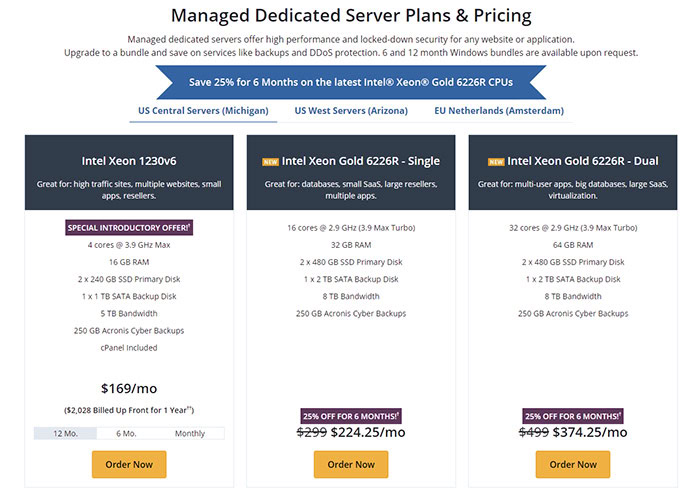
The first decision is choosing a processor, or Central Processing Unit (CPU), which determines the core computing power of your server. The right choice depends entirely on your workload, such as how many websites you’re hosting, their traffic levels, and the size of your databases. Liquid Web offers three main tiers of Intel Xeon processors, each suited for different needs.
- Intel Xeon E-2386G. This is an excellent starting point for high-traffic websites, hosting multiple small sites, running small applications, or for web hosting resellers.
- Single Intel Xeon Gold 6226R. Choose this processor if you host large databases, run a small Software-as-a-Service (SaaS) platform, manage a large reseller business, or host multiple complex applications.
- Dual Intel Xeon Gold 6226R. This is the top-tier option for maximum power. It’s built for hosting multi-user applications, managing massive databases, running a large-scale SaaS, or for creating a virtualization environment.
2. Configure backup and security options
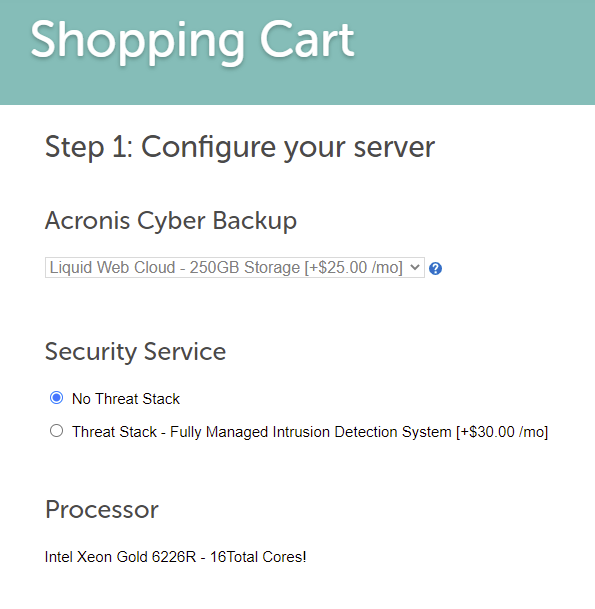
Protecting your data is critical. Backup and security solutions vary by provider, so it’s important to know what’s included.
Backups
By default, we offer off-site backups via Acronis Cyber Backup with a 250GB quota. These backups get stored in a separate data center from your server. You also have the option to keep backups in the cloud via Acronis, giving you more restore options than the initial data center you select.
How much storage you need for backups will correlate to the amount of data stored on your server as well as your backup schedule. The more restore points you have kept, the more of a quota for backups you will want to have.
Also, these are full-server, incremental backups that are encrypted and come with a self-service portal for easy backup configuration, management, and restoration.
Security
While your server will come with basic security, you have the option of adding managed intrusion protection via ThreatDown. When thinking about how to host a dedicated server, data safety is paramount. Liquid Web’s ThreatDown is an intrusion detection system that provides real-time threat monitoring. It also monitors for system and file integrity. Any anomalies detected are immediately investigated and remediated.
3. Choose the operating system and control panel
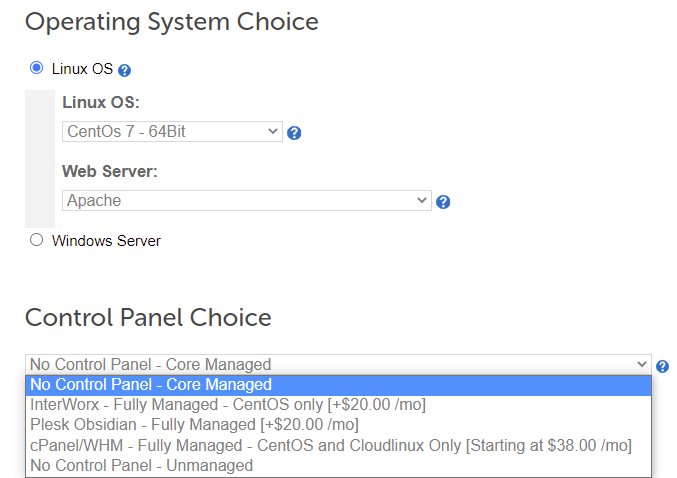
Operating System (OS)
After setting up your backups and optional security, the next step is choosing your OS and control panel. You will be able to choose between Linux vs Windows depending on the framework on which you have built your website or application. For those using Windows, licensing may vary based on your needs, so choose carefully.
Control panel
Along with the operating system, you also have the option of a control panel.
For some, this provides a needed Graphical User Interface (GUI) for server, website, and application functions. When thinking of how to set up a dedicated server, you need to bear in mind whether you and your team require a control panel for server maintenance and development.
Unless your team is comfortable working in the command line interface (CLI), you will want to have a control panel such as cPanel, Plesk, or InterWorx installed.
4. Decide on RAM, storage, and other options
Now you’ll configure your server’s memory and storage capacity. It’s helpful to understand the general principles first, then see how they are implemented.
RAM

Random Access Memory (RAM) is vital for handling concurrent tasks. The number of simultaneous website visitors, running applications, and the size of your databases all impact how much RAM you need. It’s wise to account for future growth. Upgrades are possible later, but starting with an accurate estimate saves time.
Storage

Storage holds your website files, databases, and other data. At Liquid Web, the standard configuration includes a primary Solid State Drive (SSD) storage array with a RAID 1 configuration. This setup mirrors your data across two drives, providing redundancy if one fails. A second, single Hard Disk Drive (HDD) is also typically included for on-server backups. You can further customize your setup with NVMe SSDs for maximum speed or choose different SSD vs. HDD configurations based on your project’s needs.
The amount of storage you need depends on the type of website you are hosting. If you are hosting email or a few small sites, you may get by with the default allotment of storage with no customizations or upgrades. If you host large e-commerce websites or gaming sites with extensive databases and large amounts of photo and video content, you will need to upgrade your storage.
Additional dedicated server configuration options

You can fine-tune your server with options that align with industry best practices for security, reliability, and performance:
- Server Chassis: Choose from a single or double Power Supply Unit (PSU) as well as hot-swap bays for added drive capacity.
- ServerSecure Suite Options: Choose to add additional security to your server with proven server hardening configuration methods via ServerSecure Plus.
- Distributed Denial of Service (DDoS) Attack Protection: Is your website a target for DDoS attacks, and you want protection? Liquid Web has DDoS Attack Protection options for mitigation.
- Public IP Addresses: Choose the number of IP addresses for your server.
- Bandwidth: Choose the package that best fits your transfer needs.
5. Consider add-ons

When finalizing your server configuration, you will want to consider your add-on options. Whether you have compliance, network, business email, or Enterprise Hosting needs, Liquid Web has solutions for what you seek.
Custom dedicated server solutions are also available after an in-depth discussion with our sales team to ensure the right fit.
6. Install any applications
Once you’ve finished setting up your dedicated server, you can install any CMS or software applications that you need. Softaculous is an auto installer that can set up more than 380 apps in 1 click, including WordPress. Softaculous is included with Liquid Web’s dedicated WordPress hosting and dedicated server hosting.
Explore WordPress hosting options
Liquid Web’s suite of WordPress hosting includes dedicated servers, VPS, and managed cloud.
Post-setup: Managing your dedicated server
Once your server is configured and deployed, the next phase is ongoing management. This typically involves monitoring server health and performance, applying security patches, and keeping the operating system and other software up to date. These tasks are critical for security and stability, but can be time-consuming.
This is where the value of a managed solution becomes clear. With Liquid Web’s Fully Managed dedicated servers, our expert teams handle all of these essential maintenance tasks for you, ensuring your server remains secure and optimized.When you’re ready to install your applications, you can use the included Softaculous one-click auto-installer. It allows you to easily deploy hundreds of popular applications like WordPress, Magento, and Joomla!, getting your project online in minutes.
Choosing the right dedicated server for your business
Choosing the right dedicated server comes down to understanding your project’s specific needs. By evaluating key factors like processor power, RAM, and storage capacity, your required operating system, and the level of management you need, you can build a powerful and reliable hosting foundation or rent a dedicated server.
Every business is unique, and sometimes a standard configuration isn’t the perfect fit. If you have complex requirements for compliance, high availability, or specific hardware, our solutions advisors are here to help. They can work with you to design a custom-fit solution tailored directly to your business goals.
Liquid Web is an industry leader for customer service, with a Net Promoter Score (NPS) of 67. Our team is the Most Helpful Humans in Hosting®, ready to assist you 24/7/365 with supporting your dedicated infrastructure needs. Explore our dedicated server hosting plans today!