 Amy Myers
 What is SAN (Storage Area Network)?
Enterprise storage isn’t just about hoarding data – it’s the backbone of modern business operations. At the forefront of this critical infrastructure are two titans: Storage Area Networks (SAN) and Network-Attached Storage (NAS). These powerful technologies are revolutionizing how organizations manage, access, and scale their digital assets.
But which solution will best serve your unique needs?
This comprehensive guide cuts through the jargon to deliver a clear comparison of SAN and NAS. We’ll dissect their architectures, unpack their strengths, and explore real-world applications. From performance benchmarks to cost considerations, scalability potential to management complexities – we leave no stone unturned.
Whether you’re a small business owner seeking efficient file sharing or an enterprise architect designing high-performance database environments, this article equips you with the insights to make a strategic, informed decision about your storage future.
Defining SAN and NAS
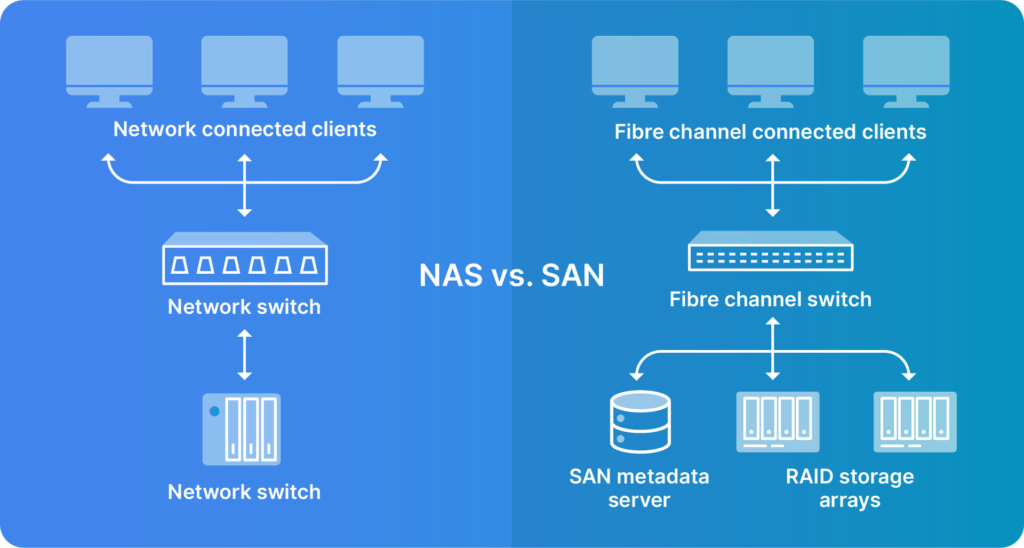
In the world of enterprise storage, two technologies stand out: Storage Area Network (SAN) and Network-Attached Storage (NAS). At their core, SAN is a high-speed network that provides block-level storage access, while NAS is a storage device that provides file-level data access over a network.
What is SAN (Storage Area Network)?
SAN (storage area network) is a high-performance, dedicated network that provides access to consolidated, block-level data storage. SANs are designed to enhance storage devices’ accessibility to servers, appearing as locally attached devices to the operating system. This technology separates storage from the rest of the local area network (LAN), offering improved application performance, data protection, and disaster recovery if needed.
Storage Area Networks utilize high-speed fiber channel connections to provide block-level storage access. They appear as local disks to connected servers and support performance-sensitive applications like databases. SANs offer a centralized storage solution that can be easily managed and scaled to meet growing data needs.
Advantages of SAN
System area networks (SANs) bring a lot to the table for businesses and organizations. For starters, they are flexible, enabling easy storage expansion. They offer fast data access, crucial for mission-critical apps that can’t afford to dawdle.
Another big plus is how SANs simplify management by consolidating storage resources, making data backup and disaster planning easier. They also manage network traffic by keeping storage-related data off the main network, freeing up bandwidth for other tasks.
Lastly, SANs keep your data safe. Their separate network setup acts like a fortress, adding an extra layer of protection for your sensitive information.
Limitations of SAN
SANs offer benefits, but also drawbacks. SANs can be complex, adding layers to your IT infrastructure, and requiring specialized knowledge. This complexity can make troubleshooting trickier and increase the management workload.
Another hurdle is the cost. Setting up a SAN isn’t cheap – you’re looking at a significant upfront investment in hardware and infrastructure. For smaller organizations or those new to SAN, this initial outlay can be tough.
Lastly, there’s the ongoing management overhead. As your SAN grows, so does the effort required to keep it running. Larger setups often need dedicated IT staff, straining resources for smaller teams.
The Most Common SAN Protocols
SAN environments typically rely on three primary protocols, each offering unique advantages:Here are three of the most common SAN protocols used:
1. Fibre Channel Protocol (FCP)
As the most popular SAN protocol, FCP uses specialized Fibre Channel networks for high-speed data transfer. It’s known for its reliability and performance in enterprise environments.This is the most widely used SAN or block protocol. It is deployed in the majority of the SAN market. FCP uses Fibre Channel transport protocols embedded with SCSI commands.
2. Internet Small Computer System Interface (iSCSI)
iSCSI incorporates SCSI commands inside an Ethernet frame. For data transport, it uses an IP Ethernet network.
3. Fibre Channel over Ethernet (FCoE)
It is similar to iSCSI since it incorporates an FC frame inside an Ethernet datagram. It also uses an IP Ethernet network for transport.
What is NAS (Network-Attached Storage)?
Network-Attached Storage (NAS) is a file-level data storage device that connects to a network, providing data access to multiple clients. NAS systems are simpler to implement and manage compared to SANs, making them popular for small to medium-sized businesses and home users.
NAS devices connect directly to existing Ethernet networks, providing file-level data access. They appear as file servers to connected devices and are ideal for storing and sharing files across a network. NAS systems offer a straightforward solution for centralized storage that can be accessed by multiple users simultaneously.
Advantages of NAS
SNetwork Attached Storage (NAS) is advantageous for smaller organizations managing data. It’s user-friendly, and no tech expertise is required for setup or maintenance.
Cost is another plus. Compared to SAN, NAS is budget-friendly for initial setup and ongoing costs, making it an attractive option for cost-conscious businesses. In addition, NAS really shines when it comes to file sharing. It’s like a digital hub for the office, allowing access for multiple users to shared files. Plus, it acts as a central repository for all your data, perfect for backups and keeping track of important files.
Finally, NAS is very compatible for remote work. With proper setup, you can access your files from anywhere with an internet connection, perfect for our your work culture.
Limitations of NAS
NAS has drawbacks. Performance can be a sticking point, especially under heavy use. When lots of users are accessing files at once, things can slow down.
It’s also worth noting that NAS systems are primarily designed for file storage and sharing, which means it may fall short in scalability. While its great for smaller setups, if you need more advanced features or specific application support, or are a rapidly growing organization, you might reach NAS’ limits sooner than expected.
Lastly, keep in mind that a NAS system is only as good as its network. If your network isn’t up to par, even the best NAS might not perform as well as you’d hope.
The Most Common NAS Protocols
When it comes to NAS implementations, two protocols dominate the landscape:
1. Common Internet File Services/Server Message Block (CIFS/SMB)
This protocol is used primarily in Windows environments. It allows for easy sharing of files, printers, and other network resources, making it ideal for collaborative work environments.
2. Network File System (NFS)
Commonly found in UNIX and Linux systems, NFS allows users to access network files as if they were stored locally on their own computer.
SAN vs NAS: An Overview
Criteria SAN NAS Data Processing Block-level storage access File-level storage access Protocols FCP, iSCSI, FCoE CIFS/SMB, NFS Scalability Highly scalable, can easily add storage capacity Limited scalability compared to SAN Price Generally more expensive, higher initial investment Less expensive, lower cost of ownership Ease of Management Requires specialized knowledge and potentially dedicated IT staff Easier to manage, suitable for small to medium-sized businesses Speed High-speed connections, typically faster than NAS Speed-dependent on local Ethernet network, generally slower than SAN Network Connection Dedicated high-speed network, often using Fibre Channel Connects to existing Ethernet network Networking Method Creates a separate network for storage traffic Integrates with existing LAN infrastructure
NAS or SAN: How to Choose?
Choosing SAN or NAS depends on your organization’s requirements and capabilities. SAN is ideal for high-performance, mission-critical applications in large enterprises with the resources to support it. On the other hand, NAS is better for cost-effective, easy-to-manage file storage in smaller organizations, departments, or environments primarily focused on file sharing and collaboration. Here’s why:
1. Performance Comparison
SAN offers high-speed performance for critical workloads. Its dedicated network architecture provides low latency and high throughput, making it ideal for databases, virtual environments, and high-transaction applications. SAN excels in scenarios requiring rapid, random data access.
NAS, while generally slower than SAN, is efficient for file storage and sharing, particularly in environments where multiple users need simultaneous access to shared files. NAS is well-suited for document management, multimedia storage, and workflows involving sequential data access.
2. Cost Analysis
SAN requires significant initial investment in specialized hardware, including fiber channel switches, and dedicated storage administrators. For organizations with demanding performance requirements, this investment can lead to improved productivity and reduced downtime. In large-scale environments, SAN’s centralized management can result in long-term cost savings.
NAS is budget-friendly, with lower purchase and maintenance costs. It’s suitable for small to medium-sized businesses or departments with less demanding storage needs. NAS devices come with user-friendly interfaces, reducing the need for specialized IT staff. The ability to scale incrementally allows for gradual investment in storage capacity as needs grow.
3. Scalability and Flexibility
SAN scales well for large, dynamic environments, accommodating massive data growth without sacrificing performance. Its block-level storage offers flexibility in how storage is allocated across different systems and applications, making it ideal for enterprises with rapidly growing data needs or significant expansion.
NAS allows easy addition of devices or capacity, and it’s plug-and-play nature makes it adaptable to changing file-sharing needs. NAS systems can be expanded by adding new devices or replacing existing ones with higher-capacity models, suiting businesses experiencing growth.
Use Cases for SAN and NAS
Understanding the ideal applications for Storage Area Networks (SAN) and Network-Attached Storage (NAS) can help organizations make informed decisions about their storage infrastructure. Let’s explore some common use cases for each:
SAN Use Cases
SANs excel in environments demanding high performance, scalability, and robust data management. This is evident from IBM’s SAN usage, with 1,675 customers primarily being large enterprises in data-intensive sectors like IT, finance, and healthcare. SANs are particularly well-suited for:
1. High-Performance Databases
SANs excel in supporting large-scale, transaction-intensive databases like Oracle and Microsoft SQL Server. Their low-latency, high-throughput design ensures rapid data access and processing, critical for business intelligence and real-time analytics.
2. Virtualization Environments
For organizations running extensive virtual machine (VM) deployments using platforms like VMware, Microsoft Hyper-V, or KVM, SANs provide the necessary performance and flexibility. They allow for features like live VM migration and centralized management of storage resources.
3. Large-Scale VDI Deployments
Virtual Desktop Infrastructure (VDI) environments, especially those serving thousands of users, benefit from SAN’s ability to handle high I/O demands and provide consistent performance across many virtual desktops.
4. Mission-Critical Applications
Enterprise Resource Planning (ERP) systems, Customer Relationship Management (CRM) platforms, and other business-critical applications that require high availability and performance are well-suited for SAN environments.
5. Data Centers and Cloud Services
SANs are ideal for large data centers and cloud service providers that need to manage vast amounts of data with high reliability and performance.
NAS Use Cases
NAS systems shine in situations that require file-level access, ease of use, and straightforward network integration. These versatile storage solutions are particularly effective in the following use cases:
1. File Sharing and Collaboration
NAS systems shine in environments where multiple users need to access and share files, such as in creative agencies, educational institutions, or any collaborative office setting.
2. Data Backup and Archiving
For small to medium-sized businesses, NAS provides an excellent platform for centralized backup storage and long-term data archiving, offering easy access and management of historical data.
3. Media Streaming and Storage
Content delivery networks, media production houses, and home media servers often use NAS for storing and streaming large media files due to its ease of use and good performance with sequential data access.
4. Small Business Server Consolidation
NAS can serve as a cost-effective solution for small businesses looking to consolidate file, print, and application servers onto a single, easy-to-manage platform.
5. Remote Office/Branch Office (ROBO) Storage
For organizations with multiple locations, NAS offers a simple, replicable storage solution that can be easily managed remotely.
Scale Your Success with Strategic Storage
Choosing between SAN and NAS depends on your organization’s specific needs, budget, and growth projections. While NAS offers cost-effective file-level storage ideal for small to medium businesses, SAN provides high-performance block-level storage crucial for large enterprises with demanding workloads. As your business evolves, your storage requirements may shift, necessitating a flexible and scalable solution.
For organizations ready to leverage the power of high-performance, scalable storage, Liquid Web’s SAN storage offers an ideal solution. With its robust architecture and expert support, you can ensure your critical data is always accessible and secure. Don’t let storage limitations hold your business back.
Check out Liquid Web’s SAN storage options and take the first step towards a more efficient, powerful IT infrastructure.