 Echo Diaz
 Whether its a hacked site or a lost password, you may find that you are locked out of your WordPress Admin control panel. If you’ve forgotten your password or don’t have access to the email address that the “Lost your password?” link sends to, you still have one more option to access it. Through the database! WordPress’ database stores all WordPress username, encrypted passwords, and the user’s email address and thus can be edited through a database client like phpMyAdmin. In this tutorial, we’ll be showing you how to edit the email address and change your user’s password.
Step 1: Enter the Database
If you don’t have your database credentials you can certainly grab them from your wp-config.php file, usually located in /var/www/html. Copy your username and password, you’ll need these to enter phpMyAdmin.
 /** MySQL database username */
 define('DB_USER', 'yourusername');
 /** MySQL database password */
 define('DB_PASSWORD', 'userpassword');
Visit https://yourhostname.com/phpmyadmin (or http) and enter your database username and password from your wp-config.php. Click on your database name on the left, in this case, ours is named 929368_kittens.
[su_box title=”Note” style=”glass” box_color=”#3ac6eb” radius=”20″]If you do not find a phpMyAdmin login page when going to the previously mentioned URL, check with your Admin or support team as it may be at a particular URL. [/su_box]
Step 2: Edit your Database

Find the wp_users table and click the Edit link in the same row as the user’s email address.
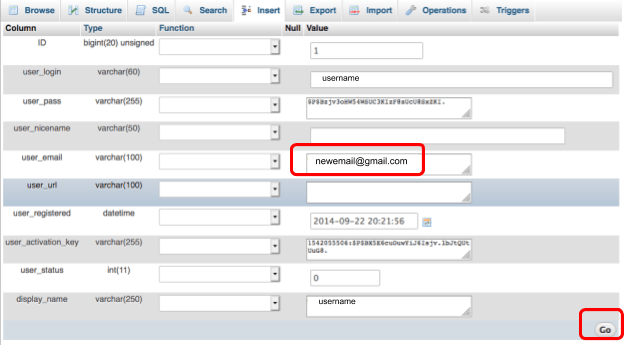
Step 3: Edit A User’s Email
Step 4: Change A User’s Password
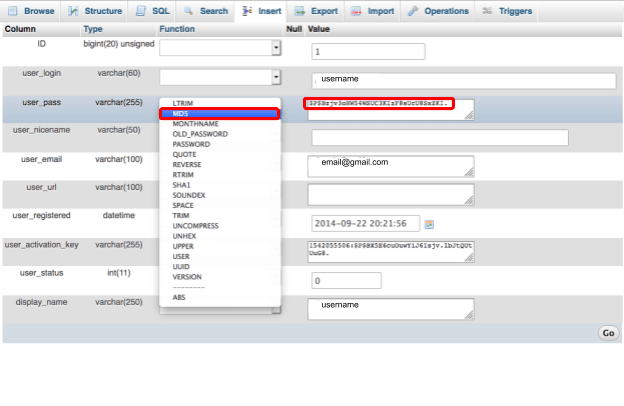
In the user_pass row set the new password by replacing the previous password with a new one. Choose MD5 from the drop-down box and select Go.
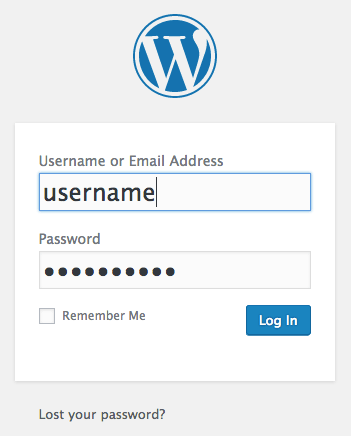
Try out your new password by going to your WordPress login at http://yourdomain.com/wp-login.php
Host Your WordPress Site with Liquid Web
Liquid Web offers unmatched speed, security, and scalability when it comes to hosting your WordPress website. Experience the difference Liquid Web makes today by browsing our full selection of WordPress VPS, dedicated WordPress hosting, and managed WordPress hosting plans today.