 Ronald Caldwell
 The list of common security issues is extensive, with securing your database being among them. In addition, ensuring that your MySQL database is free from errors in cPanel goes a long way to ensuring security as well as a good customer experience.
This tutorial will walk you through how to check a MySQL database for errors in cPanel.
Requirements
- A server running cPanel. We will be using a cPanel VPS.
- Login credentials and appropriate cPanel permissions.
How to Check a MySQL for Errors in cPanel
1. Log into cPanel.

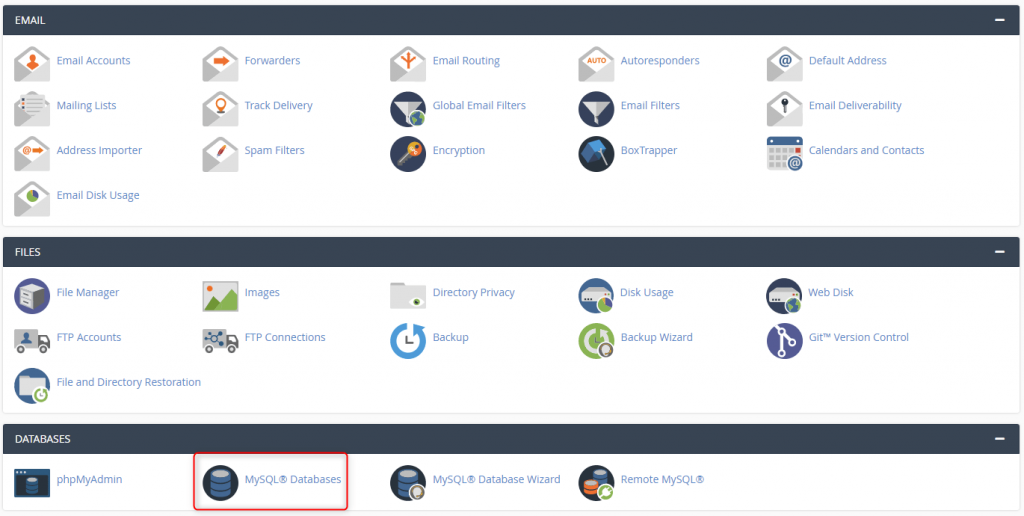
2. Click MySQL Databases under the Databases section.
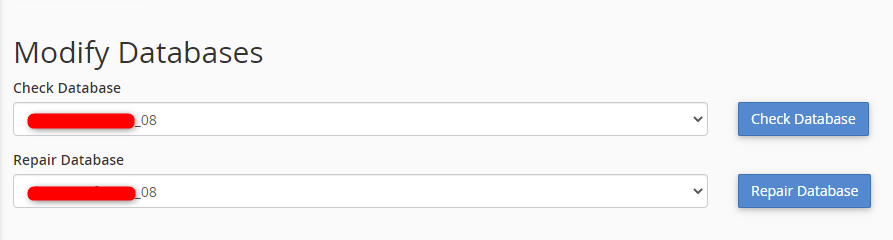
3. Under Modify Databases, select the database you wish to check under the Check Database drop-down menu. Once selected, click Check Database.
4. The check completes and displays a report of the findings. In the example below, no errors were found.

Wrapping Up
Knowing how to check a MySQL database for errors in cPanel helps protect your website from unnecessary downtime or helps you to get up and running in the event of an issue. Saving time and money with this simple task certainly keeps your website and application doing what it was designed to do for your business.
Liquid Web has VPS hosting, cloud dedicated servers, and dedicated servers for your business’ hosting needs. Contact our sales team to get your server going.