
 Liquid Web
 Imagine a scenario where critical systems need urgent hardware updates or repairs. Traditionally, this would mean planned downtime, potentially leading to lost revenue and diminished customer trust.
Live migration tackles this by moving active processes and workloads from one server to another with zero downtime.
One way to leverage live migration is through vMotion by VMware, offered via Liquid Web’s Private Cloud solution.
From setting up the ideal infrastructure to understanding its potential pitfalls, this post aims to provide a comprehensive understanding of live virtual machine migrations, their benefits, and how they can be crucial in bolstering system efficiency and simplifying hardware maintenance.
Understanding live migration in virtual machines
Before you can appreciate live migrations, you need to understand virtual machines (VMs). A VM is a simulated computer system running within a physical computer, known as the host or parent server. It replicates a physical computer’s architecture, comprising four essential components:
- Memory.
- A virtual CPU.
- Disk storage space.
- A network interface.
Virtual machines enable hosting multiple isolated computing environments on a single physical server, efficiently utilizing hardware resources.
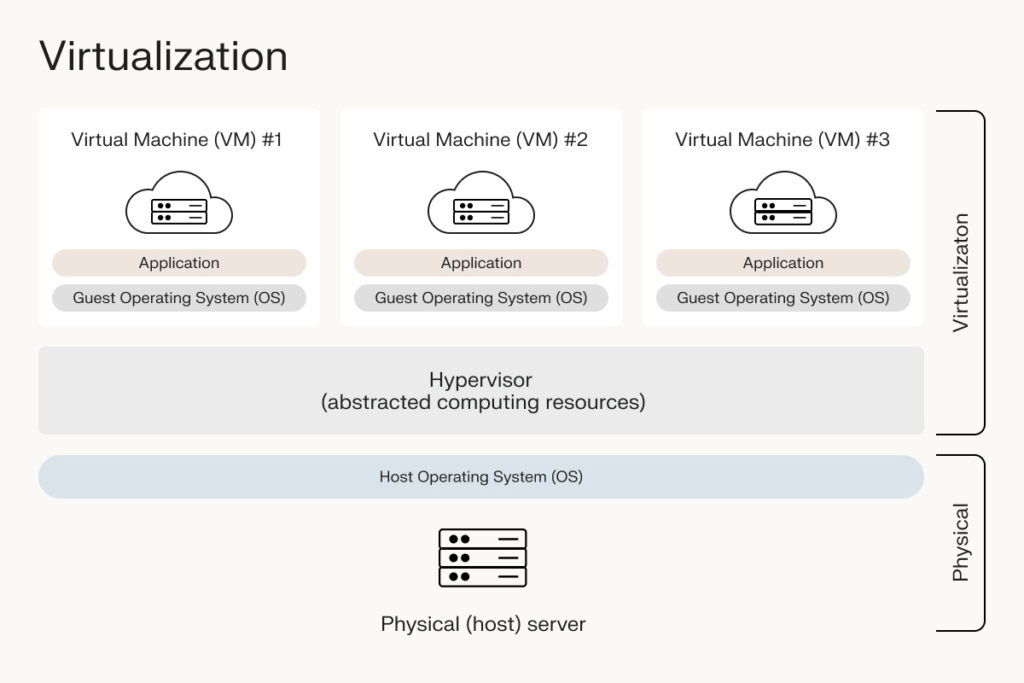
Live migration is the process of moving a running virtual machine or application between different physical machines without disconnecting the service or application.
Benefits of implementing live VM migration
Reducing downtime
In traditional environments, moving a VM from one physical server to another requires downtime, which leads to service interruption. Live migration eliminates this need by allowing the VM to keep running while it’s being moved. This is especially beneficial for critical applications and services that require high uptime.
Enhanced server performance
Through balanced resource utilization, workload optimization, and reduced resource contention, live migration contributes to increased server performance by:
- Boosting energy efficiency.
- Enabling proactive performance management and maintenance without downtime.
- Improving disaster recovery.
- Enhancing network load balancing.
- Ensuring a robust and efficient computing environment.
Optimized resource utilization availability
Live migration allows for better resource utilization, ensuring VMs run on the most suitable hardware. It enhances application availability and simplifies routine maintenance or system updates. This allows administrators to manage resources more effectively without impacting the end-user experience.
Facilitating hardware maintenance and disaster recovery
A key benefit of live migration is its ability to make hardware maintenance and disaster recovery planning easy without service interruption. It offers zero downtime, flexibility in scheduling maintenance, enhanced availability, and reduced risk of data loss. This capability is invaluable for businesses that prioritize continuous operation and data integrity.
How does live migration work?
Live VM migration is designed to ensure minimal service disturbance or unavailability. The process can be broadly classified into several key steps:
1. Initial preparation
This initial preparation phase is essential, as it lays the groundwork for a smooth and successful migration. Failure to accurately assess and prepare the target host can lead to migration failures, performance issues, or service unavailability.
This phase involves a balance of technical assessment and resource management to ensure the migration proceeds as seamlessly as possible. Here are the main aspects:
- Resource availability check: Before initiating the migration, evaluate the target host and ensure it has sufficient resources to support the incoming VM. This includes checking for adequate CPU capacity, enough memory, and sufficient storage space. It’s crucial that the target host can accommodate the VM without overcommitting its resources, which could lead to performance degradation.
- Network compatibility and configuration: Assess the network setup on the target host to verify it’s compatible with the VM’s network configuration. Check the network interfaces, IP address configurations, VLAN (Virtual Local Area Network) settings, and other network-related parameters. The goal is to ensure a seamless network transition during the migration.
- Compatibility checks: Confirm that the VM is compatible with the target host’s hardware and hypervisor, especially concerning processor architecture (like x86 or ARM) and features (like specific CPU instruction sets).
- Preparation of the target environment: The target host might require some preparatory setup, such as configuring resource pools, allocating specific storage volumes, or setting up necessary permissions and security settings. Tailor this setup to replicate the environment of the source host as closely as possible to ensure that the VM can continue to operate without issues post-migration.
- Monitoring and management tools update: If the infrastructure uses centralized management or monitoring tools, update these systems to ensure continuous operation.
2. Pre-copy phase
This phase focuses on transferring the current memory state of the VM from the source host to the target host. Here’s how:
- Memory snapshot: Begin by taking a snapshot of the entire memory state of the VM on the source host. This snapshot should include all the data currently held in the VM’s RAM. This is crucial as it represents the VM’s operational state when the migration process starts.
- Initial transfer: Transfer the snapshot of the VM’s memory to the target host by copying all the contents of the VM’s RAM over the network. The size of this data transfer can be quite large, depending on the amount of memory allocated to the VM.
- Handling active data: Since the VM continues to run on the source host during this phase, it keeps on processing data. Consequently, the contents of its memory (RAM) keep changing. These changes must be accounted for to keep the VM’s state on the target host consistent with its source host.
- Minimizing transfer size: To reduce the amount of data that needs to be transferred, you can use techniques like compression and deduplication. Compression reduces the size of the memory data to be transferred, while deduplication eliminates the transfer of duplicate data blocks.
- Network bandwidth consideration: The transfer of memory data is done over the network connecting the source and target hosts. The available network bandwidth and latency influence the speed and efficiency of this transfer. Adequate network resources are necessary to ensure this phase is completed swiftly to reduce the total migration time.
- Ensuring consistency: It’s vital that the memory state transferred to the target host is a consistent and usable snapshot of the VM’s state. Any corruption or loss of data during this transfer could result in VM instability or failure after the migration.
3. Dirty page tracking
A ‘dirty page’ is a portion of memory that was altered after it was copied to the target host. Since the VM is still active on the source host, it’s normal for some of its memory to change due to ongoing processes and computations. Dealing with this involves:
- Tracking mechanism: The hypervisor, or virtual machine monitor (VMM), on the source host keeps track of these dirty pages. This is typically uses a bitmap or a similar tracking structure. Whenever a memory page is modified, the corresponding bit in the bitmap will indicate this page is now ‘dirty’ and needs to be re-copied.
- Efficiency and performance considerations: Tracking dirty pages is a critical task that needs to be efficient to prevent the migration process from becoming too slow or resource-intensive. The hypervisor must balance the need to track these changes accurately with the need to maintain the performance of the VM and the host machine.
- Minimizing dirty pages: Various strategies may be employed to minimize the number of dirty pages. For example, some systems use a technique called “pre-paging” where likely-to-be-accessed pages are preemptively copied to reduce future changes. Another approach is to slow down the VM’s operations slightly during migration to reduce the rate of memory change.
4. Iterative pre-copy phase
The iteration phase is a balancing act. The main goal is to synchronize the VM’s memory state between the source and target hosts by:
- Transferring the dirty pages: The tracked dirty pages need to be copied to the target host in subsequent iterations (cycles). The aim is to reach a point where the amount of dirty memory is small enough to be transferred quickly during the brief pause of the VM in the final migration phase.
- Reducing the amount of data: With each iteration, ideally, the amount of memory that needs to be transferred decreases. This reduction occurs because, as the target host’s memory state becomes more similar to the source’s, there are fewer new changes to transfer.
- Convergence: The iteration phase aims for a point of convergence, where the amount of memory change (dirty pages) between iterations is small enough that it can be quickly transferred. The rate of memory change on the source VM and the network bandwidth available for the transfer play a crucial role in determining how quickly this convergence happens.
- Minimizing impact on VM performance: This phase must be carefully managed to minimize the impact on the VM’s performance. Techniques like rate limiting the memory transfer to avoid network congestion and prioritizing the VM’s operational needs over migration processes are commonly used.
The iteration phase is dynamic and adaptive, adjusting to the VM’s activity level and network conditions. If the VM is highly active, causing many dirty pages, the migration system may perform more iterations or adjust its strategies for handling the data transfer.
The iteration phase continues until the system determines that it’s feasible to proceed with the final state transfer. This decision is based on factors like the amount of memory yet to be synchronized and the expected downtime during the final transfer.
5. Quiescence (stop and copy) phase
Eventually, a point is reached where it’s feasible to switch the VM to the target host. To do this, the VM on the source host is briefly paused or put into a quiescent state. This pause is typically very short, just long enough to copy the final state (the last set of dirty pages) to the target host.
During this brief pause, the migration process captures the VM’s final state. This includes:
- Memory state: Any remaining ‘dirty pages’ are copied. At this point, since the VM is not running, no new dirty pages are being created.
- Processor state: The exact execution state of the VM’s virtual CPU(s), including register contents, program counters, and other CPU-specific data, is captured.
- Device state: The state of virtual devices, such as network connections and I/O devices, is also captured. This includes information necessary to restore these devices’ states on the target host.
This captured state is quickly transferred to the target host. Advanced techniques like compression and efficient network protocols accelerate this process and minimize downtime.
Before resuming the VM on the target host, ensure that all data has been correctly and completely transferred. This check is vital to maintain the data integrity and consistency of the VM.
6. Resume on target host
Now at its new home, the VM resumes its operation at the target host exactly from where it paused. This smooth transition ensures a sense of continuity, maintaining high service availability.
To carry on the new host:
- Start the VM on the target host: Initiate the VM’s processes and load its memory state (which has been transferred from the source host) into the target host’s RAM.
- Restore the execution state: The execution state of the VM (including the CPU register states, the instruction pointer, and other processor states) needs to be restored on the target host. This ensures that the VM continues its operations exactly from the point where it was paused on the source host.
- Reconnect and reroute the network: The VM’s network identity (like its IP address and MAC address) is maintained, but these connections must be rerouted to the target host. This often involves updating the network switch tables and the virtual switch on the target host to redirect the network traffic to the newly migrated VM.
- Connect the device storage: If the VM was connected to specific virtual devices or storage on the source host, these connections are re-established on the target host. In many setups, shared storage systems are used, simplifying this process.
- Test and verify: Immediately after the VM starts on the target host, checks and tests are often conducted to ensure it’s functioning correctly. This is done by verifying the applications and services are running as expected and that there are no disruptions or data inconsistencies.
7. Clean up
The cleanup phase involves several critical actions after the VM has successfully started running on the target host:
- Resource reclamation on source host: The resources (like CPU, memory, and storage) that were allocated to the VM on the source host are now freed up. This is an important step as it allows the source host to reallocate these resources to other VMs or tasks, optimizing overall resource utilization.
- Removal of temporary files: During the migration process, temporary files and data may be created on the source host. These could include logs, state information, or VM snapshots used during the migration. Once the migration is confirmed successful, these files are safely deleted to free up storage space and maintain a clean system environment.
- Network reconfiguration: Any network configurations that were temporarily adjusted to facilitate the migration need to be restored or updated. This could involve updating network routing tables or DNS records to reflect the new location of the VM, ensuring that all network traffic is correctly directed to the new host.
- Update management and monitoring tools: It’s vital to update system management and monitoring tools to reflect the new location and status of the migrated VM. This ensures that system administrators can continue to monitor and manage the VM in its new environment effectively.
8. Post-migration
Once the VM is up and running on the target host, it’s important to conduct a series of checks to confirm that it is operating as expected:
- Functional and performance checks: Verify that all applications and services hosted on the VM are functioning correctly and check its performance metrics to ensure they meet the expected standards. These checks help identify any issues that may have arisen during the migration process, allowing for prompt resolution.
- Update management databases: In any virtualized environment, management databases keep track of various aspects of VMs, such as their locations, configurations, resource allocations, and operational statuses. After the migration, it’s crucial to update these databases with the new location of the VM to guarantee that all management and monitoring tools reflect the current state and location, allowing for accurate tracking and administration.
- Documenting the migration: Documenting the migration process encompasses details about the migration, such as duration, data transferred, challenges encountered, and performance metrics post-migration. These records are valuable for future reference and for improving subsequent migration processes.
- Feedback and optimization: In some cases, feedback from the migration process is gathered to assess the effectiveness and efficiency of the migration strategy. This feedback can optimize future migrations, making them smoother and more efficient.
- Continual monitoring: Even after the migration is completed, continuous monitoring of the VM is crucial to ensure its long-term stability and performance in the new environment.
And that’s it – the live VM migration is officially complete. This marks the VM’s successful relocation from the source to target host while minimizing the impact on the services provided.
Addressing potential issues and limitations of live migration
When you’re going through the live migration process, it’s necessary to be aware of the obstacles that you might encounter. Here are some of these potential issues and their solutions:
- Dependency on shared storage: Traditional live migration depends on shared storage, which both the source and target hosts must access. This prerequisite might complicate setting up your infrastructure. Utilizing storage virtualization or SAN (Storage Area Network) replication can help alleviate this issue by ensuring consistent data accessibility.
- CPU compatibility: Live migration requires compatible CPUs between the source host and destination. Incompatible CPUs can lead to the ineffectual functioning of your virtual machines. Before initiating migration, you can use compatibility tools or feature masking techniques to assess compatibility.
- Downtime considerations: Though live migration aims for zero downtime, some applications are sensitive to even the slightest pauses. For such delicate applications, using network acceleration technologies or optimizing the live migration speed can minimize downtime.
- Network configuration problems: Live migration involves rerouting network traffic to the virtual machine’s new location, which requires impeccable network configuration. Manual errors in configuration can lead to complications. Ensuring meticulous pre-migration network validation and maintaining accurate network documentation can help prevent such issues.
- Insufficient or incompatible resources on the Target Host: To succeed, live migration requires adequate resources (CPU, memory, storage) on the target host. A lack of resources can lead to migration failure. Conducting thorough pre-migration assessments and capacity planning could confirm the host’s aptitude for accepting an incoming virtual machine.
Expert hosting solutions such as Liquid Web offer comprehensive migration support, freeing companies from dealing with these complexities single-handedly. Using recognized hosting partners ensures you get the best of live migration.
Tools and platforms supporting live migration
For IT professionals looking to migrate VMs without downtime, VMware vSphere vMotion and Windows Hyper-V stand out in the market.
VMware vSphere vMotion
vMotion is a feature of VMware’s vSphere suite. It enables the live migration of running VMs from one physical server to another with zero downtime, ensuring continuous availability. Its notable features include:
- Load balancing and maintenance: vMotion is important for balancing workloads across servers, conducting maintenance without disrupting operations, and avoiding resource contention.
- Shared storage requirement: vMotion requires the VM’s disk files be in shared storage accessible by both the source and target ESXi hosts. However, the disk state itself does not need to be migrated.
- Active state migration: It transfers the VM’s memory, active state, and device state to the target host using an iterative process. This is done while the VM continues to operate.
- Network continuity: vMotion ensures minimal network latency during migration, maintaining network connections.
- Integration with VMware’s Distributed Resource Scheduler (DRS): vMotion integrates seamlessly with DRS for optimal resource allocation.
- Compatibility checks: It performs thorough compatibility checks on the target host, ensuring aspects like CPU compatibility and hardware versions match.
Windows Hyper-V live migration
Hyper-V, a part of Windows Server, offers robust live migration capabilities:
- Flexible storage options: Unlike vMotion, Hyper-V supports live migration without the need for shared storage. This includes options like shared nothing live migration and live storage migration.
- Failover clustering: It supports live migration with failover clustering for enhanced reliability.
- Network optimization: Hyper-V optimizes network use during migration, ensuring maintenance of network connections and minimizing migration time.
- Integration with System Center Virtual Machine Manager (SCVMM): It integrates with SCVMM for streamlined management of the VM.
- Simultaneous migrations: Hyper-V can handle multiple live migrations concurrently.
- Performance tuning: It provides settings to fine-tune live migration performance, catering to different infrastructure needs.
The choice between these two options will depend on specific enterprise needs, existing infrastructure, and strategic IT goals.
Why choose Liquid Web for live migration?
Liquid Web offers robust solutions for businesses, including VMware vMotion via its Private Cloud solution.
Liquid Web’s Private Cloud solution harnesses the full potential of VMware vMotion. It offers exceptional hosting and provides a smooth and uninterrupted live migration experience through:
- Easy live migration: Liquid Web’s infrastructure facilitates smooth live migrations, leveraging VMware vMotion’s advanced capabilities. This ensures minimal downtime and maintains consistent performance during migrations.
- Fast and secure: Built on a highly available VMware infrastructure, this solution is designed for speed and security, meeting the stringent demands of modern businesses.
- Fully managed solutions: Liquid Web simplifies the live migration process with fully managed services. This means businesses can rely on Liquid Web’s expertise to handle the complexities of migration, freeing them to focus on their core operations.
- Expert technical support: With a team of seasoned professionals, Liquid Web provides top-notch technical support to swiftly address any issues during the migration process.
- Resource-based pricing model: The solution’s pricing model is based on resources used, allowing businesses to start with what they need and scale as they grow, offering flexibility, customizability, and cost-effectiveness.
- Time and cost savings: The detailed migration support provided by Liquid Web can save businesses considerable time and money, reducing the workload and pressure on internal IT teams.
Transform your virtual machine experience with Liquid Web
It’s clear that live VM migration is necessary for businesses striving for agility, efficiency, and continuous operation. The success of live migration heavily relies on the right tools and expert support. VMware’s vMotion stands out for its advanced resource scheduling, network optimization, and compatibility checks.
Liquid Web, with its comprehensive support for VMware vMotion through its Private Cloud solution, simplifies the migration process. They provide a fully managed solution with expert technical support to guarantee a hassle-free migration experience.