


Key takeaways
- Encryption key management controls how keys are created, stored, rotated, backed up, and destroyed.
- Keys should stay separate from protected data and should never be hardcoded.
- Centralized management, rotation, access controls, and audit logs reduce key exposure.
- Disaster recovery planning helps prevent lost keys from making encrypted data unrecoverable.
Encryption helps protect sensitive data by making it unreadable to unauthorized users, but it only works when keys remain secure, available, and properly managed.
Encryption key management best practices help teams protect the keys that protect their data. The goal is to keep keys secure while making sure authorized users and systems can access encrypted data when they need it.
What is encryption key management?
Encryption key management is the process of creating, storing, using, rotating, revoking, backing up, and destroying cryptographic keys.
Cryptographic keys are used to encrypt and decrypt data, support secure data transfers, verify digital signatures, and help protect data integrity.
Encryption key management applies across business systems, including applications, databases, backups, cloud services, private cloud environments, hybrid infrastructure, payment systems, and healthcare or financial workloads.
A strong key management process defines where keys live, what they protect, who can use them, how often they rotate, and what happens when a key expires or becomes compromised.
Risks of poor encryption key management
Encryption protects data, but poor key management can weaken that protection. Mismanaged keys can make data harder to decrypt, interrupt operations, create compliance issues, and increase breach risk. If a key is exposed, stolen, deleted, or lost, encrypted data may become accessible to the wrong person or unavailable to the people who need it.
A compromised key can allow attackers to read encrypted information, access protected systems, impersonate users, or sign documents without authorization.
13 encryption key management best practices
Strong encryption key management starts with clear rules for where keys live, who can use them, how they are protected, and what happens when something goes wrong.
Use these 13 encryption key management best practices to reduce key exposure, support compliance, and keep encrypted data recoverable.
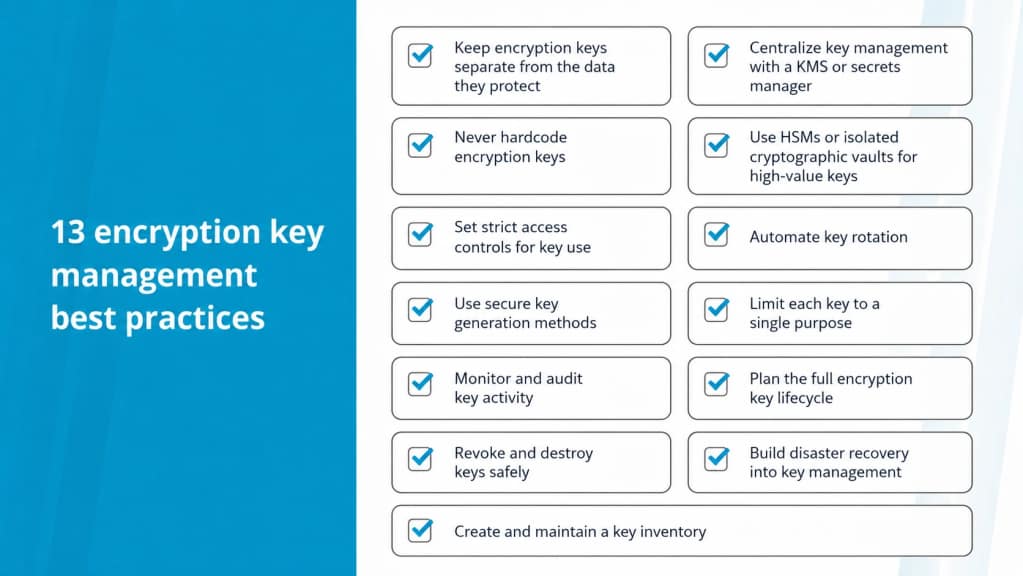
1. Keep encryption keys separate from the data they protect
Never store encryption keys in the same place as the data they protect. If attackers gain access to encrypted data and the corresponding keys at the same time, encryption no longer provides meaningful protection.
Good separation means storing keys outside the application database, separating backup keys from encrypted backups, limiting direct access to key material, and reviewing whether keys appear in logs, exports, or backups. A KMS, secrets manager, HSM, or isolated vault can help keep key storage separate from the systems the keys protect.
2. Centralize key management with a KMS or secrets manager
Scattered key storage makes keys harder to track, rotate, audit, and revoke. A centralized key management system gives teams one controlled place to manage policies, access, rotation, and logging. Key management systems (KMSs) are network services that help teams manage and use encryption keys in a secure environment.
Common options include cloud KMS tools, secrets managers, HashiCorp Vault, hardware-backed key management systems, HSM-backed KMS solutions, and dedicated key management platforms.
Centralized key management can help teams enforce access policies, automate rotation, track key usage, revoke compromised keys faster, standardize backups and recovery, and reduce manual handling.
A KMS supports those processes, but teams still need clear policies, ownership, audits, and recovery plans.
3. Never hardcode encryption keys
Don’t embed encryption keys in application source code, configuration files, scripts, container images, or repositories.
Embedding keys into the source code of your programs or configuration files adds unnecessary risk and complexity to your key management process.
Hardcoded keys create two major problems. First, anyone who can access the code may be able to access the key. Second, rotation becomes harder because teams may need to edit code, redeploy applications, and search through old branches or build artifacts.
Avoid storing keys in source code, Git repositories, committed configuration files, application images, build artifacts, logs, shared documents, tickets, or chat messages.
Use a KMS, secrets manager, environment variables, or protected configuration service instead. Make rotation possible without changing source code.
4. Use HSMs or isolated cryptographic vaults for high-value keys
Hardware security modules, or HSMs, are physical tools designed to secure key material.
HSMs can generate, store, and use keys inside tamper-resistant hardware. Because keys stay inside the HSM and aren’t exported, HSMs can reduce exposure risk for high-value cryptographic operations.
HSMs may be worth evaluating for master keys, payment systems, healthcare data, financial data, compliance-sensitive workloads, production systems with strict control requirements, and private cloud or hybrid environments.
Lower-risk systems may work well with a KMS or secrets manager. Higher-risk environments should consider hardware-backed protection, especially when compliance or customer trust depends on strong control over key material.
5. Set strict access controls for key use
Key access should follow least privilege. Users and systems should only have the access they need to do their work.
Access controls should define who can:
- Create keys
- Use keys for encryption or decryption
- Rotate keys
- Revoke keys
- Delete or destroy keys
- View logs
- Change policies
- Restore keys from backup
Separate administrative access from key use when possible. A person who manages key policies may not need permission to decrypt production data.
Use role-based access, strong identity controls, and MFA for key management tools. Review permissions regularly and remove access when roles change.
6. Automate key rotation
Key rotation limits how long a key stays useful if it becomes exposed. Rotation should happen on a defined schedule and after suspected compromise. A strong rotation process should also account for application dependencies, encrypted data, backups, and audit requirements.
Automation can reduce the risk of missed rotations and manual errors. A KMS can help automate tasks in the key lifecycle, including generation, backup, rotation, and destruction.
Build rotation plans around data sensitivity, compliance requirements, key purpose, application dependencies, environment type, and recovery needs.
Test rotation before applying changes to production systems. A broken rotation process can lock applications out of data they need.
7. Use secure key generation methods
Keys should be created with cryptographically secure tools, not predictable values or weak randomization.
Use cryptographically secure pseudorandom number generators for key creation. Follow current guidance for algorithm type, key length, and expiration based on the use case.
Avoid manually created keys, reused keys, weak or outdated algorithms, predictable patterns, test keys in production, and production keys in development environments.
Match key strength to the sensitivity of the data. Strong key generation reduces the chance that an attacker can guess, recreate, or brute force key material.
8. Limit each key to a single purpose
Data encryption keys can support encryption, decryption, authentication, digital signatures, and key wrapping. Each key should have one purpose.
Single-purpose keys are easier to manage. They make ownership, access, rotation, auditing, and revocation clearer. They also reduce the impact of compromise because one exposed key affects a smaller part of the environment.
Examples include:
- One key for database encryption
- One key for backup encryption
- One key for a specific application or service
You should also separate keys by environment, such as production, staging, and development. Broad-use keys create broader risk. If one key protects too many systems, one compromise can affect too much data.
9. Monitor and audit key activity
Teams need to know when keys are accessed, used, changed, rotated, revoked, or deleted. Conducting audits helps teams enforce key management policies and reduce the risk of compromised keys. Audits also show whether policies still match the way teams actually work.
Track who accessed a key, when the key was used, which system used it, what action occurred, whether access succeeded or failed, and whether the activity matched expected behavior.
Protect key logs from tampering and review them during audits, incidents, and compliance checks. Watch for unusual access patterns, failed access attempts, or use outside normal systems.
10. Plan the full encryption key lifecycle
A key management plan should cover the full key lifecycle, including key generation, storage, distribution, use, rotation, backup, revocation, retirement, and destruction.
A policy should clearly define who is responsible for each key lifecycle management stage, from creation and activation to expiration and destruction.
Lifecycle planning helps teams avoid old, unused, undocumented, or over-permissioned keys. It also supports faster incident response because teams already know what should happen when a key needs to rotate, expire, or be revoked.
11. Revoke and destroy keys safely
Compromised keys need a clear revocation process. Define when keys should be revoked, who can revoke them, and which systems need replacement keys. A revoked key may also require data re-encryption, application updates, and incident review.
A safe revocation process should include:
- Disable or revoke the affected key
- Identify affected systems and data
- Create or activate replacement keys
- Update connected systems
- Review access logs
- Re-encrypt data if needed
- Confirm dependent applications still work
- Document the incident
- Update policies to prevent repeat issues
When retiring keys, destroy the key material using approved methods. Don’t only delete a pointer if the key material still exists in backups, logs, old systems, or unmanaged copies.
Assign owners before keys become compromised so the team knows who handles each step.
12. Build disaster recovery into key management
Disaster response and data recovery should be outlined as a part of your key management procedures.
Start by identifying the common threats that could affect your keys, then review the potential impact of each threat so you know which keys need the fastest recovery path.
Encrypted data is only recoverable if the right keys are recoverable as well. A valid backup may become useless if the team loses the key needed to decrypt it.
- Where critical keys are backed up
- How often keys are backed up
- Who can restore keys
- How restored keys are verified
- Where backup keys are stored
- How backup keys are protected
- Which keys matter most during recovery
You can also group keys by their priority level in a recovery situation so your team knows where to focus their time if there’s a disaster event.
Test key recovery before an incident. A recovery plan that only exists on paper may fail when systems are down and teams need fast access.
13. Create and maintain a key inventory
A comprehensive inventory of your keys is useful for audits and disaster response. It should show which keys exist, what they protect, who owns them, where they are stored, and when they should rotate or retire.
Include fields such as:
| Inventory field | What to document |
| Key name or ID | The identifier used to track the key |
| Purpose | What the key protects or supports |
| Owner | The person or team responsible for the key |
| Environment | Production, staging, development, backup, or another environment |
| Algorithm and key length | The cryptographic details for the key |
| Creation date | When the key was created |
| Rotation schedule | How often the key should rotate |
| Last rotation date | When the key last changed |
| Storage location | Where the key is stored |
| Backup location | Where recoverable copies are stored |
| Authorized users | Who can access or use the key |
| Recovery priority | How important the key is during a disaster |
| Retirement date | When the key should be retired or destroyed |
Update the inventory whenever keys are created, rotated, revoked, restored, or retired.
Compare KMS, HSM, and secrets management tools
The right choice depends on risk, compliance, environment, and control needs.
| Tool type | Best for | Main benefit | Considerations |
| KMS | Managing encryption keys across applications and environments | Centralized policies, access control, rotation, and logging | May depend on provider or platform design |
| HSM | Protecting high-value master keys and compliance-sensitive workloads | Hardware-backed key generation and storage | More complex and often more expensive |
| Secrets manager | Storing application secrets, API keys, and credentials | Easier secret delivery to applications | Not always a replacement for full key lifecycle management |
| Cloud KMS | Cloud workloads and platform-native encryption | Strong integration with cloud services | Requires careful identity and access control |
| Hybrid or on-premises vault | Mixed environments and private infrastructure | Central control across different systems | Needs clear ownership and maintenance |
KMS tools, HSMs, and secrets managers can work together. For example, an HSM may protect master keys while a KMS manages policies and key operations.
Encryption key management and compliance
Key management can support compliance, but requirements vary by industry, data type, and framework.
Many organizations consider key management when working with PCI DSS, HIPAA, GDPR, SOC 2, NIST guidance, or FIPS requirements.
A key management program can support compliance by showing how the organization protects key material, controls access, tracks usage, rotates keys, and responds to compromise.
| Practice | Compliance value |
| Access control | Limits who can use or manage keys |
| Rotation | Reduces exposure from old or compromised keys |
| Audit logging | Shows who accessed or changed key material |
| Secure storage | Protects keys from unauthorized access |
| Key inventory | Supports audits and ownership reviews |
| Disaster recovery | Shows how encrypted data can be restored |
| Revocation and destruction | Supports secure retirement of old or compromised keys |
Work with legal, compliance, or security experts to understand which requirements apply to your organization.
When to ask for support
Ask for support when key management affects production systems, compliance-sensitive data, backups, or disaster recovery.
Support may help when:
- You don’t know where all keys are stored
- Encrypted backups depend on undocumented keys
- Key rotation could disrupt live applications
- Security and operations teams need a cleaner key management process
Encryption key management best practices checklist
Use this checklist to review your current process:
- Store keys separately from encrypted data
- Use a KMS, secrets manager, or HSM where appropriate
- Never hardcode encryption keys
- Use secure key generation methods
- Limit each key to one purpose
- Apply least-privilege access
- Automate key rotation
- Monitor and audit key activity
- Back up critical keys securely
- Document ownership and recovery priority
- Keep an updated key inventory
- Revoke compromised keys quickly
- Destroy retired keys properly
- Test key recovery procedures
Encryption key management FAQs
Getting started with encryption key management
Encryption key management works best when security, operations, and recovery planning stay connected. Strong policies, secure storage, access control, rotation, audits, and recovery procedures all protect encrypted data from different sides.
Start by building or updating your key inventory. Identify where keys live, what they protect, who can access them, when they rotate, and how they can be recovered.
If encryption, compliance, backups, or disaster recovery affect a live environment, explore Liquid Web Private Cloud powered by VMware. Private cloud gives teams more control over hosting, security, and recovery planning for sensitive workloads.