 David Singer
 Websites hosted on subdomains make up a large subsection of the internet. If you own a domain you can create as many subdomains as you want with it. This can be useful when you want to create isolated sections of your websites with specific functions. Creating subdomains is useful if you want to have an online store, blog, or forum.
For example if you own domain.com then you can create:
blog.domain.com
store.domain.com
promo1.domain.com
promo2.domain.com
Cloud Sites treats each subdomain as its own website! You can create them the same way you create any other website.
- Log into your Cloud Sites control panel.
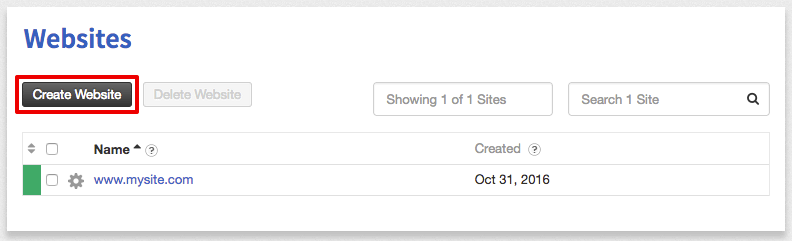
- Click the Create Website button.

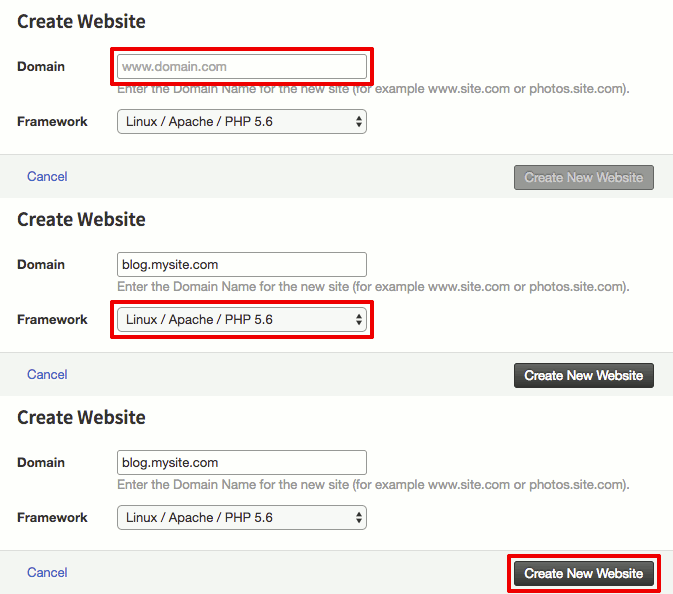
- Enter your subdomain and domain name and choose the technology framework you’d like. Then click Create New Website.

If you would prefer to create a subdomain alias for an existing site you can review the “Adding a Domain Alias in Cloud Sites” article.
Not hosting with Liquid Web yet?
We’re happy to help architect the right plan for your needs. Check out our hosting solutions, which include VPS servers, dedicated hosting, and more. Get started today, or reach out to learn more.