
 Liquid Web
 The terms SaaS (Software-as-a-Service) and cloud-based services are often used interchangeably. While they may sound similar, however, they have distinct differences that can significantly impact businesses operations.
SaaS applications are always cloud-based, delivered over the internet, and accessible from anywhere. Think of popular tools like Google Workspace (formerly G Suite) or Salesforce – they live in the cloud and you access them through your web browser without needing to install anything extra on your computer.
Cloud-based services, however, include a wider range of offerings like PaaS (Platform-as-a-Service) and IaaS (Infrastructure-as-a-Service). That means that not all cloud services are SaaS. For instance, Amazon Web Services (AWS) provides IaaS with storage, databases, and computing power.
Understanding these terms and their differences is important for anyone looking to leverage technology effectively in their business operations. Whether you’re deciding on a new software tool or planning your company’s IT infrastructure, this article will cover everything you need to know to find the best fit for your business needs!
Key points
- Not all cloud services are SaaS. Cloud computing includes a wider array of services, such as PaaS (Platform-as-a-Service) and IaaS (Infrastructure-as-a-Service).
- SaaS applications are cloud-based and accessed via the internet with minimal installation. Examples include Google Workspace and Salesforce.
- SaaS simplifies software access and maintenance, making it ideal for small businesses. Larger organizations benefit from cloud computing’s flexibility and control over data and infrastructure.
- Choosing the right SaaS involves evaluating specific needs, scalability, integration, cost, and vendor reputation. Liquid Web offers reliable hosting for SaaS applications, ensuring consistent performance and security.
Understanding the foundations of SaaS and cloud
What is cloud computing?
Cloud computing provides computing resources on demand via the internet. Instead of owning and maintaining physical servers or data centers, businesses can access these resources via a subscription-based model, where the necessary infrastructure is hosted by vendors such as Liquid Web, AWS, Microsoft Azure, and Google Cloud Platform.
Cloud computing comes in different forms to cater to various business needs, including:
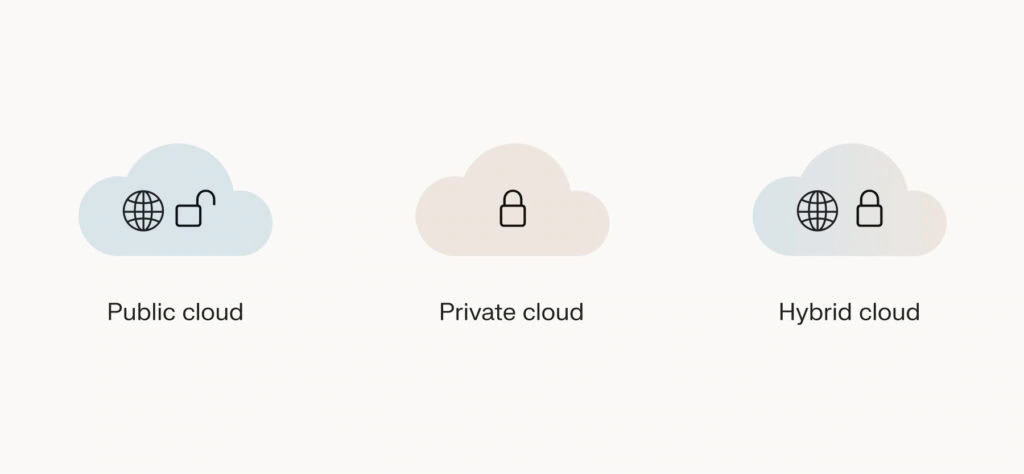
- Public cloud: Services are delivered over the public internet and shared across organizations. This model is cost-effective and scalable, making it ideal for businesses of all sizes.
- Private cloud: Dedicated environments for a single organization, offering greater control and security. Private clouds are often used by larger companies with specific regulatory or security requirements.
- Hybrid cloud: A combination of public and private clouds, allowing data and applications to be shared between them. This model provides flexibility and more deployment options.
Within these cloud models, different types of services can be hosted:
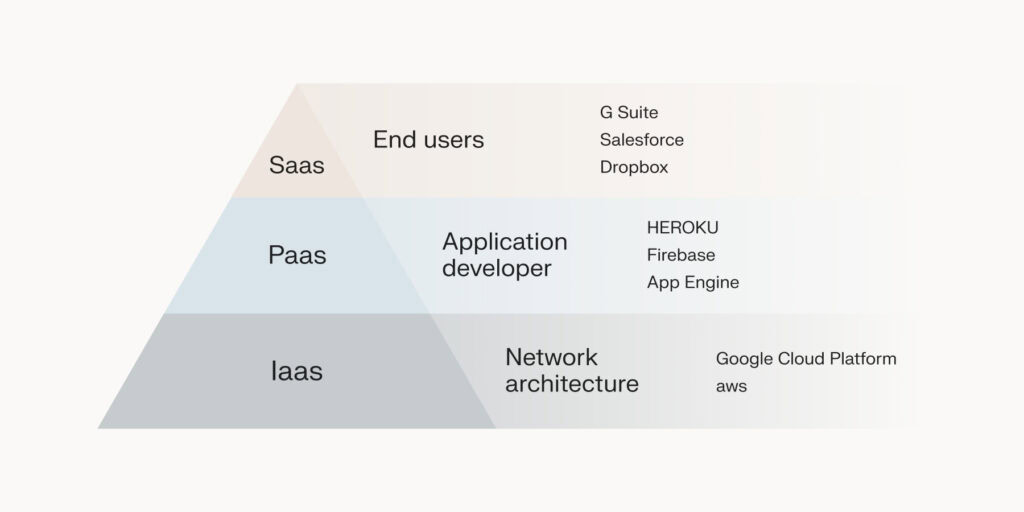
- SaaS: Provides software applications over the internet. Users can access these applications via their web browsers, thus eliminating the need for installation or maintenance. Examples include Zendesk and Microsoft 365.
- IaaS: Offers virtualized computing resources over the internet. Businesses can rent infrastructure components such as servers, storage, and networking. AWS is a prime example of an IaaS provider.
- PaaS: Provides a platform that allows customers to develop, run, and manage applications without concern for the underlying infrastructure. Services like Microsoft Azure and Google App Engine fall under this category.
The benefits of cloud computing are numerous. Businesses can achieve increased efficiency and flexibility, allowing them to adapt quickly to shifting market demands and technological advancements. This is evident in the projected growth of the cloud computing market. In the U.S. alone, the market size was $97.44 billion in 2022, and experts predict it will soar to $458.45 billion by 2032.
With cloud computing, businesses can easily scale resources up or down based on demand. This ensures you only pay for what you use. They can also reduce capital expenditure by eliminating the need for physical hardware, which comes with ongoing maintenance costs. Users can access resources and applications from anywhere, anytime, with an internet connection.
What is SaaS?
Instead of installing software on individual devices, SaaS users can access these applications via their web browsers. This model simplifies software usage, making it accessible and convenient for businesses and individuals alike.
Even better, users always have the latest version of the software. The SaaS providers are the ones responsible for software updates and patches, ensuring users always have access to the latest security enhancements and reducing the burden on IT teams.
🔎 Did you know? The importance and relevance of SaaS in today’s business landscape are underscored by its market growth. SaaS dominates the market with a projected market volume of $150.70 billion in 2024, highlighting its critical role in modern business operations.
SaaS and cloud vs traditional IT
The shift from traditional IT infrastructure to cloud-based services and SaaS solutions has fundamentally transformed the way businesses operate. Traditionally, companies relied on on-premise software and hardware, requiring significant capital investment in servers, storage, and IT personnel to manage and maintain these resources. However, the advent of cloud computing and SaaS has introduced a more flexible, cost-effective, and scalable approach to IT.
Flexera’s 2023 State of the Cloud Report revealed that nearly half of the respondents plan to move from on-premise software to SaaS. This shift is motivated by the desire to eliminate the substantial resources required to manage equivalent on-premises software packages. By adopting cloud-based services, businesses can redirect their focus and resources towards innovation and growth rather than maintenance and infrastructure management – here’s how:
| SaaS and cloud | Traditional IT | |
|---|---|---|
| Pricing models | Operate on a subscription-based pricing model, where businesses pay a recurring fee (usually monthly) for access to software and services. This model reduces the need for large upfront investments and allows for predictable budgeting. | Requires significant upfront capital investment for hardware and software licenses. Ongoing costs include maintenance, upgrades, and IT staff. |
| Scalability | Offer seamless scalability. Businesses can easily adjust their usage up or down based on current needs, ensuring they only pay for what they use. | Scaling up requires purchasing additional hardware and software. This can be time-consuming and expensive. Scaling down often leaves companies with unused resources. |
| Accessibility | Enable access from anywhere with an internet connection, supporting remote work and global collaboration. | Access to software and resources is typically limited to on-premise locations, requiring VPNs or other solutions for remote access. |
| Maintenance | Providers handle maintenance, updates, and security, ensuring that users always have access to the latest features and protections without the need for internal IT resources. | Maintenance, updates, and security patches are the responsibility of the in-house IT team, requiring continuous attention and resources. |
SaaS vs. cloud computing: Unpacking the differences
When discussing SaaS (Software-as-a-Service) and cloud computing, it’s essential to understand that while SaaS is a component of cloud computing, the two are not synonymous. They differ significantly in scope and functionality, ownership and management, and privacy and accessibility.
| SaaS | Cloud computing | |
|---|---|---|
| Ownership and management | The service provider owns and manages the software, infrastructure, and data. Users have little to no control over the backend but benefit from reduced maintenance responsibilities. | Users have more control over the infrastructure and resources. For example, with IaaS, businesses can manage their virtual servers, storage, and networking, giving them greater flexibility to customize their IT environment. |
| Privacy and accessibility | Offers high accessibility as users can access software from any device with an internet connection. However, this also means that data is stored on the provider’s servers, which may raise privacy and security concerns for some organizations. | Offers varied levels of privacy and control, depending on the model (public, private, or hybrid cloud). Organizations can choose private or hybrid cloud solutions to maintain greater control over their data and security. |
Small organizations often benefit more from SaaS due to its cost-effectiveness and ease of use. SaaS eliminates the need for significant upfront investments and simplifies software management, making it ideal for smaller teams with limited IT resources.
Larger organizations might utilize cloud computing for its flexibility and control over data storage and processing power. Large businesses can leverage IaaS and PaaS to build customized solutions and scale their infrastructure as needed.
Exploring the synergy between SaaS and cloud computing
The relationship between SaaS and cloud computing creates a synergy that benefits businesses through cost efficiency, scalability, and operational flexibility. Integrating SaaS applications with cloud infrastructure has revolutionized business operations, enabling access to applications from anywhere and at any time, thereby enhancing productivity.
Combining SaaS with cloud computing allows businesses to minimize upfront costs by eliminating the need for expensive hardware and software licenses. Subscription-based models ensure predictable expenses and reduce financial strain.
Additionally, the integration of SaaS with cloud infrastructure supports remote work and global collaboration. Employees can access essential tools and applications from any location, promoting a more flexible and responsive business environment.
The future of SaaS and cloud computing synergy looks promising, with emerging trends set to further enhance business operations. AI and machine learning are becoming vital to cloud and SaaS platforms, driving capabilities such as predictive analytics, automation, and personalized customer experiences. Currently, 76% of SaaS vendors are adopting artificial intelligence (AI), and a further 23% are exploring its application within their businesses.
The cons of cloud-based SaaS
While SaaS offers numerous benefits, it’s essential to be aware of potential drawbacks, particularly regarding security and customization.
Relying on the provider for robust data security and infrastructure means that SaaS solutions can be vulnerable to various security threats. Some specific vulnerabilities include:
- Insecure APIs: Poorly designed or insecure APIs can expose data and functionality to external threats.
- Shadow IT: Unauthorized use of SaaS applications can bypass security controls and lead to data breaches.
- Account hijacking: Weak passwords and lack of multi-factor authentication can result in account compromise.
- Zero-day vulnerabilities: Attackers can exploit newly discovered security flaws that lack patches.
To mitigate these risks, businesses should implement best practices such as:
- Multi-factor authentication (MFA): Provides additional security by requiring multiple forms of verification.
- Regular security audits: Identifies and addresses potential vulnerabilities in the system.
- Threat detection solutions: Monitors for suspicious activity and responds to threats in real-time.
- Risk assessments: Evaluate potential risks and implement strategies to manage them effectively.
Aside from security vulnerabilities, SaaS solutions can sometimes limit the ability to customize applications to meet specific business needs. Additionally, businesses may face the risk of vendor lock-in, where switching providers becomes difficult due to data migration challenges or proprietary technology.
Choosing the right SaaS solution for your enterprise
Selecting the right SaaS solution is crucial for enhancing operational efficiency, cost-effectiveness, and future-proofing your business. According to BetterCloud, organizations now use 130 SaaS apps on average, a net growth of 18% from 2022. Here are some key considerations when choosing a SaaS solution:
- Specific needs: Evaluate your business’s specific needs and identify the features and capabilities required. A comprehensive understanding of your business objectives will help you choose a solution that aligns with your goals.
- Scalability: Ensure the SaaS solution can scale with your business. As your business grows, the solution should be able to accommodate increased demand without compromising performance.
- Integration Capabilities: Consider how well the SaaS solution integrates with your existing systems and workflows. Seamless integration is essential for optimizing efficiency and avoiding disruptions.
- Cost Implications: Assess the total cost of ownership, including subscription fees, implementation costs, and any additional expenses for customization or support.
- Vendor Reputation and Support: Research the vendor’s reputation and track record. Look for case studies and customer reviews and testimonials. Also, evaluate the quality of their support services, as reliable support is imperative for addressing any issues that may arise.
Take the next step in your SaaS journey with Liquid Web
The SaaS market is on a robust growth trajectory, with Statista projecting it will grow from $197 billion in 2023 to $232 billion in 2024. As this market expands, Liquid Web is a premier choice for businesses looking to transition to SaaS models and leverage top-tier hosting services for their applications.
Liquid Web’s high availability hosting ensures that SaaS applications remain consistently online, reducing downtime and increasing productivity, which is necessary for smooth business operations. They provide compliant solutions that meet industry standards, securing data and allowing IT teams to focus on strategic goals. Transparent pricing eliminates hidden costs, aiding in efficient resource allocation.
With premium hosting services – such as Cloud VPS and Cloud Dedicated Servers – Liquid Web is known for reliability, security, performance, and 24/7 customer support.
With Liquid Web as your partner, you can confidently navigate the complexities of SaaS adoption and implementation, improving your operations and bottom line. Discover how Liquid Web can help you achieve your business goals and drive success today!