


 Andrej Walilko
 Key takeaways:
- The fastest, lowest-risk way to start a hosting business is as a reseller.
- Shared hosting is the wrong foundation. Building on VPS or dedicated infrastructure means better performance, fewer client complaints, and real room to grow.
- Competing against established providers head-on is a losing strategy, but owning a specific market segment is very winnable.
- For digital agencies and web design firms, hosting isn’t a new business. It’s an additional revenue stream that makes your existing service harder to leave.
Starting your own hosting business is one of those things that seems so simple that you wonder why everyone isn’t doing it. While there’s plenty of competition, there’s also plenty of room to grow.
If you run an agency or handle web design for clients, adding hosting to your existing platform brings in new recurring revenue without proportional added work. And if you are starting from scratch, a hosting business gives you a scalable product with predictable margins from day one.
Before you dive in, it helps to understand exactly what you are getting into, and what most guides leave out.
What is a web hosting reseller business?
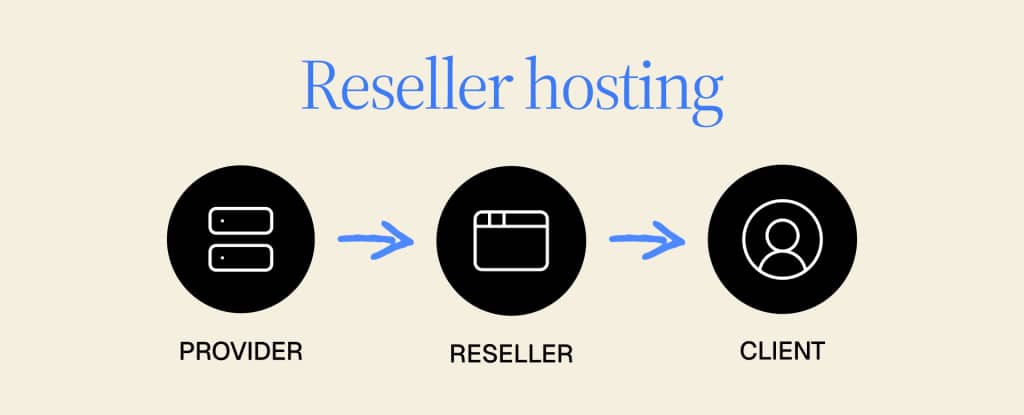
A hosting reseller rents server infrastructure from an established provider at wholesale pricing, then sells hosting plans under their own brand at a markup. You set the prices, manage the client relationships, handle billing, and run support. The provider handles the physical infrastructure: the servers, the network, the data center.
This is the recommended starting point for almost everyone entering the hosting industry. You do not need to own hardware, manage server networking, or hire a systems team. The technical heavy lifting stays with the provider. Your job is building a client base and delivering a good experience.
The core tools you will work with from day one:
- WHM (Web Host Manager): Controls your reseller account and lets you create individual cPanel accounts for each client.
- cPanel: The control panel your clients use to manage their own websites, email, and files.
- WHMCS or Blesta: Automates client billing, account provisioning, and support ticketing so the business runs without constant manual input.
Plan for roughly $1,000 in startup capital to cover your first reseller plan, billing software, a domain, and basic branding.
Why start a hosting business?
It makes sense for agencies and web design firms
If you already build or manage websites for clients, hosting is the natural extension. It keeps clients inside your ecosystem, simplifies account management across your portfolio, and generates recurring monthly revenue without adding a new service you have to learn from scratch.
You already understand what your clients need. Hosting is how you monetize that relationship past the initial project.
Liquid Web agency customers are running 50 or more client sites on a single infrastructure relationship. That is the scale this model can reach, and it starts with one client, one plan, one decision to add hosting to what you already offer.
It makes sense for new entrants
- Low barrier to entry. Startup costs are minimal compared to most businesses, and you do not need to own physical infrastructure.
- Scalable income. You add clients as you grow, and revenue scales without linear increases in effort or overhead.
- Predictable margins. Recurring monthly billing means you can forecast revenue and plan growth with confidence.
- White-label opportunities. You sell under your own brand. Clients work with you, not your provider.
5 steps to starting your hosting business
1. Find your niche
In the web hosting business, competition is fierce. You will not be able to compete with the giants of the industry, at least not yet, but you can target a specific niche and grow from there.
It’s essential to offer something that separates you from the crowd and serves an underserved need. That could be an additional service like web design, a pricing structure built for a specific buyer, or a focus on a particular community: local small businesses, WordPress agencies, nonprofit organizations, ecommerce operators, or event-based businesses.
Whatever your niche turns out to be, figure it out before you get into the details. Every other decision flows from this one. Your server selection, your pricing, your marketing, and your client acquisition strategy all depend on knowing who you are building for.
Your existing skills can themselves become the differentiator. If you do web design, development, or digital marketing, those skills let you bundle more value than a generic hosting plan ever could. A client who gets hosting plus design support from one provider has less reason to leave than a client who only gets server space.
2. Research your competitors
Next, you want to separate yourself from other hosting companies within your niche. Ideally, your offering will be distinct enough that direct comparison is difficult, but you’ll still have competitors.
Research their business models. Look at what they do well, where clients express frustration, and what gaps exist in their offerings. Analyzing competitors is the most reliable way to find the angles that will actually differentiate you, whether in pricing, service bundling, support quality, or target audience.
This research also shapes your marketing. You’ll find language your competitors are not using, problems they are not solving, and audiences they are not speaking to directly.
3. Choose your server infrastructure
This is where too many new hosting businesses get it wrong. Many start on shared hosting because the price is low, but shared hosting is the wrong foundation for a reseller business. It won’t provide the performance, security, or scalability your clients need, and when things go wrong, you are the one who takes the call.
Start on VPS at minimum.
As your client base grows and your needs become clearer, you can evaluate dedicated and cloud options. Here is how the main types compare:
| Server type | Cost range | Best for | Control level | Scalability |
| VPS | $20–$100/mo | New resellers, small to mid-sized client sites, budget-conscious buyers | High — root access, isolated environment | Moderate — upgrade plans as needed |
| Dedicated server | $100–$500+/mo | High-traffic sites, strict security or compliance requirements (e.g., HIPAA), demanding workloads | Highest — full control over hardware and configuration | Low — fixed resources, hardware upgrades required to scale |
| Dedicated cloud | $100–$300/mo | Clients with unpredictable traffic, performance-sensitive workloads, mid-to-large businesses | High — dedicated resources in a cloud environment | High — scale resources without hardware changes |
| Public cloud | $10–$200/mo | Fast-growing startups, small ecommerce, sites with variable or bursty traffic | Moderate — depends on provider configuration | Very high — near-instant resource scaling |
VPS (Virtual Private Server): A single server partitioned into isolated environments. It’s the most accessible starting point for resellers: lower cost than dedicated, more control and performance than shared. You can still host multiple clients on one system while keeping your customers’ environments separated with a hosting control panel. Features are more limited than dedicated options, but for a new reseller focused on small to mid-sized clients, VPS is the right place to begin.
Dedicated server: A physical server assigned to a single client. This is the highest-performance option and the most expensive. It suits clients with large traffic volumes, strict security requirements, or compliance needs like HIPAA. As your client base includes more demanding workloads, dedicated servers become the right answer.
Dedicated cloud server: A cloud environment with dedicated resources. No sharing, no noisy neighbors, and no scaling concerns when traffic spikes. Performance stays consistent regardless of load. It sits between dedicated and public cloud in terms of cost and is a strong choice for clients whose traffic is hard to predict.
Public cloud server: A scalable, multi-server environment. Public cloud is flexible and affordable, but resources are shared across the pool.
There is no single best option. Choose based on your niche, your clients’ workloads, and how you want to position your offering.
4. Build your business infrastructure
Four things need to be in place before you take your first client.
Branding: Your company name, logo, and domain. Keep the name memorable and easy to search. Check domain availability early because it will narrow your options faster than you expect. Your brand is what clients are buying when they choose you over a generic provider, so it is worth investing time here.
Pricing: Find the range between what your infrastructure costs you and what your target clients will pay. Resist the temptation to undercut on price to win early clients. Clients who choose you purely on price churn quickly, generate the most support tickets, and never upgrade. Price for the value you deliver, not for the lowest number you can post. Competing on confidence beats competing on cost every time.
Your website: Your website is your storefront. Three pages are enough to launch: a home and about page, a product and pricing page, and a contact page. Make sure your SSL certificate is installed correctly, use responsive design so it works on mobile, and include a privacy policy. The quality of your site signals the quality of your service. Clients are making a judgment before they ever contact you.
Billing and automation: Set up WHMCS or Blesta before you onboard your first client. These platforms handle invoicing, recurring payments, account provisioning, and support ticketing automatically. Manual billing and account management works for two clients. It does not work for twenty. Building automation in from day one is what makes the business scalable without adding headcount.
5. Launch customer service and support
Your clients depend on you to keep their websites running. It has to work.
Customer service and support are not optional in hosting. For most of your clients, their website is their business, and when something breaks, the pressure lands on you. Even clients with technical backgrounds expect fast, competent responses. Clients without technical backgrounds are counting on you completely.
Set up a ticketing system before you launch. Define your response time expectations and communicate them clearly. Build a basic knowledge base with answers to the questions you know are coming: setup guides, billing FAQs, and common troubleshooting steps. The more clients can self-serve, the less reactive your support burden becomes.
Support quality is also your most visible differentiator. Clients talk to each other and to your potential future clients. A fast, empathetic response to a problem builds more loyalty than any feature list.
One practical advantage of reselling through a provider with strong support infrastructure: your clients benefit from it too. Liquid Web’s support team operates with a 59-second response guarantee and 24/7 availability. When your client’s site goes down at 2 a.m., that infrastructure is behind you.
What to avoid when starting a hosting business
This list is equally important.
Building on shared hosting. Shared hosting is cheap, but it’s a liability. Performance is unpredictable, security controls are limited, and you have no room to grow. Start on VPS and move up from there.
Trying to serve everyone. A generic hosting business competes directly against providers with decades of infrastructure investment and millions in marketing budgets. A hosting business built specifically for agencies in a single sector, nonprofit organizations, or local ecommerce operators competes in a much smaller and more winnable space.
Underpricing to win clients. Clients who choose you because you are the cheapest option are the hardest clients to keep. They churn at the first lower offer, generate disproportionate support volume, and rarely upgrade. Price for the clients you actually want.
Overcomplicating your launch. You don’t need five service tiers, a custom control panel, and a full marketing funnel before you take your first client. Launch with a simple product, serve it well, and expand from there.
Starting a hosting business FAQs
Getting started with your web hosting business
Starting a hosting reseller business is genuinely accessible. The infrastructure barrier is low, the tools are well established, and the market is large. The difference between a hosting business that grows and one that stalls comes down to three decisions made early: choosing a real niche, building on the right infrastructure rather than shared hosting, and setting up support before you need it. Get those right and the rest follows.
Your next step is straightforward. Choose a reseller hosting plan, get your WHM account set up, and sign your first client. You don’t need everything perfect before you start. You need a niche, a working billing system, and a provider you can depend on.
Tired of piecing together hosting infrastructure that barely holds up? Liquid Web’s reseller program is built for agencies and entrepreneurs who want dependable infrastructure, real support, and room to grow without managing servers themselves. Move your sites without the headache. Our team handles the migration.