


 Kerri Molitor
 As your business or website grows or changes, it is important to remember the key role your virtual private server plays in your success. Even if your VPS seems to be running smoothly, it’s always a good time to take a closer look at potential ways to optimize its performance.
The default settings for many server applications aren’t always optimized for performance. Low memory limits and high timeout values, for example, can give you a noticeably sluggish VPS.
Luckily, there are a few simple tips you can follow to reduce load and improve site response times, including caching, more closely monitoring performance metrics, and using a content delivery network (CDN).
Key points
- Regularly update your VPS software, including the OS, web server, and database, to improve performance and security.
- Optimize database performance by cleaning up unused indexes, tuning MySQL settings, and using query caching where appropriate.
- Implement a Content Delivery Network (CDN) like Cloudflare or BunnyCDN to reduce latency and server load.
- Use caching solutions like Varnish, Memcached, or Squid to improve speed and reduce resource consumption.
- Monitor and optimize server performance with tools like Netdata, Prometheus + Grafana, and htop.
- Minimize CSS, JavaScript, and HTML files, optimize images, and enable lazy loading to reduce unnecessary resource use.
- Fine-tune Apache or Nginx settings, adjusting KeepAlive, worker_processes, and compression options for better efficiency.
- Choose a VPS plan based on actual resource needs, prioritizing NVMe storage for database-heavy applications and scalable bandwidth for growing traffic.
- Liquid Web’s managed VPS hosting includes fast NVMe storage, flexible scaling, and expert support to optimize performance and uptime.
How to optimize your VPS
1. Keep your server updated
Every software package on your VPS – whether it’s the OS, web server, or database – usually gets faster and more efficient with updates. Delaying them means running unoptimized code while also leaving your server full of exploitable vulnerabilities.
Here’s what to do:
- First, use your system’s package manager to update core software. Automate security updates, but manually review major version changes to avoid breaking compatibility.
- For web servers (Nginx, Apache) and databases (MySQL, PostgreSQL), check logs and release notes before upgrading. If your VPS runs mission-critical applications, test updates in a separate environment first.
2. Optimize your database performance
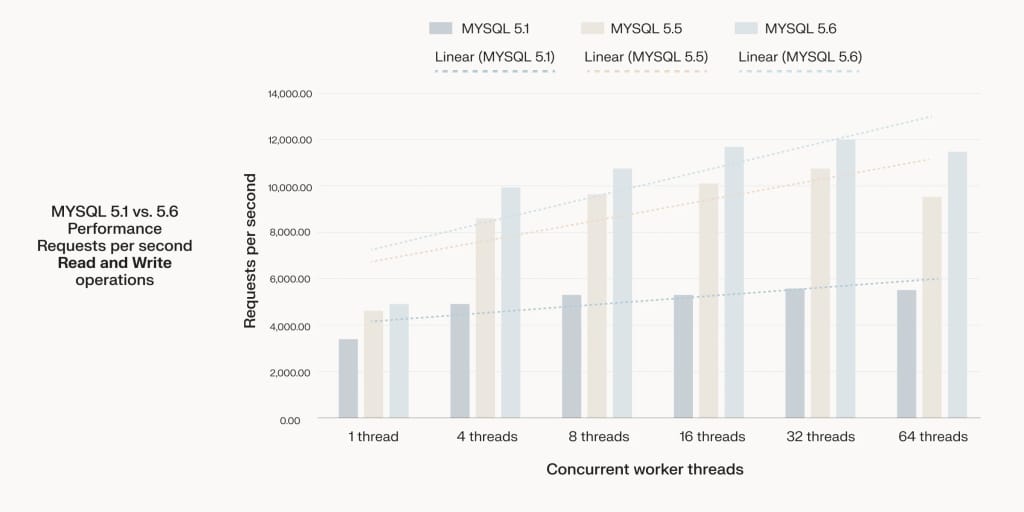
Keeping your database updated ensures better VPS performance and security. If you’re on WordPress, new MySQL releases improve query execution, indexing, and resource efficiency.
Check your MySQL version with mysql --version, and if it’s outdated, review the release notes before upgrading. Always test updates in a staging environment to catch compatibility issues.
Regular cleanup prevents database bloat and slow queries. To do this:
- Remove unused indexes, as they add unnecessary overhead.
- Run
OPTIMIZE TABLEon frequently updated tables to reclaim space. - Purge old logs, clear temporary tables, and enable
innodb_file_per_tableto prevent excessive file size growth.
Finally, fine-tune MySQL parameters for performance by:
- Allocating around 70% of available RAM to
innodb_buffer_pool_sizefor a dedicated database server. - Setting
query_cache_sizeconservatively if using query caching, as if it is too large it becomes a bottleneck. - Using
SHOW GLOBAL STATUS LIKE 'Slow_queries'to identify performance issues and optimize queries accordingly.
3. Use or optimize a CDN
The further an end user’s browser is from your server, the longer it takes to deliver your content and the more likely your server could be bogged down by content requests.
A content delivery network can shorten the physical distance between website visitors and your server by storing static content on servers around the world, allowing for faster content delivery and better performance by freeing up your server’s resources.
CDNs also optimize page load speed by caching assets, compressing files, and reducing server requests. Implementation is straightforward – services like Cloudflare, BunnyCDN, or Fastly integrate via DNS settings.
4. Implement caching
Another way to optimize your VPS is to use caching strategies.
Caching to memory improves speed and reduces latency by temporarily storing frequently accessed data, avoiding the need to repeatedly fetch static files. Keeping essential data more readily available minimizes resource usage and significantly accelerates performance.
The tools we recommend for this include:
- Varnish, a proxy and cache that improves the performance of busy, dynamic websites.
- Memcached, a high-performance in-memory caching system primarily used to speed up sites that make heavy use of databases.
- Squid, a caching proxy that optimizes web content delivery and reduces bandwidth usage by efficiently handling HTTP, HTTPS, and FTP traffic.
If your WordPress hosting provider has the right hardware, plugins like WP Super Cache, W3 Total Cache, and WP Fastest Cache can take advantage of disk caching to improve VPS performance.
5. Use tools to optimize VPS performance
Without the right tools, your VPS is just waiting to fall apart under the pressure. Here are some tools you could use to ensure your VPS delivers peak performance:
- Use a load balancer to distribute traffic efficiently to prevent overload on a single server. Use Nginx, HAProxy, or Cloudflare Load Balancer to evenly route requests and improve uptime. For database-heavy applications, consider MySQL or PostgreSQL replication with a load balancer like ProxySQL to distribute queries across replicas.
- A reverse proxy like Nginx or Apache improves performance by caching static content, compressing responses, and offloading SSL processing. It also protects backend services by hiding server details and filtering malicious requests. To reduce backend load, configure it to serve frequently requested assets directly.
- Monitor CPU, memory, and disk usage with tools like Netdata, Prometheus + Grafana, or htop. Set up alerts for high resource usage with Zabbix or New Relic to prevent downtime and analyze slow queries, failed requests, and traffic spikes to fine-tune your VPS before performance degrades.
6. Optimize website content and code
Bad code and bloated content waste server resources. Every millisecond wasted on bad code is a millisecond your server could be doing something useful. You can avoid that by doing the following:
- Minify CSS, JavaScript, and HTML with tools like Minifier to cut load times. Switch to WebP or AVIF for images, and enable lazy loading so your server isn’t pushing unnecessary data.
- Inefficient database queries slow everything down. Optimize indexes, cache results, and avoid redundant queries.
- Again, look into using a CDN to offload traffic, reducing server strain while delivering content faster.
- On the backend, enable OPcache for PHP and use JIT compilation where possible. If you’re running WordPress, trim unnecessary plugins and scripts – they eat CPU cycles for no reason.
7. Configure Apache/Nginx settings
One of the best places to look when optimizing your VPS performance is your web server – whether you’re running Apache or Nginx. Both can consume excessive resources if not configured correctly, especially on a VPS with limited capacity. Proper tuning helps prevent resource exhaustion and ensures your server handles traffic efficiently.
In Apache, settings like KeepAlive, MaxClients, StartServers, and MaxRequestsPerChild can be adjusted to reduce overhead. For Nginx, optimizing worker_processes, worker_connections, and enabling gzip compression can significantly improve performance.
Choosing a VPS plan with the right storage and bandwidth
The right VPS plan isn’t always the one with the biggest numbers. More RAM and CPU cores won’t fix poor resource allocation, and unlimited bandwidth is meaningless if your provider throttles speed. Don’t pick a VPS based on marketing fluff – choose one that actually fits your workload.
Start with resource assessment: how much CPU, RAM, and storage does your application realistically need? If you’re running a database-heavy workload, prioritize high IOPS SSD or NVMe storage to handle rapid read/write operations.
Hosting large media files? Look for high bandwidth allowances, but don’t pay for unlimited data unless your traffic demands it – many providers cap speeds after a threshold.
Finally, evaluate scalability. Can you add resources as traffic grows, or are you locked into a fixed plan?
Liquid Web’s VPS solutions offer fast NVMe storage, generous bandwidth, and flexible scaling, ensuring you only pay for what you use. Managed support also keeps downtime from becoming your problem.
Start optimizing your VPS today
Liquid Web’s managed VPS hosting services give you access to assisted migrations, and our team is here to help you optimize your infrastructure for speed and reliability.
If your VPS is running out of space, our plans allow you to offload media or backups to cloud storage, freeing up valuable space. We can help you clear old log files, temporary data, and outdated backups and check which folders are taking up the most storage and remove unnecessary files or software.
We also perform regular maintenance, like cleaning up unused apps and managing database storage, to help prevent clutter and keep your server running efficiently.
Check out our VPS hosting plans and take charge of your server performance!