

MemberDash for Give
The Give MemberDash integration enables site administrators to automatically assign memberships in MemberDash when a donation is completed. This is particularly valuable for nonprofits that offer member-only benefits or restricted content. The integration works seamlessly with both one-time and recurring donations.
Before You Begin
Make sure to complete the following steps:
- Give is installed and activated
- Give Memberdash is installed and activated
- MemberDash is installed and activated
- A valid Give license is active
- At least one membership level is created in MemberDash
How to Assign Donations to Memberships
Follow these steps to connect donations in Give to a membership in MemberDash:
- Set up your Campaign form in Give and create donation levels that match your membership price levels.
- Go to MemberDash > Memberships and scroll over the the membership level you want to link, click Payment Options.
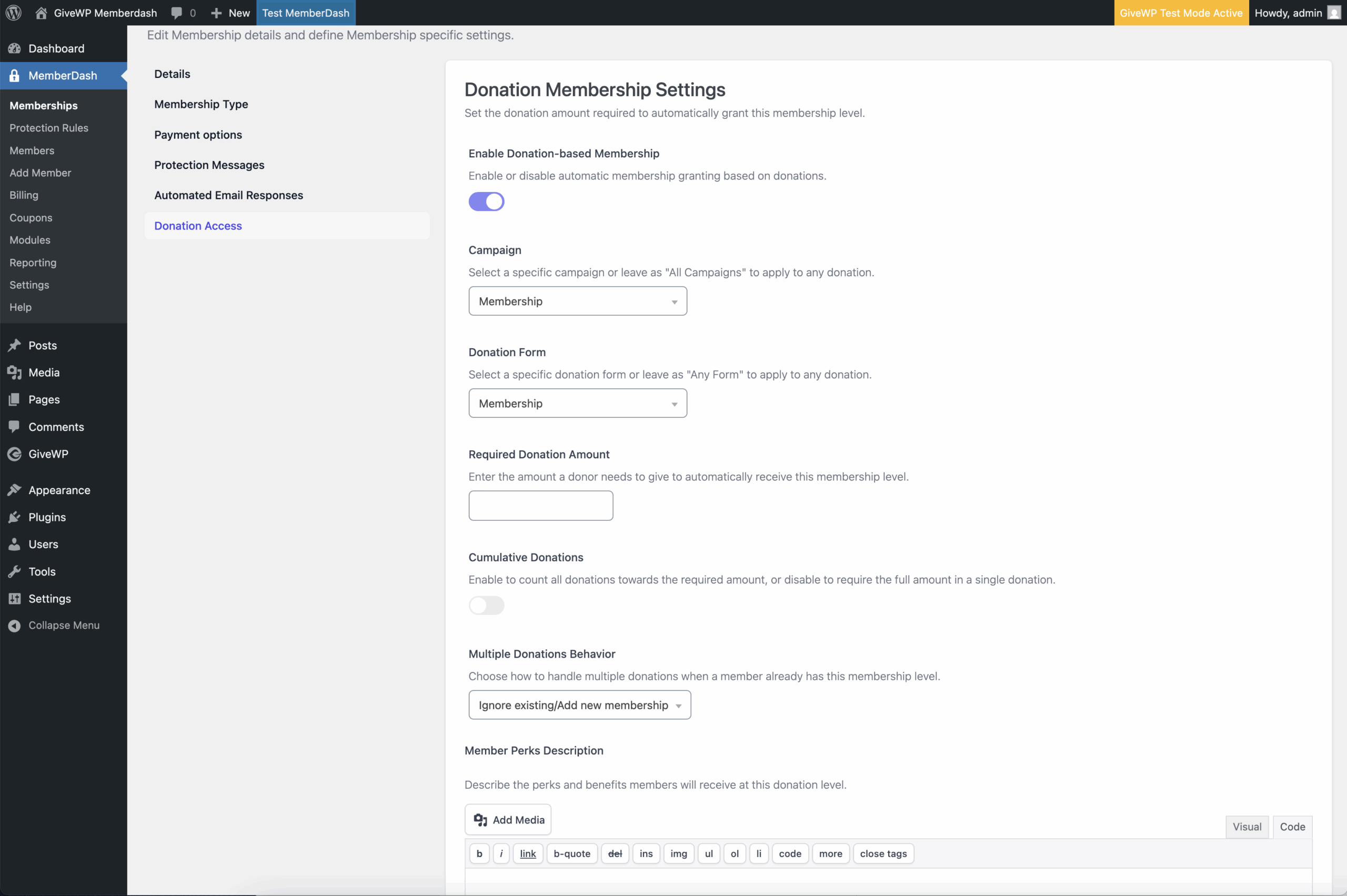
- Click on the Donation Access tab and enable Donation-Based Membership.
- In the Campaign dropdown, choose “All Campaigns” or select a specific campaign.
- If you choose a specific campaign, an additional option appears to select a specific Campaign Form.
- Set a Required Donation Amount that a donor must meet to gain access.
- (Optional) Enable Cumulative Donations if you want the donor’s total giving across donations to count toward the required amount.
- Set Multiple Donations Behavior to define how additional donations from the same donor are handled.
By default, extra donations are ignored once access has been granted. - (Optional) Use the Member Perks Description field to share details about what access or benefits the membership includes.
What Happens After a Donation?
When a donor completes their gift, Give automatically creates a MemberDash account (if one doesn’t already exist).
The donor is assigned the selected membership level. If the donation is recurring, the membership renews automatically with each successful payment. Donors can see their Memberships in the Donor Dashboard.