

How to Show Single Variations Based on Product Category
If you want to show single variations in just your WooCommerce category pages, this guide will show you how.
By default, Show Single Variations applies the same visibility settings for all variable and variation products when indexing. However, if you want to make this specific to certain categories only, this guide will show you how.
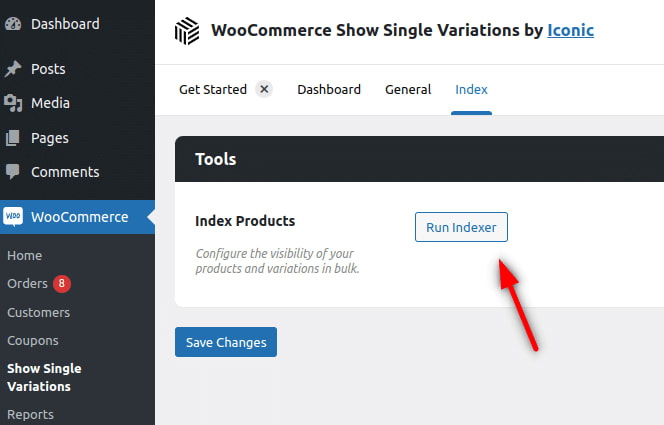
- From your WordPress dashboard, go to WooCommerce > Show Single Variations > Index and click on the Run Indexer button.
- A popup will then appear allowing you to determine where you want your single variation products to show. Check the option Select categories to apply visibility settings and select the categories you want to apply the visibility settings to by typing the category name.
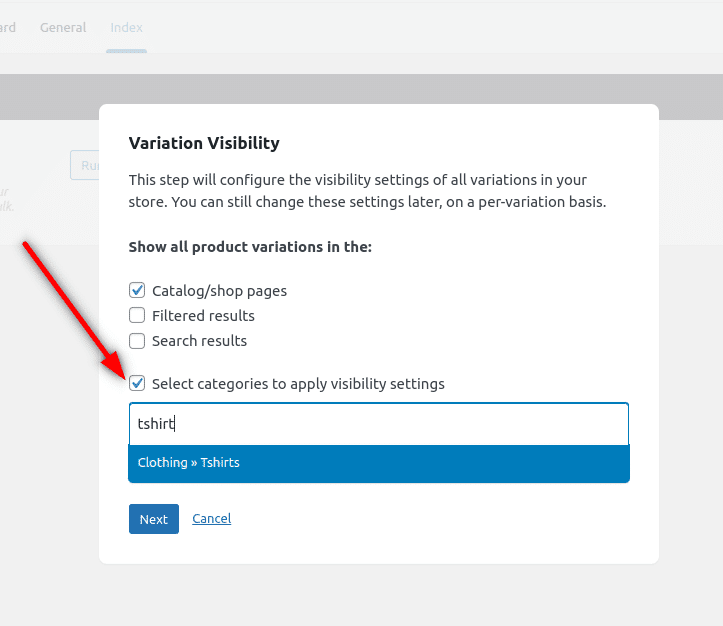
- Once you’re happy with this, click the Next button.
- On the next screen, you can set visibility settings for the variable (parent) products. You can select the same or different categories.

- Once you’re happy with all these settings, click the Submit button and wait for all products to be processed.