

 Kyle Johnson
If you’re running WordPress sites, you’ve probably heard the term “latest PHP version” thrown around. Well-known sites like Facebook and Wikipedia are websites developed using the PHP language. Additionally, 40% of the web is powered by WordPress which is built using PHP.
But, what is it? And why should you use the latest version?
What is PHP?
PHP is a general purpose scripting language used in web development and is widely used by some of the largest websites on the internet. PHP stands for “PHP: Hypertext Preprocessor.” The language is open source and free to use.
What is the latest PHP version?
As of January 2026, the latest PHP version is PHP 8.5, which was officially released on November 20, 2025. According to the PHP supported versions page, PHP 8.5 will receive active support (including bug fixes) until December 31, 2027, and security updates until December 31, 2029.
Why are there multiple PHP versions?
Like any software, PHP receives regular updates to add new features, improve performance, and fix bugs. Each version gives development teams a safer, more stable foundation to upgrade or migrate between major releases.
Why it’s important to use the latest PHP version
There are a number of reasons why you’d want to use the latest PHP version. Here are a few to consider.
Latest features
The growth of PHP has seen many new features, especially in recent years, which make PHP even more powerful. Not only is access to PHP for web development increasingly common, it also offers top notch features that compare with other powerful languages. If you aren’t using the latest PHP version, then you are missing out on these latest features.
Active maintenance and bug fixes
Sustainable software is supported by frequent and consistent updates in response to bug reports. Keeping up to date with each release of the latest PHP version ensures the most stable experience that the features set has to offer.
Security updates
It is important to remember that security issues come around and need to be addressed swiftly and effectively. Using the latest PHP version ensures the longevity of security updates. While older versions of PHP offer security updates for a time past “end of life,” the most secure option is the version that is actively maintained.
PHP version history
| PHP version | Release date | Key features |
| PHP 8.5 | November 20, 2025 | New syntax and language features, Pipe (|>) operator, new URI extension, enhanced error handling, immutability and type system behavior refinements |
| PHP 8.4 | November 21, 2024 | Explicit types for class constants, json_validate() function, readonly properties, performance improvements |
| PHP 8.3 | November 11, 2023 | Typed class constants, granular DateTime Exceptions, fallback value support for PHP INI syntax |
| PHP 8.2 | November 24, 2022 | Readonly classes, new functions and classes, constants in traits, type system improvements, new random extensions, new built-in parameter attribute |
| PHP 8.1 | November 25, 2021 | Enumerations, read-only properties, noreturn type, new in initializers, final class constants, fibers (asynchronous PHP) |
| PHP 8.0 | November 26, 2020 | Major performance improvements, just-in-time compilation, nullsafe operator, match expression, constructor property promotion, union types, mixed type, static return type |
| PHP 7.4 | November 28, 2019 | Custom object serialization, null coalescing assignment operator, reflection for references, foreign function interface |
| PHP 7.3 | December 6, 2018 | Reference assignment for destructured arrays, flexible heredoc and nowdoc syntax |
| PHP 7.2 | November 30, 2017 | Object type hint, abstract function overriding |
| PHP 7.1 | December 1, 2016 | Void return type, class constant visibility |
| PHP 7.0 | December 3, 2015 | Major performance improvements, null coalescing operator, return types |
| PHP 5.6 | August 28, 2014 | Variadic functions, argument unpacking |
| PHP 5.5 | June 20, 2013 | Generators, finally keyword, password_hash() |
| PHP 5.4 | March 1, 2012 | Traits, short array syntax, built-in web server |
| PHP 5.3 | June 30, 2009 | Namespaces, late static binding, closures |
| PHP 5.2 | November 2, 2006 | JSON extension, improved memory usage |
| PHP 5.1 | November 24, 2005 | PDO (PHP Data Objects), better performance |
| PHP 5.0 | July 13, 2004 | Introduction of OOP (classes, inheritance), exceptions |
It is important to note that PHP 6 was never released. While originally planned, PHP 6 was abandoned and the release following PHP5.x continued with PHP 7.x. This jump in the version number was largely to prevent confusion when discussing the abandoned PHP 6 as compared to the to-be-release version following PHP 5.6.
For an exhaustive list of changes, see the PHP 5.x changelog, the PHP 7.x changelog, and the PHP 8.x changelog.
Additionally, PHP versions are available for download all the way back to PHP 1 on the PHP museum website, for those that are interested.
How to tell which PHP version you’re on
Command line
The command php -v will provide the active PHP CLI version. Note that this may be different than the version of PHP running on the server, which is used to serve web requests.

The php -v command tells you the version used by the command-line interface (CLI), which may differ from the PHP version used by your web server (Apache or Nginx). Web server PHP versions are typically configured through modules like php-fpm or mod_php, and can be set independently from the CLI version—so it’s important to check both if you’re troubleshooting compatibility or performance issues.
phpinfo() or phpversion() functions
PHP offers multiple functions for displaying server configuration information. This information is typically for debugging purposes and should not be made publicly accessible as some of the information may be abused.
In your local environment, you can use the phpinfo() function to render a table of server configuration details in an easy to read (and search) table.
Additionally, for quick access to the PHP version you can use the phpversion() function to simply return the active PHP version used by the server.

WordPress dashboard
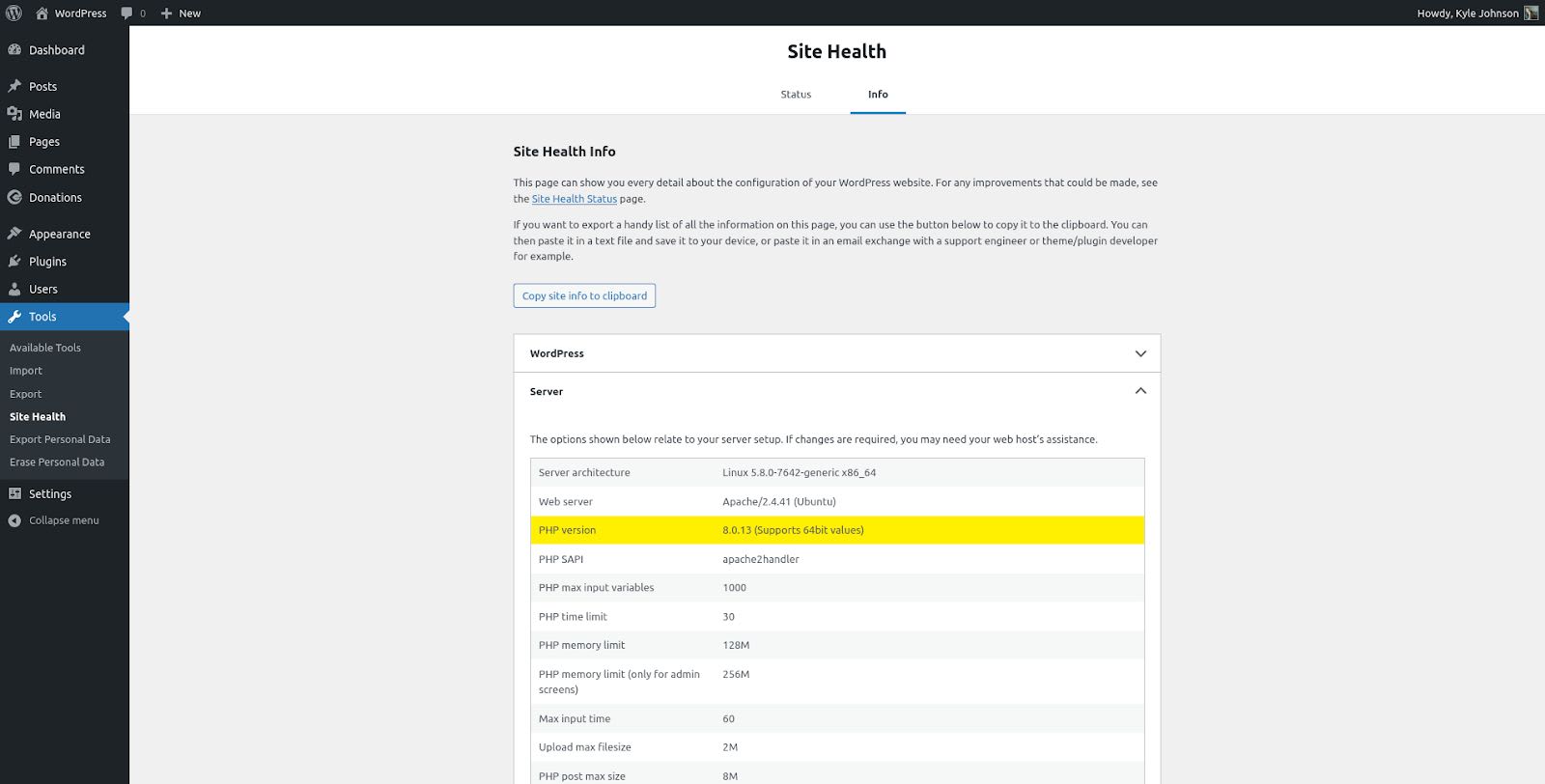
The WordPress administrator dashboard has a site health tool (under Tools -> Site Health) that details the server configuration on which the site is installed. Listed here is the installed PHP version.
How to update your PHP version
If you want to be on the latest PHP version, here’s how to update it.
Update PHP using apt on Ubuntu, Debian, Linux
A specific version of PHP can be installed using the apt command-line utility, following the naming convention of phpX.X, for example php8.1 or php8.4.
The below command will install PHP version 8.5:
sudo apt-get install php8.5Multiple versions of PHP can be installed, but only one PHP version can be activated at a time.
Assuming an active version of PHP 8.4 updating to PHP 8.5, the following script will disable PHP 8.4 and enable PHP 8.5:
sudo a2dismod php8.4
sudo a2enmod php8.5
sudo service apache2 restart
sudo update-alternatives --set php /usr/bin/php8.5
PHP version FAQs
How many versions of PHP are there?
Starting with version 1, the PHP ecosystem is currently at version 8.5. While PHP 6 was never released, PHP has gone through 7 major version series: 1 through 5, 7, and 8.
What is in the latest PHP version?
The latest PHP version is 8.5, which includes continued performance improvements, refinements to the type system, and stability enhancements aimed at modern PHP applications and frameworks.
Which version of PHP is best?
The best version of PHP is generally the latest version of PHP that is available for use. For new projects, this will usually mean PHP 8.5 is the place to get started. For existing projects, there are compatibility considerations that may require some code updates to ensure that the project is compatible with any breaking changes in the latest release.
Try fully managed WordPress hosting from Nexcess
Fully managed WordPress hosting from Nexcess brings out the best in your site. As a part of Liquid Web’s WordPress hosting suite, Nexcess offers the high-quality performance with the best support in the industry.
Automatic image compression, a built-in content delivery network (CDN), and advanced WordPress caching features make your site load at a hyper speed. At the same time, Solid Security Pro will make sure your site is secure.
And just in case something goes amiss, Nexcess’ WordPress experts are there for you 24/7.
Check out our fully managed WordPress and WordPress ecommerce solutions to get started today.