

How to configure Magento to use your SSL certificate
Purpose of SSL certificates
SSL certificates create an encrypted link between a server and a client. A functioning SSL allows users to transmit sensitive information between servers and browsers without fear of third-party eavesdropping.
For more information about SSL certificates and how they function, see our What are SSL certificates? help article.
Method of configuration
If you have not already purchased an SSL certificate, you may visit our website or contact our sales team. Otherwise, use the procedure below to configure Magento to use your SSL certificate:
1. Log in to your Magento Admin Panel.
2. From the Stores tab, click Configuration:
3. In the Configuration menu, from the General dropdown list, click Web:
4. In the Web section, click Secure:
5. In the Base URL field, enter “https://” and follow it with your domain name:
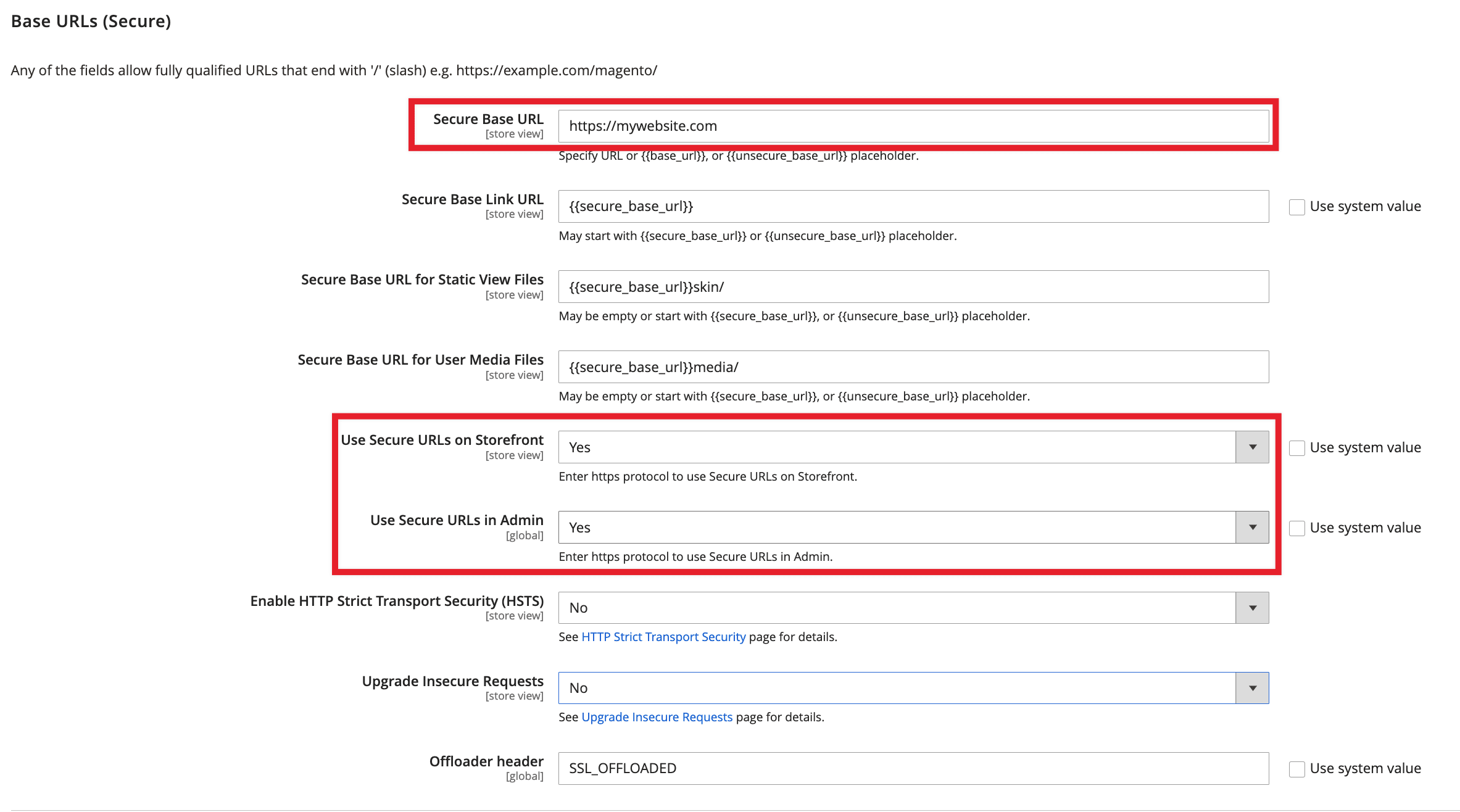
6. In the Use Secure URLs on Storefront and Use Secure URLs in Admin fields, select Yes (see above). Your store is now configured to use your SSL certificate.