

Nexcess & WordPress Cache Settings: Excluding Pages & Data
Caching can be an excellent solution for improving your WordPress website performance. Having requested data cached means it can be served to the website visitors quickly while bypassing the process of dynamic content generation. This streamlined serving is even more helpful for data that is requested more frequently.
In this article, we will review the WordPress cache settings available to Nexcess users and learn how we can exclude certain data pages and data from being cached to ensure caching will not cause issues with your website functionality.
Introduction
Nexcess users can leverage built-in caching solutions optimized for the Content Management System (CMS) in use. That includes both page and persistent object cache that can help improve website load time if applied correctly.
Nexcess provides full-page caching for managed WordPress and WooCommerce sites by having a fully-optimized solution based on the KeyDNS’s Cache Enabler plugin’s functionality, which is automatically enabled. In addition, we maintain an improved version of the plugin that we created to serve better the needs of our WordPress, WooCommerce, and StoreBuilder platform users. Page caching means static HTML files of cached pages are stored on the disk in a specific WordPress cache folder.
We are using Redis as a persistent object cache solution for WordPress that helps reuse cached objects without sending queries to the WordPress database. Although WordPress does provide object caching, it is non-persistent. Redis stores data persistently for the saved objects to be reused between page loads.
Redis object caching is enabled on our managed WordPress and WooCommerce solution by having the Redis Object Cache plugin installed and activated by default.
Our customers, however, can use other page caching solutions for WordPress like WP-Rocket, W3 Total Cache, WP Super Cache, and similar. So if there is another WordPress caching plugin is used, its functionality will be sufficient, and our built-in page caching solution will not be activated. But if you switch to Nexcess Page Cache, you can enable it from your WordPress dashboard.
Excluding Data From Being Cached: When & Why
Each WordPress caching solution provided by Nexcess is fully-optimized for WordPress and takes all aspects of the content management system into account, so you will rarely need to adjust any WordPress cache settings yourself. However, there are cases when you need to exclude certain pages and specific data from being cached. Let’s see why we would want to do that sometimes.
WordPress is used to build dynamic, database-driven websites, which means dynamic content can contribute to a considerable part of your site. Data needs to be retrieved from the database and merged with template files to generate a static HTML page that will be sent to the visitor. This process lies at the heart of the content rendering process.
Caching solutions help you save the generated content, including the whole web pages or the results of the queries sent to the database. This process works well until there is a need to regenerate a specific page each time it is requested because it contains personalized information that needs to be tailored to each visitor. JavaScript can be used to handle some dynamic elements which would make it work perfectly with WordPress cache.
However, all sites are unique, and it is not uncommon for caching to interrupt the correct work of a WordPress website, which needs an individual approach to adjusting WordPress cache settings. So excluding certain pages and data from being cached can help avoid any issues with the website functionality that may arise due to caching.
WordPress Cache Settings & Solutions Already Excluded from Caching
All modern caching solutions for WordPress are designed to work efficiently with websites where dynamic features use PHP to generate the output. There are specific rules in place that detect certain changes to know when to flush cache and data exclusions that are meant to work in most situations.
For example, when running an ecommerce site, dynamic pages such as the account area, shopping cart, and checkout are already excluded from being cached by most WordPress cache solutions. It is done as some plugins and widgets still employ PHP instead of having content updated dynamically using Ajax.
WordPress Cache Settings: Excluding Pages and Data
Certain pages and data can be easily excluded from being cached in the WordPress cache settings of the caching solutions used by Nexcess. Let’s dive into the process to understand how we can do it to avoid any issues that can potentially be caused by caching. First we will review configuring exclusions in the Nexcess Page Cache, WP Rocket, and Redis Object Cache.
Data to be Excluded: Finding the IDs
Before we dive into excluding data from being cached, we need to understand what we can exclude and how. Most WordPress caching plugins allow you to exclude the following data:
- Page by ID. You can find a specific page ID by opening it for editing from WordPress admin and checking the post ID shown in the browser’s address bar.
- A group of pages by URLs. You will need to specify the paths one by one or using regex.
- Query strings. Query string parameters will also need to be specified using regex.
- Cookies by ID or full name. You can find the IDs by opening the Application tab from the dev tools in your web browser and checking the Storage section.
- Specific object groups. You can exclude particular groups of objects from being cached by using a WordPressconstant.
Nexcess Page Cache
Nexcess Page Cache settings can be adjusted from Nexcess > Page Cache in the WordPress Admin area. You can adjust the cache behavior, including how long a page needs to be stored in cache and what events can trigger pages to be generated again rather than retrieved from the WordPress cache folder. For example, you can choose to create an additional cached version for mobile devices.

The Cache Exclusions menu allows you to exclude specific data by page ID, website paths, query string parameters, or cookies. Nexcess Page Cache already has some data excluded by default. The default caching configuration, including the exclusions specified by default, will be sufficient for the correct work of a WordPress website in most cases.
Here we have excluded two pages by their IDs. You will need to use regex to add exclusions for everything else, including cookies and query string parameters.

WP Rocket Caching Plugin
WP Rocket plugin allows you to exclude cookies, pages, and groups of pages by IDs and URLs.
You can configure the exclusions from the Advanced Rules settings tab of the plugin’s interface.
Cache Query Strings
Although the WP Rocket plugin does not cache pages with query strings by default, there are a few exceptions. There is a group of ignored query string parameters that WP Rocket has by default.

You can customize query string caching by removing some of the ignored parameters from the list to prevent pages from being cached. You can also configure some pages with query strings to be cached by WP Rocket by adding specific parameters to the list under Cache Query String(s) in the Advanced Rules settings tab.
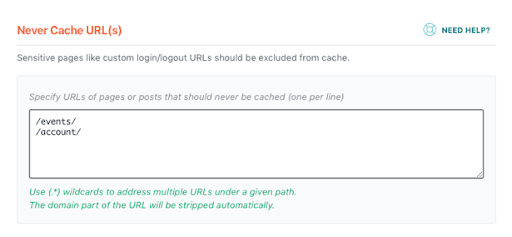
You can exclude pages and groups of pages by URL by listing them one by one or using regex to specify a rule.
Never Cache URLs
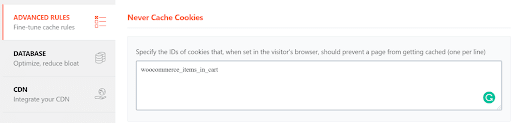
Never Cache Cookies
The Never Cache Cookies option allows you to exclude certain cookies by ID or name.
Redis Object Cache
Redis object cache allows WordPress users to exclude certain groups from being cached, which would cause the keys of the ignored groups never to be stored in Redis. It can be done by using the WP_REDIS_IGNORED_GROUPS WordPress constant in the wp-config.php file.
define( 'WP_REDIS_IGNORED_GROUPS', [ 'options', 'user_meta' ]);
There can be cases when the Redis cache could interrupt the correct work of a plugin. In that case, you can contact the plugin support or review the documentation to find the specific object groups the plugin uses to exclude them from being cached. But that might not be the correct approach, so it is crucial to have a professional look at the issue to determine what caused it.
Most of the time, manipulating object cache performance on a particular site requires the involvement of a strong WordPress developer familiar with your WordPress site structure.
Conclusion
Caching can be a valuable option for speeding up your WordPress site, however, it will not be effective in all situations. Sometimes WordPress cache settings need to be adjusted to meet the specific needs of your website. Modern WordPress cache solutions allow you to customize their behavior, including having certain pages and data excluded from being cached.
Most of the time, the default configuration meets the requirements of most WordPress sites as it is specifically optimized for the content management system. However, there can be cases when certain areas of your website can work incorrectly due to caching. In that case, excluding data from being cached can be reasonable unless there is another solution.
Before you configure exclusions in a caching solution of any type, we strongly recommend you consult with a qualified WordPress developer.
Frequently asked questions
Related Articles
- Scope of Support
- Getting started with managed WordPress and WooCommerce hosting
- Migrating to Nexcess with managed WordPress and managed WooCommerce hosting
- Going live with your site in Managed WordPress and Managed WooCommerce hosting
- WordPress Cleanup 101: 9 Easy Ways To Clean Up and Optimize Your WordPress Site
- How to configure the Nexcess CDN with WordPress and CDN Enabler
- The Nexcess Plugin Performance Monitor
- Everything You Wanted to Know About Auto Scaling
- Viewing AWStats for Managed WordPress & WooCommerce