

Nexcess Cloud Plans: Manual Web Hosting Backups
All Nexcess plans include free daily web hosting backups that will automatically be stored for 30 days on a remote backup server.
The Nexcess Backup Policy ensures that, but ultimately clients still assume responsibility for data integrity, retention, security, backup, and ownership. That is why it is a good idea to have a recent web hosting filesystem’s backup saved locally or on the server you are hosting the site on.
Nexcess Web Hosting Plans
There are quite a few different Nexcess web hosting plans, and they all allow the user to create manual web hosting backups as well, in addition to the already existing automated daily backups. These manually created web hosting backups can be left on the server where they will be visible in the Nexcess Client Portal and will be using a part of disk space allocated to each plan. On the other hand, daily backups do not count against the account quota.
If you are not an entirely new website owner, you have most likely found yourself, at least once, in a situation where a good backup was needed after your site crashed. It might have been something minor, like a change in the site’s appearance that would not go back to what it was no matter what you did.
However, it also could have been something major, like a plugin update or even a Content Management System (CMS) update that made your site unrecognizable or just threw a fatal error.
Of course, resolving the error was important, but getting the site to its previous stable and accessible state was more important. That’s where the backups kick in and are the most important.
It is always a good idea to create a manual backup before making any changes to the site. That way, you will ensure all the posts or products you recently added are in place and accessible as soon as possible.
WordPress Backups
WordPress sites can be backed up using any of the vast numbers of WordPress backup plugins. These backups can be stored on the web hosting server or downloaded onto a local machine. Backups for WordPress sites can also be created manually.
Backups for Nexcess Cloud Hosting Plans
Flexible Cloud Hosting Plans allow you to create manual backups in two ways. Here, we will guide you on creating a backup in the Control Panel of your Nexcess Cloud Plan.
- Log in to sites-portal.liquidweb.com. If you do not know your password, click Forgot Password? on the login page.
- From the Home page, click Plans > Name of the Flexible Cloud plan > Control Panel:

- Control Panel will look much different from the Nexcess Portal and will have some additional settings that are not implemented in the Portal:
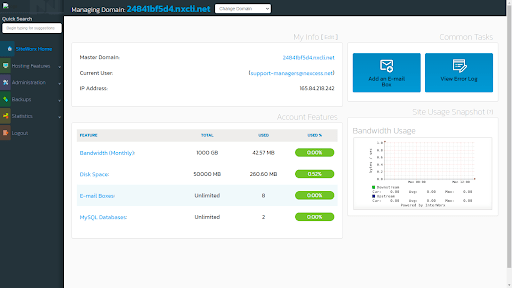
- Click on the Backups section, and then on Backup Now.
- Choose the Backup type from the following options:
- A full backup creates a backup of the site files and the database.
- A partial backup will prompt you for the part you wish to back up.
- The location of the backup should be set to a default location so that it does not get recursively backed up in newer manual backups if it is kept on the server for a more extended period of time.
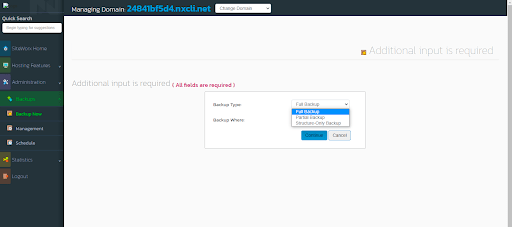
- If you selected the full backup option, you would be prompted to choose single or multi-domain backup. Single domain backup will create a backup of site files, emails, and the database of the managing domain listed on top of the screen. Multi-domain backup will back up files, databases, and emails for all the sites on the plan.
If you selected a partial backup, you would be prompted to choose what to back up — site files, emails, or databases (or any combination of those options):

- Once you have clicked the Backup button, the backup process will begin. You can track its progress in the Backups > Management section. Once done, you will see a list of created backups in the Management section.
Here, you will be able to download the backup you wish by clicking on the name of the backup file. If you do not want to keep it on the server anymore, this is where you will be able to delete them as well.
Conclusion
Many remote backup solutions are a great solution if you are planning to have remote backups for redundancy purposes. However, those could be pricey as well. Nexcess Cloud Plans allow manual creation of full account backups to be kept locally on the server for quicker accessibility. However, for additional security, those can be stored elsewhere if so desired.
Whether you have an online store, or a blog, having a reliable partner for your business is necessary to make any task more manageable. Our Flexible Cloud Plans are scalable, stable, and managed. They are a unique product that allows the hosting of multiple CMSs or environments on a single plan.
Related Articles
- Domain Registration
- Global DNS Checker
- Buy an SSL Certificate
- What is a temporary or dynamic IP address?