

How to change permissions for MySQL users
How Nexcess clients can use SiteWorx to change permissions for MySQL users.
Step by step instructions
Log in to your SiteWorx account.
If you do not know your password, click Forgot your password on the login page.
- From the SiteWorx main menu, click Hosting Features > MySQL > Databases.
- In the Existing Database section, locate the relevant database, then click Manage Users.
- You may view existing permissions for all users in the Existing Permissions section. To edit a user’s permissions, from the User drop-down list, select the user, then select or clear the appropriate check box corresponding to each permission.

- Click Save.
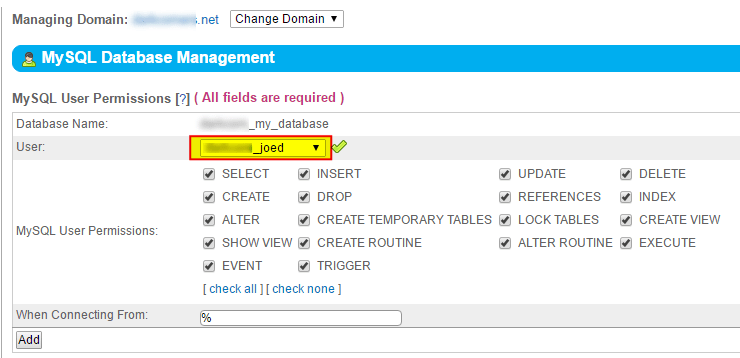
User permissions
The following table defines the permissions available for application to a specific MySQL Database user account.
| User Permissions | Operations Allowed |
|---|---|
| Select | Select rows from tables in the database. |
| Create | Create new databases or tables. |
| Alter | Alter the table structure. |
| Show View | Show views. |
| Insert | Insert rows into tables. |
| Drop | Drop or remove existing databases and tables. If this permission is enabled for a user, the user will be able to drop the database in which the MySQL access privileges are stored. |
| Create Temporary Table | Create temporary tables. |
| Create Routine | Create stored routines, procedures, and functions. |
| Update | Update database table rows and data. |
| References | Not currently used. |
| Lock Tables | Lock tables in the database. |
| Alter Routine | Modify or alter stored routines. |
| Delete | Delete data and rows in database tables. |
| Index | Create or remove indexes. |
| Create View | Create a new view. |
| Execute | Run store routines |