Help Docs Server Administration Server Database Management phpMyAdmin Web-Based Database Management Using phpMyAdmin

Using phpMyAdmin

Some website admins have trouble leveraging phpMyAdmin as a MySQL/MariaDB management tool, but Nexcess Hosting makes it easy to use from the Nexcess Client Portal.

Using phpMyAdmin

  1. Log in to my.nexcess.net. Your Nexcess Cloud account superuser access and Client Portal login credentials are required in this process. If you cannot locate your credentials, click “Forgot Password?” on the login page.
  2. Once you have successfully logged in, navigate to Plans and select the plan of your choice.
Plans on the Left Menu
  1. Next, select the site for which you want to work with phpMyAdmin to management the database.
  2. Once you are in the Site Dashboard area, click on the Show More option.
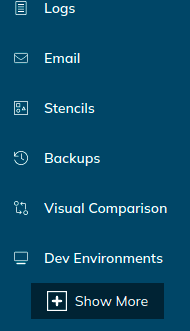
Show More on the Left Menu
  1. When you click on Show More, it will expand the feature list, and a MySQL option will appear in the sidebar.
MySQL on the Left Menu
  1. Click on MySQL. When the screen with Launch phpMyAdmin button appears, click the button to go the phpMyAdmin Web Interface.
Launch phpMyAdmin Screen

How Do You Launch phpMyAdmin with SiteWorx?

  1.  Log in to your SiteWorx account. If you do not know your password, click Forgot Your Password on the login page.
  2. In the SiteWorx main menu, select Hosting Features > MySQL > phpMyAdmin:
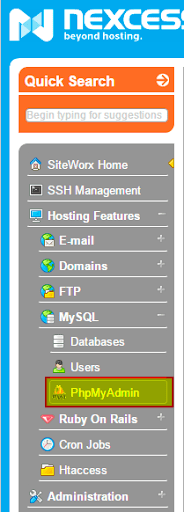
phpMyAdmin on the Left Menu

How Do you Access phpMyAdmin for a Magento Database?

The process for accessing phpMyAdmin for your Magento sites is basically the same. An important difference to make note of is that all the sites are integrated under a single Magento environment when you choose the Magento plan. Consequently, you will have a common MySQL option for all your Magento sites. 
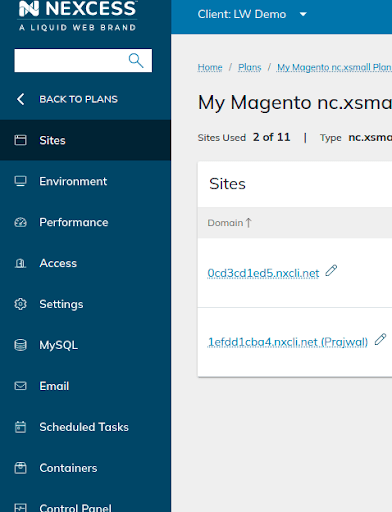
Sites on the Left Menu

Frequently asked questions

The phpMyAdmin tool is a free software application written in PHP that allows the management of MySQL or MariaDB databases. Most administration tasks are performed by phpMyAdmin. Using phpMyAdmin, you can create or modify databases, run queries, and create user accounts.

The phpMyAdmin interface can be accessed through SiteWorx (non-cloud) or my.nexcess.net, depending on whether you use a physical (non-cloud) account or a Nexcess Cloud account.

Many people who have trouble understanding the use of phpMyAdmin as a management tool, but Nexcess makes it extremely easy to manage it from the Client Portal.

Find out how to use phpMyadmin with Nexcess by reviewing the answers below to the most frequently asked questions.

– The phpMyAdmin web interface can run on any server or on any Operating System (OS) using a web browser.

– Admins can create, delete, and manage the database using the Graphical User Interface (GUI) provided by phpMyAdmin, which is much easier to use than the standard MySQL command-line editor.

– Admins back up the MySQL or MariaDB database and export the data in different formats, including CSV, DOCX, PDF, ODT, SQL, XLSX, and XML.

– Admins can execute complex SQL statements and queries, create and edit functions, triggers, and events using the easy-to-understand GUI that phpMyAdmin offers.

The Graphical User Interface (GUI) provided by phpMyAdmin as a web application makes it easier to use when compared to MySQL Workbench, which is fairly complex for beginners.

Users find the easy-to-understand GUI a great way to run SQL commands and perform SQL operations for a MySQL or MariaDB database.

The phpMyAdmin application is an open-source database management tool written in PHP, which was introduced on September 9, 1998. Basically, the software uses third-party tools to manage the tables and data within databases. The phpMyAdmin tool supports different types of operations on MySQL

Was this article helpful?