

Magento 2 Admin Login: Disable 2FA
What is Two-Factor Authentication (2FA)?
Two-Factor Authentication (2FA) is one category of Multi-Factor Authentication (MFA) that strengthens access security requirements by needing two authentication factors/methods to verify your identity.
Why Would You Want to Disable Two-Factor Authentication (2FA) in Magento 2.4 & Greater Versions?
Although earlier versions of Magento offered options to not install or to disable Two-Factor Authentication (2FA), Magento 2.4 and greater versions enable 2FA by default on every installation. The Magento admin user must disable 2FA using the command line.
While it is never recommended to disable 2FA in Magento 2.4 and greater versions, given its strength of security, there are a few scenarios in which you may want to disable it:
- To enable the admin user to log into the Magento 2 Admin Panel Dashboard for the first time due to 2FA warning message.
- When 2FA is not needed in a staging environment.
- When 2FA is not needed in a testing environment.
- When 2FA is not needed in a development environment.
Magento 2.4 & Two-Factor Authentication (2FA)
By default, Magento will enable Two-Factor Authentication (2FA) after Magento version 2.4. So, before logging into the Magento Admin Panel Dashboard, the admin users will need to configure their 2FA either through the user interface or a web API. The 2FA provides an additional layer of security to the Magento 2 Admin Panel, making it harder for suspicious users to log in to the Magento 2 Admin Panel Dashboard without authorization. It also helps decrease the chance of questionable access to the Magneto 2 Admin Panel Dashboard. So, we do not recommend that you disable 2FA authentication in your Magento 2 Admin Panel Dashboard for security reasons. If you still do not wish to use 2FA, you can disable 2FA for the development, testing, or staging, environment or store.
Once you install Magento 2 for your domain, you will receive the following warning message while trying to access the Magento Admin Panel Dashboard for the first time:
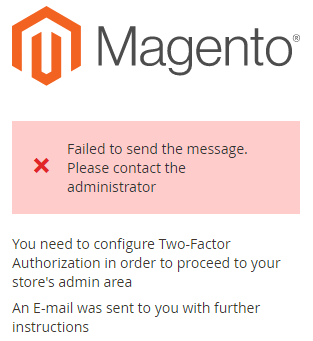
Due to this warning message, you will not be able to log in to the Magento 2 Admin Panel Dashboard. Unfortunately, Magento 2.4 and greater versions do not provide an option to disable Two-Factor Authentication (2FA). But you can disable the 2FA by following any of the command line methods from your Magento 2 root directory.
Command Line Method #1: Magento 2 Admin Login & Disabling 2FA Temporarily
The first command line method for disabling 2FA temporarily from your Magento 2 root directory is done by issuing the following command:
php bin/magento module:disable Magento_TwoFactorAuth

bin/magento cache:flush
Command Line Method #2: Magento 2 Admin Login & Disabling 2FA Temporarily
The second command line method for disabling 2FA temporarily from your Magento 2 root directory is done by issuing the following command:
bin/magento config:set twofactorauth/general/enable 0

bin/magento cache:flush
Command Line Method #3: Magento 2 Admin Login & Disabling 2FA Temporarily
The third command line method for disabling 2FA temporarily from your Magento 2 root directory is done by taking the following steps:
Open the app folder -> etc -> config.php using any of the text editors (for example the VI Text Editor) from your Magento 2 root directory:
vi /app/etc/config.php Find ‘Magento_TwoFactorAuth’ => 1, and replace with ‘Magento_TwoFactorAuth’ => 0,
- Where you use a value of 0 for disabling 2FA and a value of 1 for enabling 2FA.
3. Clean the cache by the following command:
bin/Magento cache:flush Now you will be able to log into the Magento Admin Panel Dashboard without using Two-Factor Authentication (2FA).