

◦ Comprehensive security
◦ 24/7 support
WordPress Guide → Plugins → Best Activity Log
7 best activity log plugins for WordPress

Keeping track of what’s happening on your WordPress site is more important than ever. Whether it’s a team of editors, ecommerce orders, or plugin changes, you need visibility into who did what—and when. Activity log plugins make that possible.
Let’s look at the top 7 plugins that help you monitor, log, and manage activity on your WordPress site.
Get fast, reliable hosting for WordPress
Power your site with the industry’s fastest, most optimized WordPress hosting
| Plugin | Key Features | Free Version | Starting Price (Pro) |
|---|---|---|---|
| WP Activity Log | Real-time tracking, login alerts, third-party integrations | ✓ | $99/year |
| Activity Log | Lightweight, tracks posts/pages/users/themes/plugins | ✓ | $39/year |
| Simple History | Easy-to-read dashboard feed, REST API access | ✓ | Free |
| Stream | Multisite support, detailed user activity tracking | ✓ | Free |
| User Activity Log | Tracks core and custom post types, email alerts | ✓ | $69/year |
| Error Log Monitor | Tracks PHP errors in your admin area | ✓ | Free |
| Sucuri Security | Includes file integrity and login activity | ✓ | Free |
1. WP Activity Log
WP Activity Log is widely considered the most comprehensive activity log plugin for WordPress. It tracks nearly every action that takes place on your site in real time, from user logins to WooCommerce changes to plugin installations.
It also supports integrations with Slack, Loggly, Syslog, and more—making it a powerful option for large sites or regulated industries.
- Real-time activity feed with full user tracking
- Supports WooCommerce, Yoast, MemberPress, WPForms, and more
- Searchable, filterable log viewer in the admin panel
- Alerts via email or third-party tools like Slack
Best for: Sites with multiple users or compliance needs
Starting at: $99/year
2. Activity Log
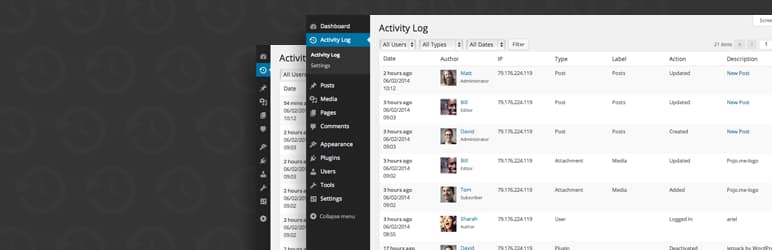
The Activity Log plugin by Aryo is a lightweight, beginner-friendly option that logs standard user actions like editing posts, changing themes, or activating plugins. It’s a solid choice for smaller sites or solo admins who want visibility without complexity.
You can filter logs by user, role, or action type—and export data if needed.
- Tracks post/page edits, plugin/theme activation, user logins
- Filters by user or activity type
- Exportable logs for backups or reviews
Best for: Lightweight tracking on basic sites
Starting at: $39/year
3. Simple History
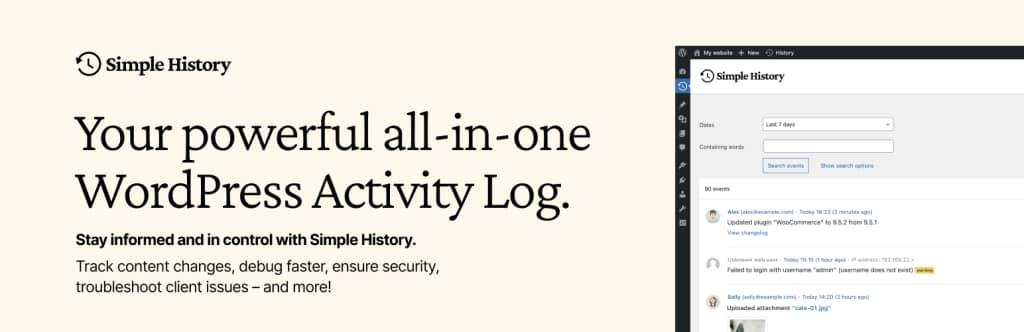
Simple History is a user-friendly activity log plugin that adds a visual timeline of events right to your WordPress dashboard. It covers content changes, user logins, plugin installs, and more in a clean, readable feed.
There’s also a built-in REST API, so developers can build custom interfaces or use the log data elsewhere.
- View logs on the dashboard or plugin page
- Tracks failed login attempts and user changes
- Supports export to JSON or CSV
Best for: Admins who want a visual activity feed
Starting at: Free
4. Stream

Stream is a developer-friendly plugin built for large and multisite WordPress installs. It’s ideal for agencies and enterprise users who need granular control and filtering across many actions and users.
It supports filtering by context, action, and user, and includes options to export your logs or send them to third-party logging platforms.
- Multisite-compatible with advanced filtering
- Tracks custom post type edits, menu changes, media uploads
- Log export in CSV or JSON format
Best for: Agencies or multisite environments
Starting at: Free
5. User Activity Log
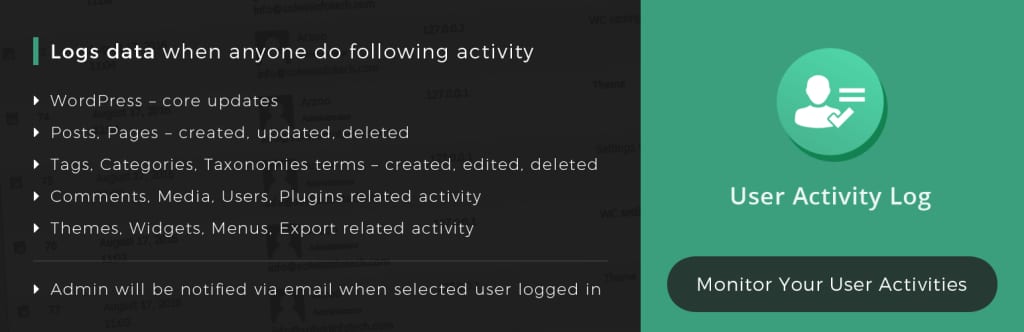
User Activity Log is designed to be developer-ready with tracking for both default and custom WordPress features. It supports custom post types, WooCommerce, Easy Digital Downloads, and even form plugins like Gravity Forms (in the Pro version).
You can also enable email alerts for specific user actions.
- Logs activity on posts, plugins, themes, and settings
- Supports custom post types and roles
- Alerts for user logins and changes
Best for: Tracking custom or ecommerce-related activity
Starting at: $99/year
6. Error Log Monitor
While not a full user activity plugin, Error Log Monitor is a valuable addition for developers. It displays PHP errors directly in the WordPress dashboard and can send email alerts if something goes wrong.
This is especially useful for catching plugin or theme conflicts before they break your site.
- Dashboard widget for real-time PHP error tracking
- Email notifications for new entries
- Lightweight and easy to install
Best for: Developers and advanced users monitoring server health
Starting at: $99/year
7. Sucuri Security

Sucuri Security is a full security suite that includes several monitoring tools—one of which is a basic activity log for logins, file changes, and integrity checks.
While it doesn’t log every user change like a dedicated plugin, it’s great for spotting suspicious behavior or intrusion attempts.
- Tracks login attempts and file changes
- Monitors core files for integrity
- Includes firewall and malware scanning
Best for: All-in-one security and activity logging
Starting at: Free
What is an activity log in WordPress?
An activity log is a chronological record of actions performed on your WordPress site. These actions can include user logins, plugin updates, content edits, settings changes, and more. Activity logs provide transparency and help you monitor everything happening behind the scenes.
Why you need to monitor your WordPress activity log
Monitoring activity logs helps you keep your site secure and manageable. Here’s why it matters:
- Track user actions: Know exactly who changed what and when.
- Detect suspicious activity: Spot brute force login attempts or unauthorized changes.
- Troubleshoot problems: Find the source of plugin errors or broken features.
- Maintain accountability: Great for teams or client sites that need oversight.
- Meet compliance requirements: Useful for HIPAA, GDPR, or SOC2 audits.
Key features to look for in an activity log plugin
Not every plugin offers the same level of tracking. Here are features worth prioritizing:
- Real-time logging: Instantly records user actions and changes.
- Filter/search tools: Helps you find what you’re looking for fast.
- Email/Slack alerts: Sends notifications for critical events.
- Exportable logs: Backup your logs or share them with a team.
- Compatibility: Supports your themes, plugins, and custom post types.
How to choose the right plugin for your site
Here’s how to pick the best activity log plugin based on your needs:
- Small blog or solo site: Go with a lightweight option like Simple History.
- WooCommerce or business site: Use WP Activity Log or User Activity Log Pro for advanced logging.
- Multisite or agency: Choose Stream for network-wide activity tracking.
- Developer/debugging use: Add Error Log Monitor for server-side error visibility.
Activity log plugin FAQs
Getting started with a WordPress activity log plugin
Keeping an activity log helps you stay in control of your WordPress site’s security, performance, and accountability.
If you’re managing a team, running an ecommerce store, or just want peace of mind, pick one of the plugins above and test it on your site.
Ready to upgrade your WordPress experience? Professional hosting improves speeds, security, and reliability for a website and a brand that people find engaging and trustworthy.
Don’t want to deal with server management and maintenance? Our fully managed hosting for WordPress is the best in the industry. Our team are not only server IT experts, but WordPress hosting experts as well. Your server couldn’t be in better hands.
Click through below to explore all of our hosting for WordPress options, or chat with a WordPress expert right now to get answers and advice.
Additional resources
What is a WordPress plugin? →
A complete beginner’s guide to WordPress plugins and how to manage them
7 best WordPress community plugins [2025] →
Let’s look at what these handy WordPress plugins are, the benefits of using them, and how to choose the best to help you grow your online community
How to check if a plugin is safe →
Simple steps to evaluating a plugin before you install and activate it