

◦ Comprehensive security
◦ 24/7 support
Magento Guide → Cart → Clear
How to clear a Magento 2 cart with a URL (programmatically)
Key takeaways
- Magento 2 doesn’t include a default public URL for clearing the full cart.
- A URL-based clear cart flow requires a custom module, route, and controller.
- The truncate()->save() method can clear all cart items while keeping the quote session intact.
- A clear cart URL should be protected with access checks, token validation, redirects, logging, and staging tests.
Clearing a shopping cart in Magento 2 can be frustrating if you want to do it automatically, like via a link or button, but there’s no built-in URL for it. The good news? You can create one yourself. With just a few lines of PHP and a custom module, you can programmatically clear a cart in Magento 2 using a direct URL.
Let’s walk through everything you need to build this step by step, even if you’re new to Magento development.
Host Magento at full throttle.
Get secure, reliable Magento hosting so you can scale faster.
Can you clear a Magento 2 cart with a URL?
Magento 2 doesn’t provide a built-in public URL that clears the entire cart. To clear a Magento cart via URL, a developer needs to create a custom module, route, and controller that runs cart-clearing logic when the URL is visited.
There’s a reason Magento doesn’t include this by default. A public clear-cart URL could create security and usability issues if anyone could trigger it and empty customer carts without permission. Magento carts are also tied to checkout sessions and quotes, so cart clearing should happen through controlled programmatic logic rather than an exposed public endpoint.
Once the module is set up, visiting your custom URL can clear the cart and redirect the shopper to the cart page, homepage, or another page that fits your workflow.
Step 1: Create your custom module
All custom functionality in Magento lives inside a module. To start, create the folder structure for your module in app/code.
Navigate to your Magento root directory and create the following folder structure:

Replace Vendor with your actual namespace. You can name it whatever you like, but for consistency, stick with capitalized words.
Inside that folder, create the registration.php file:

Next, create the module.xml file in app/code/Vendor/CartClear/etc/:

Enable your module by running:

This step registers your new module and makes it active in Magento 2.
Step 2: Add a custom route
Now that the module is in place, you need a route so Magento knows which URL should trigger the cart-clearing action.
Create a routes.xml file inside app/code/Vendor/CartClear/etc/frontend/:

id=”clearcart” sets the internal name of the route.
frontName=”clearcart” defines the part of the URL that comes after your domain.
This makes yourstore.com/clearcart/index/index available to use.
Use a route name that makes sense for your workflow, and avoid promoting the URL publicly.
Step 3: Create the controller to empty the cart
Now you’ll create the PHP class that will run when someone visits your custom URL. This class will use Magento’s cart model to clear the cart contents.
Create this file:

Paste the following code inside:

What’s happening here:
- The constructor injects the Cart model, which lets you access the user’s shopping cart
- The truncate() method deletes all cart items at once
- save() commits the changes
- _redirect() sends the user to the cart page after it’s emptied
You can now visit:
https://yourstore.com/clearcart/index/index…and the cart will instantly be cleared.
Why use truncate()->save()?
This approach is useful for clearing the full cart because it removes the cart contents without requiring a loop through every item. It can also help preserve the broader quote/session structure compared with rougher approaches.
Add a redirect after the cart clears
After the cart is cleared, the controller should redirect the shopper somewhere intentional. In the example above, the user is redirected to the cart page.
Depending on the use case, you may want to redirect to the homepage, a support page, a campaign page, or a custom landing page. The redirect should give the user a clear next step after the cart is emptied.
Testing and security tips
Make sure to:
- Restrict access to logged-in users: Inject \Magento\Customer\Model\Session and check if the user is logged in before running the logic
- Add a token: Include a random string in the URL, like clearcart/index/index?token=xyz, and validate it in your controller to avoid abuse
- Avoid using this in production without protections: You don’t want search engines or bots triggering your cart-clear URL accidentally
- Log the action: Use Magento’s logger to record when and how often the URL is accessed. This can help you debug or prevent misuse
Also test this workflow in staging before production. Confirm that the URL behaves correctly for guest carts, logged-in customer carts, simple products, configurable products, coupon codes, shipping estimates, and any checkout extensions that affect cart state.
Minicart, cache, and customer section refresh
After clearing a cart programmatically, the visible minicart or cart count may not update immediately if frontend customer sections or cached data aren’t refreshed.
Developers may need to review Magento customer-data sections, frontend cache behavior, redirects, or JavaScript refresh logic so shoppers don’t see stale cart data.
Alternative method: Loop through and remove items
If you don’t want to clear everything or need more control, for example, only removing certain SKUs, you can loop through cart items manually.
Replace the execute() method with this version:
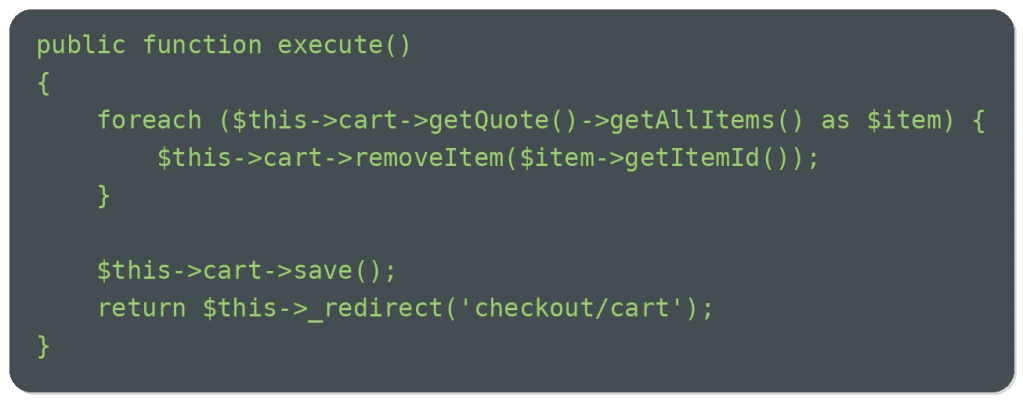
This approach is useful if you want to:
- Exclude promotional items
- Clear items from specific categories only
- Create logic around custom product attributes
This method is still programmatic, but it gives more control than clearing the full cart at once. If you’re removing a single item instead of clearing the full cart, use the quote item ID rather than assuming the product ID and cart item ID are the same.
When to use a clear cart URL
A custom clear cart URL may be useful for controlled workflows, such as QA testing, support-assisted cleanup, custom checkout resets, promotional flows, or removing stale cart contents before redirecting users to a specific page.
Common mistakes when clearing a Magento 2 cart with a URL
Common mistakes include exposing the URL publicly, skipping access checks, forgetting save(), clearing carts without a redirect, not testing guest and logged-in sessions, using product ID instead of quote item ID for item-level removal, ignoring minicart refresh issues, and making direct database changes.
These mistakes can create poor customer experiences, debugging problems, or security risk.
Magento 2 cart FAQs
Magento 2 cart next steps
Clearing a Magento 2 cart with a URL requires a custom module, route, controller, and safe cart-clearing logic using methods such as truncate()->save().
Start by defining why the URL is needed and who should be allowed to use it. Then build and test the module in staging with guest carts, logged-in customer carts, redirects, minicart behavior, and any checkout extensions that affect cart state.
Magento custom workflows work best when the store stays fast, secure, and reliable under real traffic. Liquid Web Magento hosting gives ecommerce teams the performance, support, and reliability they need to run custom Magento stores with confidence. Explore Liquid Web Magento hosting to find the right fit.
Ready to get started?
Get the fastest, most secure Magento hosting on the market
Additional resources
What is Magento Ecommerce? →
A complete beginner’s guide to the Magento Ecommerce platform
Magento shopping cart: How to setup, optimize, and manage →
Let’s walk through everything you need to know about configuring, optimizing, and maintaining your Magento cart the right way.
Best Magento ERP extensions →
Our top 10 compared so you can decide which is best for your business