

◦ Comprehensive security
◦ 24/7 support
WordPress Guide → Plugins → CRM Integration
CRM WordPress integration: plugins, HTML forms, and more

Most WordPress websites need more than just contact forms to build meaningful customer relationships. Whether you’re running a WooCommerce shop, a membership site, or an agency website, CRM integration helps you manage and automate communication, lead tracking, segmentation, and sales processes—all from inside your WordPress dashboard.
Let’s explore what CRM plugins do and which ones are worth installing.
Get fast, reliable hosting for WordPress
Power your site with the industry’s fastest, most optimized WordPress hosting
What is a WordPress CRM plugin?
A WordPress CRM plugin is a tool that lets you manage customer interactions, track leads, segment your audience, and automate follow-ups—directly inside the WordPress admin.
CRMs traditionally live outside of WordPress, requiring you to sync or export data from forms and orders. But WordPress CRM plugins either bring this functionality in-house or seamlessly integrate your site with platforms like HubSpot or Salesforce.
A good WordPress CRM helps you reduce friction between marketing and customer management. You can see user activity, send targeted campaigns, assign deals to team members, and even create automation workflows triggered by user behavior like cart abandonment, form submissions, or product purchases.
CRMs are especially useful for ecommerce shops, membership sites, coaches, agencies, and course creators.
Best WordPress CRM plugins
If you’re looking to track leads, manage customers, and automate outreach without leaving WordPress, these CRM plugins stand out in 2025.
| Plugin | Key Features | Best For | Starting At |
|---|---|---|---|
| FunnelKit Automations | Visual automation builder, WooCommerce integration, email & SMS | WooCommerce stores, automation-first users | Free |
| HubSpot | External CRM integration, forms, popups, live chat | Marketing teams and agencies | Free |
| FluentCRM | Native WordPress CRM, email campaigns, tagging, automation | Solopreneurs, content creators | Free |
| Jetpack CRM | Client profiles, invoicing, quotes, syncs with WooCommerce | Freelancers and small businesses | Free |
| Groundhogg | Marketing automation, LMS & ecommerce integrations, pipelines | Online course sites and coaches | Free |
1. FunnelKit Automations

FunnelKit Automations (formerly Autonami) is built for WooCommerce users who want advanced marketing automation without relying on external tools. The plugin tightly integrates with WooCommerce actions like cart abandonment, order status changes, and subscriptions, making it easy to set up responsive and dynamic campaigns.
It includes a drag-and-drop visual builder to create automations for email, SMS, and user tagging. You can also run email broadcasts, set up follow-ups, and track detailed analytics on how each automation is performing.
FunnelKit Automations plays nicely with other FunnelKit tools, but you don’t need the whole suite to use it. It’s great for store owners who want to increase conversions and improve customer retention using real-time, event-driven workflows.
- Visual drag-and-drop automation builder
- Deep WooCommerce triggers and actions
- Email and SMS marketing tools included
- On-site storage—no external CRM required
Best for: WooCommerce stores and automation-first marketers
Starting at: Free (Pro starts at $129/year)
2. HubSpot

The official HubSpot plugin connects your WordPress site to HubSpot’s all-in-one CRM and marketing platform. It brings in a set of powerful features, including live chat, forms, popups, and email marketing—all synced with your HubSpot account. Contacts are automatically added to your CRM when users fill out forms, book meetings, or engage with your site.
Since the CRM is cloud-based, your WordPress site stays lightweight. However, you’ll need to log into your HubSpot account to access full contact timelines, pipeline data, and sales reports.
- Built-in live chat, forms, popups, and email tools
- Automatically syncs contacts and form data with HubSpot CRM
- Supports segmentation, analytics, and deal pipelines
- Designed for scale with minimal WordPress load
Best for: Marketing teams and agencies that already use HubSpot
Starting at: Free (HubSpot CRM free plan; paid marketing tools optional)
3. FluentCRM

FluentCRM is a 100% self-hosted CRM built for WordPress users who want full control over their customer data and email marketing. Everything happens within your site, but it integrates well with WooCommerce, LearnDash, LifterLMS, Easy Digital Downloads, and several membership plugins.
With FluentCRM, you can tag and segment users, run broadcasts and sequences, and create conditional automation workflows using its visual builder. It’s surprisingly lightweight for how feature-rich it is, and it’s backed by WPManageNinja, the team behind Fluent Forms. For privacy-focused or data-sovereignty-conscious users, it’s a strong alternative to cloud-based CRMs.
- Fully hosted within your WordPress site
- Advanced segmentation, tagging, and email automation
- Integrates with LMS, ecommerce, and form plugins
- Clean UI and very active development team
Best for: Solopreneurs and site owners who want full control over their CRM
Starting at: Free (Pro starts at $129/year)
4. Jetpack CRM

Jetpack CRM (previously Zero BS CRM) is a modular, no-frills CRM for small business owners, freelancers, and agencies who want a simple way to manage clients. It offers tools for contact management, invoicing, quotes, proposals, and WooCommerce syncing. Its user interface is focused more on backend operations—like tracking leads, issuing invoices, or sending basic emails—than marketing automation.
It’s designed to work out of the box but can be extended with modules for email sequences, client portals, and integrations with platforms like Mailchimp, PayPal, and Stripe. Because of its modular design, you can keep your CRM lightweight by enabling only the parts you need.
- Lightweight client management system
- Invoicing, quoting, and transaction tracking
- WooCommerce and payment integration
- Owned and supported by Automattic
Best for: Freelancers, small agencies, and service-based businesses
Starting at: Free (Premium modules sold individually or in bundles)
5. Groundhogg
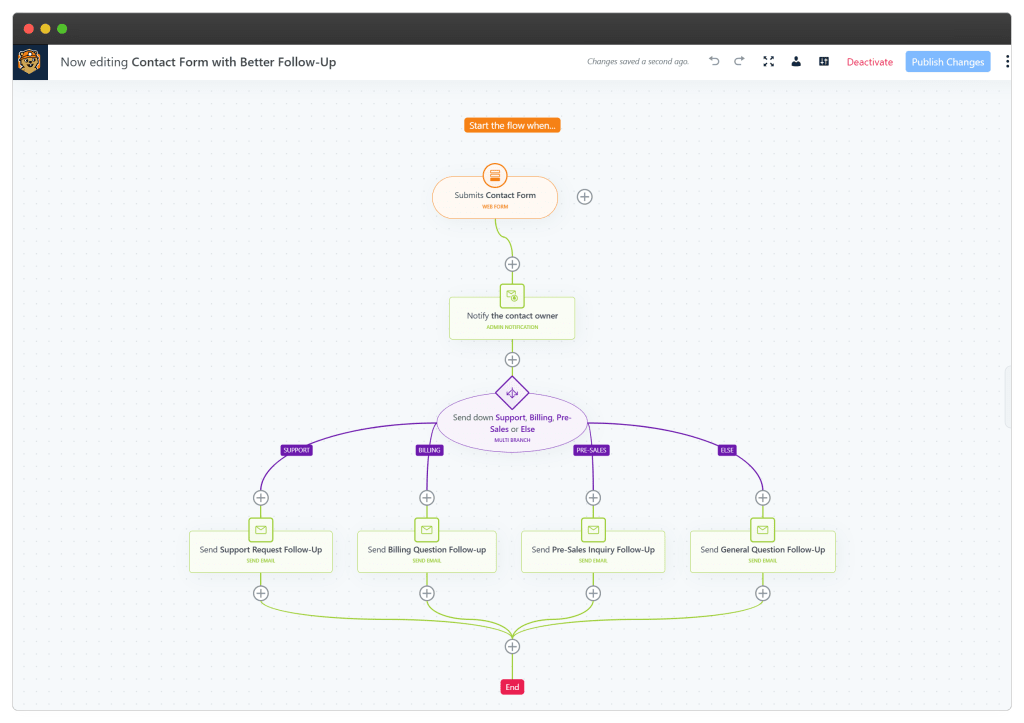
Groundhogg is a powerful CRM and marketing automation plugin tailored to marketers who want more than just a contact list. It offers full funnel creation, contact tagging, segmentation, broadcast emails, pipelines, and visual workflows—all inside WordPress.
The plugin integrates well with LMS plugins, WooCommerce, and affiliate tools, making it ideal for digital product sellers, coaches, and course creators.
One standout feature is the funnel builder, which lets you stack automation steps and conditions visually. You can set delays, triggers, and actions to move leads through a sales journey. Its pricing is higher than some competitors, but the advanced marketing functionality is robust and well-maintained.
- Full CRM and automation system inside WordPress
- Visual funnel and automation builder
- Excellent integrations with LMS and ecommerce tools
- Built-in pipeline and deal tracking
Best for: Online course creators, coaches, and advanced marketers
Starting at: Free (Pro plans start at $240/year)
Integration methods: 3 ways to integrate WordPress and your CRM
If you don’t want to install a CRM plugin or need to connect your site to an external system, there are several ways to integrate WordPress with a CRM.
Plugin integration
As discussed, this is the easiest method. Most major CRMs have official or third-party WordPress plugins.
These plugins handle form syncing, user tracking, and sometimes marketing features like email popups or live chat. You’ll typically manage your CRM from its native dashboard while syncing data from your site in real time.
HTML form integration
If your CRM offers embeddable forms (and most do), you can copy/paste the HTML form code into WordPress pages, posts, or widgets.
This method doesn’t require a plugin but lacks automation or advanced tracking. Form data gets sent to the CRM, but the user won’t be recognized elsewhere on your site unless you manually build a cookie-based tracking solution.
Custom API integration
For developers or large-scale sites, custom API integration gives the most flexibility. You can send and receive data between WordPress and your CRM based on specific user actions—like creating a contact when someone registers or updating a lead score after a purchase.
This method is powerful but requires a solid understanding of REST APIs and authentication protocols.
Benefits of CRM WordPress integration
Integrating CRM tools directly into WordPress helps you streamline marketing and customer service, reduce manual work, and grow smarter.
- Centralized data: Access customer records, orders, and activity from one place—no more bouncing between tools.
- Automated marketing: Trigger emails, SMS, and follow-up tasks based on user behavior like form submissions or purchases.
- Improved segmentation: Tag contacts based on their interests or interactions and send personalized campaigns.
- Lead tracking and sales pipelines: Move leads through stages and manage deals without leaving your dashboard.
- Better customer insights: See lifetime value, behavior history, and engagement trends to inform your business strategy.
Next steps for choosing the best WordPress CRM plugin
Choosing the right CRM plugin comes down to how you work. Some businesses need automation tools for WooCommerce, while others just need a simple way to manage contacts.
If you’re not sure which to start with, install the free version of FluentCRM or Jetpack CRM and see how they fit into your current workflow.
Ready to upgrade your WordPress experience? Professional hosting improves speeds, security, and reliability for a website and a brand that people find engaging and trustworthy.
Don’t want to deal with server management and maintenance either? Our fully managed hosting for WordPress is the best in the industry. Our team are not only server IT experts, but WordPress hosting experts as well. Your server couldn’t be in better hands.
Click through below to explore all of our hosting for WordPress options, or chat with a WordPress expert right now to get answers and advice.
Additional resources
What is a WordPress plugin? →
A complete beginner’s guide to WordPress plugins and how to manage them
Floating Google reviews plugin for WordPress: Top 3 options and how to choose →
Showcase social proof and build trust by displaying floating Google reviews on your website.
How to check if a plugin is safe →
Simple steps to evaluating a plugin before you install and activate it