

◦ Comprehensive security
◦ 24/7 support
WordPress Guide → Plugins → Forum
7 best WordPress forum plugins (free and paid picks)

Forums are one of the most effective ways to build an online community, drive engagement, and keep users coming back. Whether you’re offering support, encouraging conversations, or building a niche network, a well-built forum adds real value to your WordPress site.
Let’s walk through the top WordPress forum plugins available today—what they do best, who they’re for, and how to choose the right one for your goals.
Get fast, reliable hosting for WordPress
Power your site with the industry’s fastest, most optimized WordPress hosting
What to look for in a WordPress forum plugin
Before picking a plugin, consider what kind of experience you want to create—for both users and admins. Some features you may want to consider:
- Seamless integration with your theme and other plugins
- Frontend topic and reply submission
- Admin moderation tools and spam filtering
- Threaded or Q&A layout options
- Member roles and access control
- Compatibility with membership plugins or LMSs
- Lightweight performance and regular updates
Best WordPress forum plugins (quick comparison)
| Plugin | Best For | Free Version | Standout Features |
|---|---|---|---|
| Jetonomy | Simplicity and flexibility | ✅ | Modern Q&A, community-focused UX |
| bbPress | Simplicity and speed | ✅ | Native WordPress integration, lightweight |
| BuddyPress | Social networks | ✅ | Profiles, activity streams, messaging |
| wpForo | Full-featured forums | ✅ | Multi-layout options, SEO tools |
| Asgaros Forum | Lightweight standalone forums | ✅ | Clean UI, simple setup |
| Sabai Discuss | Q&A-style forums | ❌ (Paid only) | Stack Overflow-style voting, rich layouts |
| CM Answers | Community Q&A sites | ✅ (with pro upgrade) | Moderation tools, categories, attachments |
| DW Question & Answer | Q&A format with voting | ✅ | Email notifications, question filtering |
1. Jetonomy

Jetonomy is a modern WordPress community and Q&A plugin designed for building discussion hubs, support communities, and interactive knowledge-sharing platforms. It offers a cleaner and more organized experience than traditional forum plugins, making it ideal for blogs, membership sites, SaaS platforms, and customer support portals.
The plugin includes features like question and answer boards, voting tools, notifications, reputation systems, moderation controls, and powerful search functionality to improve engagement and content discovery. It also supports forums, feedback boards, and idea-sharing communities.
Strengths:
- Modern Q&A and community-focused experience
- Built-in voting, notifications, and reputation system
- Easy content discovery with search functionality
- Flexible for support forums, communities, and feedback boards
Best for: Website owners who want a modern, engagement-focused alternative to traditional forum plugins.
2. bbPress

bbPress is the original forum plugin built by the team behind WordPress. It’s lightweight, fast, and blends right into the admin interface you’re already used to. Designed for simplicity, it lets you create forums, topics, and replies using custom post types.
While it doesn’t have the bells and whistles of more modern forum platforms, it shines in reliability and integration with WordPress themes, plugins, and user systems.
Strengths:
- Official WordPress plugin with long-term support
- Easy to use, even for beginners
- Compatible with most themes
- Extendable with dozens of add-ons
Best for: Anyone who wants a fast, reliable forum that won’t slow down their site.
3. BuddyPress

BuddyPress transforms your WordPress site into a social network. It’s not just a forum plugin—it adds user profiles, activity streams, messaging, groups, and more. When paired with bbPress, it can power a full community website with both threaded discussions and social networking features.
BuddyPress is best for sites where user interaction goes beyond just Q&A or topic threads.
Strengths:
- Adds full social features like profiles and groups
- Seamless integration with bbPress
- Strong developer community
- Supports private messaging and notifications
Best for: Membership sites or online communities that need more than just forums.
4. wpForo Forum

wpForo is a robust, modern forum plugin that goes well beyond basic functionality. It offers multiple layout types including traditional forum, simplified, and Q&A mode. It’s packed with built-in tools like SEO optimization, user ranks and badges, member subscriptions, and a clean responsive design.
The free version is powerful on its own, but you can extend it with premium add-ons for things like private messaging, ad management, and custom user fields.
Strengths:
- Multiple layout styles and customization options
- Built-in SEO, caching, and anti-spam features
- Active development and frequent updates
- Expandable with premium modules
Best for: Site owners who want a complete forum system without third-party plugins.
5. Asgaros Forum

Asgaros Forum is an easy-to-use plugin that’s perfect for small or medium-sized sites. It creates a standalone forum section with a clean, minimalist design and essential features like categories, user groups, stats, and attachments.
Unlike some bigger plugins, Asgaros is lightweight and easy to set up in minutes, with everything managed from a single WordPress page.
Strengths:
- Simple setup and fast performance
- Clean, responsive user interface
- Includes file uploads, polls, and reporting
- Multisite compatible
Best for: Small websites or blogs that need a simple, reliable forum.
6. Sabai Discuss
Sabai Discuss is a premium plugin focused on Q&A-style community support. It looks and works more like Quora or Stack Overflow than a traditional forum. Users can ask questions, vote on answers, and earn reputation. It supports categories, tags, user roles, and custom layouts, making it a strong fit for customer support portals or internal knowledge bases.
Strengths:
- Q&A format with voting, best answer selection, and reputation scores
- Highly customizable design and layout
- Responsive and mobile-friendly
- Built-in moderation and flagging tools
Best for: Businesses that want structured Q&A support with a polished frontend.
7. CM Answers
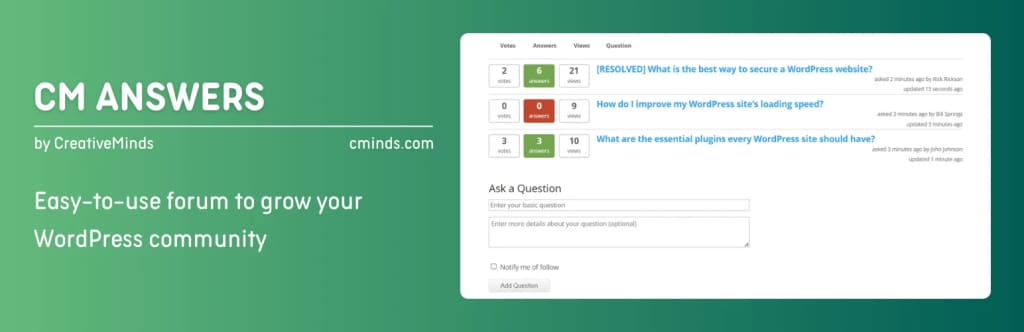
CM Answers gives your site a Stack Overflow-style question and answer section. The free version supports user submissions, voting, comments, and categories.
The pro version adds more features like private messaging, role-based access, file attachments, and moderation tools. It also integrates with CM’s ecosystem of tools like Micropayments and Membership for even more flexibility.
Strengths:
- Good balance of free and paid features
- AJAX-based submission and voting
- Moderation and anti-spam tools
- Works with social login and notifications
Best for: Knowledge base sites or communities focused on support-style questions.
8. DW Question & Answer
DW Question & Answer is a straightforward Q&A plugin that allows users to ask questions and get answers in a Stack Overflow-style format. It includes core features like voting, status tagging (open, resolved, closed), email notifications, and reCAPTCHA.
While the UI may look slightly dated, it’s easy to customize with templates and has solid plugin support for translation and access control.
Strengths:
- Supports voting and answer approval
- Built-in spam protection with reCAPTCHA
- Simple frontend submission and filtering
- Free with optional premium support
Best for: Site owners who want a free Q&A format forum that feels familiar.
Honorable mentions
These plugins didn’t make the main list but are worth checking out if you have more specific needs or want extra flexibility.
9. Simple:Press
Simple:Press is a powerful forum solution with deep customization and advanced features like user ranks, post moderation, and content permissions. It’s better suited for larger forums or enterprise-style communities where detailed role management and plugin integrations matter. However, it has a steeper learning curve and can feel heavier than more streamlined alternatives like bbPress or wpForo.
Best for: Large, complex community forums that need advanced control and scalability.
10. Discussion Board
Discussion Board is a beginner-friendly plugin that adds a basic forum area with topics and replies. It’s designed to be super simple, with minimal configuration and a clean UI. While it lacks some of the features power users may want, it’s a solid choice for small communities or blogs that just need a place for reader interaction.
Best for: Site owners who want to add simple discussion threads without the overhead of a full forum system.
Getting started with a WordPress forum plugin
Adding a forum to your WordPress site is one of the best ways to build engagement, keep users on your site longer, and encourage return visits. But not all forum plugins offer the same experience—for you or your users.
Start by deciding whether you want a traditional forum, Q&A layout, or full social community. Then pick a plugin that aligns with your goals, site size, and level of tech comfort.
Ready to upgrade your WordPress experience? Professional hosting improves speeds, security, and reliability for a website and a brand that people find engaging and trustworthy.
Don’t want to deal with server management and maintenance? Our fully managed hosting for WordPress is the best in the industry. Our team are not only server IT experts, but WordPress hosting experts as well. Your server couldn’t be in better hands.
Click through below to explore all of our hosting for WordPress options, or chat with a WordPress expert right now to get answers and advice.
Additional resources
What is a WordPress plugin? →
A complete beginner’s guide to WordPress plugins and how to manage them
7 best WordPress calendar plugins →
Compare the best WordPress calendar plugins for events, bookings, and scheduling to find the right fit for your site.
How to check if a plugin is safe →
Simple steps to evaluating a plugin before you install and activate it