

◦ Optimized configs
◦ Industry-leading support
GPU → vs NPU
NPU vs GPU (vs CPU vs TPU) and what it means for AI
The race to power faster, smarter AI is pushing chip design into new territory. From image generation to autonomous vehicles to real-time speech translation, modern AI demands massive compute power—and highly specialized hardware to keep up.
That’s where chips like the GPU and NPU come in. Both are engineered to accelerate machine learning workloads, but they approach the problem differently. For anyone working in AI, data science, or high-performance computing—especially at scale—understanding the distinction is more than academic. It can determine which infrastructure delivers better performance, lower costs, and more reliable results.
For teams deploying AI apps on custom infrastructure or renting bare metal, GPU server hosting is still the most flexible option. But with NPUs now on the rise—especially in edge AI environments—it’s worth understanding where each fits.
Get premium GPU server hosting
Unlock unparalleled performance with leading-edge GPU hosting services.
NPU vs GPU: Key differences at a glance
A GPU (graphics processing unit) is a highly parallel chip designed for general-purpose compute acceleration, especially matrix-heavy workloads like graphics and AI. An NPU (neural processing unit) is purpose-built to accelerate deep learning workloads by optimizing for low-precision operations and power efficiency.
| Feature | GPU | NPU |
| Full name | Graphics Processing Unit | Neural Processing Unit |
| Primary purpose | General-purpose compute acceleration | Deep learning and neural network acceleration |
| Architecture | Highly parallel, floating-point optimized | Custom, often low-precision and sparsity-aware |
| Efficiency | High throughput, moderate power use | Ultra-efficient for AI inference |
| Flexibility | Broad support for workloads (graphics, AI, video, etc.) | Specialized for neural networks |
| Availability | Widely available in cloud and on-prem | Mostly found in edge/embedded AI devices |
| Use cases | AI training, inference, 3D rendering, video processing | Real-time AI inference, mobile AI, embedded systems |
What is a GPU?
A GPU (graphics processing unit) is a specialized processor originally designed to accelerate image and video rendering through parallel processing. Over time, its architecture—optimized for handling thousands of simultaneous operations—proved ideal for many high-performance computing tasks, especially AI.
GPUs are now a standard tool in machine learning workflows. They’re used in both training and inference stages, capable of crunching massive matrices of data in parallel. In server environments, GPUs unlock the power to process complex neural networks in record time, making them a go-to for researchers, dev teams, and AI startups alike.
What is an NPU?
An NPU (neural processing unit) is a processor engineered specifically to run artificial neural networks. Unlike GPUs, which are general-purpose compute accelerators, NPUs focus solely on AI workloads—especially deep learning inference.
NPUs work by optimizing data movement and compute operations common in neural networks. This often involves using lower-precision math (like INT8 instead of FP32), enabling faster processing and drastically lower power consumption. Many NPU designs also include hardware support for sparsity, which lets them skip zero-value weights to save time and energy.
Originally developed for edge AI applications (think smartphones, smart cameras, and autonomous vehicles) NPUs are built with efficiency in mind. They’re designed to process AI models locally, without relying on cloud data centers, enabling real-time decisions with minimal latency.
Key features that distinguish NPUs include:
- Fixed-function AI hardware: NPUs include dedicated logic blocks for common AI operations like convolution, pooling, and activation.
- Low power consumption: NPUs outperform GPUs in performance-per-watt for AI inference, especially in mobile or embedded use cases.
- Memory optimization: NPUs often have tight integration with on-chip memory to minimize bandwidth and latency bottlenecks.
- Model-specific acceleration: Many NPUs are tailored to run specific model types (like CNNs or RNNs) with greater efficiency than general-purpose chips.
GPU vs NPU: Key differences explained
While both chips accelerate AI workloads, they serve different roles depending on the task and environment.
Purpose
GPUs were designed to handle graphics rendering but have evolved into versatile compute engines ideal for AI training and inference. NPUs were purpose-built to accelerate AI inference with extreme efficiency, especially on edge devices where power and thermal budgets are tight.
Performance efficiency
In AI workloads, “performance efficiency” usually refers to how much useful computation you get per watt or per dollar. NPUs shine here. They’re optimized for low-precision math, often delivering better performance-per-watt than GPUs in inference tasks.
GPUs, on the other hand, offer higher peak throughput and more versatility—especially when running larger or more complex models.
Accessibility
Accessibility includes availability, integration, and support. GPUs are everywhere: cloud providers, dedicated servers, workstations, even consumer laptops. NPUs are more niche—most often embedded in edge AI hardware or built into specific SoCs (like Apple’s Neural Engine or Huawei’s Ascend).
If you’re building for scale or flexibility, GPU server hosting still offers the best bang for your buck.
Flexibility
GPUs support a wide range of frameworks, libraries, and model types. They’re programmable and adaptable for all kinds of parallel computing.
NPUs are much more specialized. They’re often designed for specific model architectures or operations, which limits flexibility but boosts performance in those narrow tasks.
Maturity
GPUs have been in the AI game for over a decade, with a massive ecosystem of tools, frameworks, and community support behind them. They’ve been stress-tested in everything from academic research to enterprise-scale production.
NPUs are relatively new. Most are developed by individual hardware vendors, with less standardization and more variation in performance, tooling, and integration options.
Software stack
GPU software ecosystems are well-developed. CUDA, cuDNN, TensorRT, and ROCm provide powerful abstractions and optimizations for AI developers. They’re backed by years of support and deep integration with popular frameworks like PyTorch, TensorFlow, and JAX.
NPU software stacks are still catching up—often proprietary, device-specific, and lacking the unified APIs or tooling depth that GPU developers take for granted. That can add friction when trying to deploy or scale across devices.
NPU vs GPU use cases
Each chip type excels in different environments. Choosing the right one depends on workload, latency needs, and power or infrastructure constraints.
NPU use cases
- Smartphones and tablets: NPUs handle real-time image processing, voice recognition, and augmented reality tasks locally without draining the battery or requiring a data connection.
- Smart cameras: Edge-based NPUs can run object detection, face recognition, and motion tracking with low latency and no cloud dependency.
- Autonomous vehicles: NPUs process sensor data and make driving decisions in real-time, where every millisecond counts.
- Wearables: Health-tracking devices with NPUs can run lightweight AI models for anomaly detection, fitness insights, or predictive alerts without relying on external servers.
- Industrial IoT: NPUs in edge gateways analyze sensor data for predictive maintenance or anomaly detection without round-tripping to the cloud.
GPU use cases
- AI model training: GPUs excel at large-scale training tasks, with the memory and compute power to process huge datasets and complex models. Their parallel architecture makes them the go-to for deep learning frameworks like PyTorch and TensorFlow.
- Video rendering and transcoding: High-resolution video editing, VFX, and real-time rendering depend on GPU acceleration for fast turnaround, especially in media production pipelines and streaming services.
- AI inference at scale: In cloud-hosted apps, GPUs deliver the throughput needed to serve thousands of inference requests per second while maintaining low latency and high availability.
- Scientific computing: Simulations, genomics, climate modeling, and particle physics often rely on GPU parallelism to process highly complex mathematical operations at scale.
- Ecommerce personalization: Real-time product recommendations, dynamic pricing engines, and fraud detection models often run on GPU-powered servers to deliver fast, personalized user experiences.
- Gaming: From AAA game titles to VR environments, GPUs drive real-time rendering and physics simulations, enabling smooth, immersive gameplay on both local machines and cloud gaming platforms.
- Big data analytics: GPU-accelerated analytics platforms like RAPIDS use parallelism to process massive datasets faster than traditional CPUs, especially for ETL, graph analytics, and real-time dashboards.
- Financial modeling: Risk modeling, Monte Carlo simulations, and high-frequency trading systems use GPUs to accelerate compute-heavy financial calculations that demand speed and accuracy.
- Cybersecurity: Real-time threat detection, anomaly detection, and pattern matching across large network datasets benefit from the raw processing power of GPUs for fast response times.
- Medical imaging: GPUs power advanced imaging techniques like MRI reconstruction, CT scan analysis, and 3D visualization, allowing radiologists to work faster with higher diagnostic accuracy.
How NPU and GPU work together
Despite their differences, NPUs and GPUs can be complementary in hybrid systems, especially when balancing performance, efficiency, and latency.
- Edge-cloud handoff: NPUs handle lightweight inference on the edge, while GPUs in the cloud retrain and fine-tune models.
- Multi-chip AI pipelines: In complex systems, data can flow from sensors to NPUs for pre-processing, then to GPUs for deeper analysis.
- Load balancing: In AI accelerators like Apple’s M-series chips, GPUs and NPUs share tasks to balance power and throughput.
- Specialized acceleration: NPUs can offload repetitive AI functions from GPUs, freeing them for more complex or variable tasks.
- Energy optimization: Systems can route inference to NPUs when efficiency matters, and switch to GPUs for performance-heavy tasks.
What about TPU?
A TPU (tensor processing unit) is a proprietary AI accelerator designed by Google. It focuses on high-performance matrix math for training and inference, primarily in Google Cloud.
TPUs are architected around systolic arrays that accelerate tensor operations. They’re best known for powering Google’s internal AI tools, like Translate and Search, and are available to external users through Google Cloud’s AI Platform. They offer exceptional performance for TensorFlow models, but lack the broad compatibility and flexibility of GPUs.
How we got here: A brief history of AI chips
It started with CPUs, which were flexible but not parallel enough for large-scale AI. As AI models ballooned in size, GPUs took over, offering thousands of cores capable of processing matrix operations in parallel.
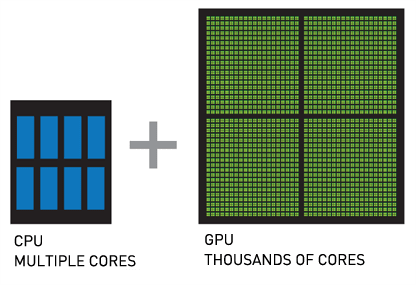
Then came TPUs—Google’s response to growing AI demand—optimized for neural network workloads and tightly integrated into their cloud platform. NPUs followed, not as GPU competitors in the cloud, but as ultra-efficient inference engines for edge and mobile applications.
Today’s AI landscape is a multi-chip environment, where each processor has a role depending on the task, budget, and infrastructure footprint.
Getting started with GPU servers
GPU technology continues to drive AI breakthroughs, from training foundation models to running production inference at scale. For developers and data teams, GPU server hosting offers direct access to this power with none of the overhead of managing hardware in-house.
With dedicated bare metal GPU servers, you get full control over the software stack, better performance than virtualized cloud instances, and predictable pricing—ideal for sustained AI workloads. Whether you’re training models, processing large datasets, or building real-time AI applications, GPU hosting gives you the flexibility to scale on your terms.
Ready to put your AI workloads to work? Start with a dedicated GPU server that’s optimized for performance, cost-efficiency, and control.
Click below to explore options or start a chat with one of our dedicated server support team members today.
Additional resources
Best GPU server hosting [2025] →
Top 4 GPU hosting providers side-by-side so you can decide which is best for you
GPU vs LPU →
Learn about LPUs, 5 key differences, and how to decide which one you need
GPU for AI →
How it works, how to choose, how to get started, and more