

◦ Comprehensive security
◦ 24/7 support
WordPress → History
History of WordPress: From b2/cafelog to managed WordPress hosting

According to W3Techs, over 43.2% of all websites use WordPress. You can attribute this popularity to its user-friendliness, which makes website management feel easy.
But have you ever wondered how WordPress got to where it is today? Since its inception in 2003 to its 20th anniversary in 2023, WordPress has received several updates to become the top blogging tool in the market.
WordPress 101
WordPress is an open source content management system used to create, modify, and manage websites. It works under the GNU GPL v2 license, so you can install it on a personal server or a third-party web host’s server to run your website.
What is WordPress used for?
Individuals and businesses use WordPress to build and maintain their websites. It’s a popular solution for building websites since it requires little to no coding experience. Even a beginner can start and build a website within a day.
History of WordPress: 2003-now
WordPress has undergone several changes since its inception in 2003 to its present-day success.
Here is a short recap of its activities and developments through today.
When was WordPress created? → 2003
In 2001, a French programmer, Michel Valdrighi, created a blogging platform named b2/cafelog to create dynamic webpages from a MySQL database’s contents. While he gathered a small following of users, Michel abandoned the project and dropped its support in 2002.
Two disgruntled users, Matt Mullenweg, and Mike Little, took up the challenge and reimagined b2/cafelog to create a new way to build websites. That was the birth of WordPress.
On May 27, 2003, Matt and Mike announced the first version of WordPress based on a b2/cafelog fork but with significant improvements. Besides a new admin interface, WordPress came with generated XHTML 1.1 templates with a post editor identical to the one below.

2004 — WordPress 1.2 and plugin architecture
In May 2004, the WordPress team released version 1.2 to the public with a new feature, plugin architecture. It enabled users to build WordPress plugins to extend the default WordPress functionality.
2005 — WordPress 1.5, pages, comment moderation, Kubrick theme, and Automattic
In 2005, WordPress 1.5 was released, with several notable features.
First was the Kubrick theme. Matt introduced Kubrick as a new default theme to showcase the “incredibly flexible theme system” 1.5 offered. Second, WordPress went beyond blog posts and added support for pages. Lastly, WordPress 1.5 made it easy to moderate comments by requiring approval on first-time comments.
Also, Matt Mullenwag started Automattic and started recruiting leading WordPress contributors.
2006 — WordPress 2.0, WYSIWYG editor, and WordPress trademarks
Just before the turn of the year, WordPress 2.0 was released. It introduced an inbuilt WYSIWYG page editor and improved the publishing workflow. Users could add tags and categories while working on the post and preview the final post before publishing it.
The WordPress team also launched the theme directory, which allowed users to find tried-and-tested themes in a single place.
Given the popularity of WordPress, Automattic registered WordPress’s brand name and famous blue logo to protect it.
Lastly, Matt Mullenweg organized the world’s first WordCamp in San Francisco.
2007 — WordPress 2.1
Version 2.1 came with several new features, including improved search functionality and an autosave feature to prevent the loss of unsaved content. With this new update, users could also spell-check their content before posting it.
Unfortunately, WordPress also encountered its first major security breach in 2007, which led developers to create safeguards, security updates, and patches for security issues.
2008 — WordPress 2.5, new admin dashboard
In 2008, Happy Cog, a web design company, collaborated with the WordPress team and helped design WordPress’s new administrator interface.
With the new dashboard, the WordPress team focused on the essentials and removed the clutter from the admin interface to improve the user experience.
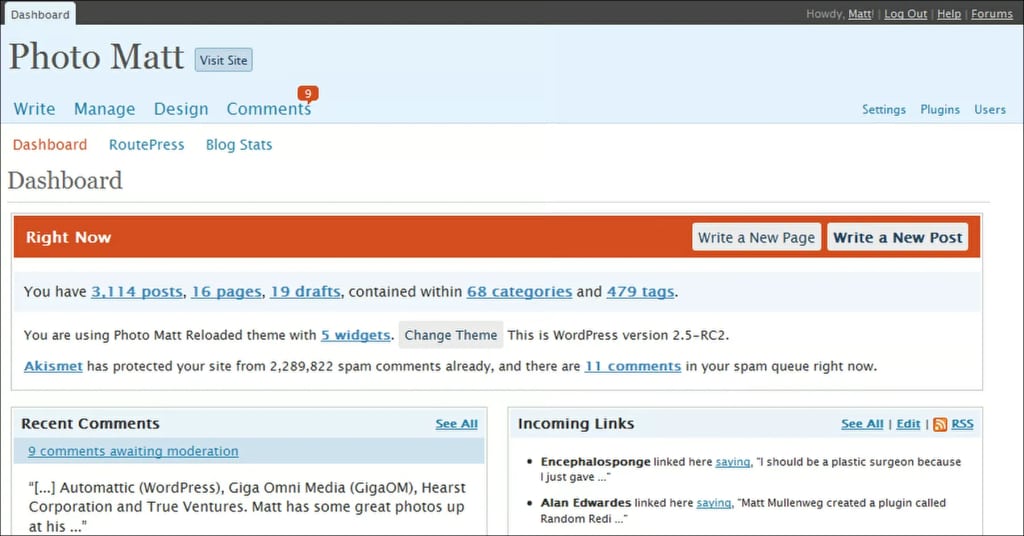
Besides that, WordPress 2.5 supported multiple uploads, one-click updates, plugin installation, and shortcodes. Two more versions of WordPress were also released in 2008, including:
- Version 2.6 showed post revisions and the “press this” feature.
- Version 2.7 resolved multiple bugs caused by previous versions. It also came with a redesigned user interface, sticky posts, comment replies, and customizable admin tools.
Lastly, Matt Mullenweg organized the world’s first WordCamp in San Francisco.
2009 — WordPress 2.8, BuddyPress
WordPress 2.8 was released, which came with improved widget management and a new theme browser. The WordPress team also built BuddyPress, a social networking plugin for WordPress, to help users looking to create websites like Facebook and Myspace with WordPress.
Later in 2009, version 2.9 came with major improvements to WordPress’s SEO features and an inbuilt image editor. It also pioneered bulk updates, letting users update multiple themes, widgets, and plugins at once.
2010 — WordPress 3.0, WordPress Foundation
2010 was a significant year for WordPress.
Automattic finalized the WordPress trademark and logo transfer to the WordPress Foundation. That ensured that WordPress would remain open source and community members would continue contributing to the project.
Besides that, WordPress 3.0 brought along exciting features like custom post types, taxonomies, headers, menus, and backgrounds. It also introduced a new default theme named Twenty Ten.
Version 3.0 also introduced multisite, enabling users to run multiple websites on the platform.
2011 — WordPress 3.1, 3.2, and 3.3
WordPress 3.1 was released, which introduced an admin bar and post formats. Version 3.2 came with a default Twenty Eleven theme. Finally, version 3.3 added support for drag-and-drop file uploading.
2012 — WordPress 3.4
The WordPress team released version 3.4 with a new theme customizer and improved custom headers. Administrators could now preview changes in the theme customizer before applying them sitewide.
Moreover, the WordPress team added a media library to simplify media management for large websites and updated the image editor, so users could add custom image dimensions.
Version 3.5, which came soon after, brought image captions and Twitter embeds.
2013 — WordPress 3.6, 3.7, and 3.8
The rapid development of WordPress continued in 2013, too, as WordPress had three major releases.
- Version 3.6 came with a new default theme and improved audio and video files support, enabling users to preview audio and video files in the media manager.
- Version 3.7 introduced automatic updates, better language support, and more secure password checks.
- Version 3.8 brought a fresh visual feel with a long-due dashboard update. WordPress adopted MP6. Besides the new admin panel, WordPress users also got a more intuitive widget section and new color schemes to customize their admin experience. Version 3.8 also brought a new default theme with Twenty Fourteen.

With version 3.8’s admin update, WordPress also became responsive for access on mobile devices.
Lastly, the fourth quarter of 2013 saw the first WordCamp Europe held in Leiden, Netherlands.
2014 — WordPress 3.9 and 4.1
With version 3.9, the WordPress team brought changes to the visual post editor. Users could drag and drop images onto the editor and edit them on the fly with improved image editing capabilities. Besides that, WordPress also received live widget and header image previews.
Version 4.1 introduced a new default theme in Twenty Fifteen powered by Google’s Noto font family. It improved the multilingual support of WordPress, and as a result, non-English downloads of WordPress surpassed English downloads of WordPress in 2014.
2015 — WooCommerce
In a phenomenal year, Automattic acquired WooCommerce, which was already dominating as a WordPress plugin to create online stores. In a way, it made WordPress capable of both publishing blogs and building ecommerce websites.
Meanwhile, WordPress released three versions — 4.2, 4.3, and 4.4 — in 2015, which added:
- Support for emojis.
- Embeds for Tumblr, Kickstarter, and other emerging platforms.
- List views in the admin panel.
2016 — WordPress 4.5, 4.6, and 4.7
In 2016, once again, WordPress released three new versions. Each version brought new features:
- Version 4.5 brought responsive and live menu previews for different screen sizes, optimization of images, and custom logo support.
- Version 4.6 introduced a better multisite system, allowing users to cache their websites. Also, you could update plugins and themes more cleanly.
- Version 4.7 added WordPress REST API endpoints, letting developers interact with WordPress remotely. Besides that, it also introduced a new default theme in Twenty Seventeen.
2017 — WordPress 4.9 and security vulnerabilities
The year 2017 didn’t start out well for the WordPress community since it found that the REST API had security vulnerabilities that were allowing hackers to deface websites based on WordPress 4.7.
WordPress fixed that via security patches of 4.7.2.
In the second half of 2017, WordPress released version 4.9, significantly improving WordPress Customizer — what you use to tinker with your WordPress theme.
Before version 4.9, you had to publish the changes to save design changes done via Customizer to your website. After the update, you could save the changes drafts and even share the previews with other team members.
2018 — WordPress 5.0, Gutenberg editor
In 2018, WordPress officially launched the Gutenberg editor in version 5.0. Gutenberg, a block editor, changed the whole WordPress experience as you could use and rearrange blocks to create blog posts and even whole websites.
WordPress also added support for reusable blocks to speed up website design.

2019 — WordPress 5.1, site health
In 2019, the WordPress team spent a fair bit of time debugging the tools that came with the Gutenberg project.
However, that wasn’t all.
With version 5.1, WordPress introduced Site Health, which would notify users about outdated PHP code. In the 5.2 version, WordPress improved this tool and introduced a widget to display website health and recommended improvements.
Finally, WordPress 5.3 brought significant updates to the Gutenberg editor, including improved block management and grouping.
2020 — COVID and WordCamps
Due to COVID, Matt Mullenweg canceled WordCamp Asia, which was to take place in Bangkok.
However, WordPress development continued, and we got three new releases.
- Version 5.4 introduced a welcome screen for beginners with no experience in WordPress.
- Version 5.5 introduced automatic updates for themes and plugins. Also, it introduced block patterns and predefined block layouts enabling users to drag and drop to speed up website creation.
- Version 5.6 improved the block editor and added initial support for PHP 8.
2021 — WordPress 5.7 and 5.8
2021 brought more WordPress enhancements as it moved towards Full Site Editing.
For instance, WordPress 5.7 added support for dragging and dropping blocks from the inserter. Also, it refined reusable blocks, so they would automatically save with the post.
Also, WordPress 5.7 made it easier to switch from HTTP to HTTPS via SSL certificates. Previously, WordPress users had to update many hard-coded URLs in the database themselves. With version 5.7, users could switch from HTTP to HTTPS with a single click.
Version 5.8 introduced Template Editor, where users could use the default block editor to edit templates. Also, users could customize widgets with blocks, which was another step toward no-code website development.
Finally, with 5.8, WordPress dropped support for Internet Explorer 11.
2022 — WordPress 5.9 and 6.0
In 2022, the WordPress team further refined the editing process to enable Full Site Editing (FSE).
With version 5.9, WordPress announced, “Full Site Editing is here.” WordPress users got flexible block controls to modify spacing, borders, appearance, and more. Similarly, they got a block pattern directory to find block patterns the WordPress community had shared.
WordPress 6.0 improved the writing experience, added a global style switcher, and added even more design tools — controls for transparency, layouts, and borders.
Now — future of WordPress
So what’s in store for WordPress going forward?
WordPress has been changing the website development environment since the start of the Gutenberg project with WordPress 5.0. Currently, WordPress is completing its work with the second phase — Customization — of the Gutenberg project.
Once it finalizes that phase, WordPress will start working on Collaboration, the third phase of the Gutenberg project, to simplify co-authoring content.
After Collaboration, WordPress aims to make website development accessible for everyone, everywhere, by going Multi-lingual.
Modern WordPress: offerings
Plenty has changed in WordPress since its inception in 2003. With all those developments, updates, and upgrades, what does the contemporary version of WordPress offer?
Themes
Modern WordPress simplifies website creation using themes. You can install themes to customize the whole visual look of your website within seconds. Each theme includes fonts, colors, layouts, and other design elements.
You can find thousands of free and paid theme choices in the WordPress theme library. Find a theme you like and implement it to speed up the initial website development.
Plugins
WordPress also offers thousands of free and paid plugins to extend the default features and functionality. You can install plugins to integrate social media into your website, enhance security, optimize your SEO, and enhance your customer experience.
For instance, you can use Restrict Content Pro to turn your WordPress website into a membership website and LearnDash to develop an online learning platform.
Block patterns
Block patterns are predefined layouts of blocks you can use to speed up the creation of individual webpages.
Say you’re trying to create the hero section of your website’s homepage and fall short of ideas. You can go to WordPress’s Block Pattern Directory to look for inspiration and customize a block pattern to make it your own.

What kinds of websites can you make with WordPress?
Regardless of your unique needs and requirements, you can rely on WordPress to build and manage a website.
Here are a few examples of websites you can build with WordPress.
Portfolio websites
A portfolio website lets you showcase your creative work to clients, customers, and businesses.

Ecommerce websites
With an ecommerce website, you can sell products or items from your online store.

Magazine websites
A magazine website is an ideal choice if you want to create a digital publication on a specific interest or subject.

Personal blog
A personal blog is an online journal where you publish your thoughts and personal experiences.

Business website
A business website advertises your services and products and helps you create a digital footprint for your business.

Getting started with WordPress
WordPress has an extensive history of change and development, and what was originally a blogging tool has evolved into much more over the years.
That’s where fully managed WordPress hosting comes in. Fully managed hosting means you don’t have to worry about that — your website is in the hands of hosting experts.
Liquid Web offers WordPress hosting for every need and skill level. If managed hosting sounds like a weight off your shoulders, our WordPress experts can take care of the technical server work for you.
Additional resources
What is WordPress? →
A complete beginner’s guide to basic WordPress options
Is WordPress easy to use? →
Discover a user-friendly WordPress hosting solution designed for seamless website management and effortless customization.
A complete guide to WordPress shortcodes →
Shortcodes make life easier. Learn how to get started!

Maddy Osman is a WordPress expert, WordCamp US speaker, bestselling author, and the Founder and SEO Content Strategist at The Blogsmith. She has a B.A. in Marketing from the University of Iowa and is a WordCamp Denver organizer.