


 Maddy Osman
 A data backup and disaster recovery plan is essential for protecting your data against all forms of cyberthreats and data loss, which are unfortunately more common than you may have realized.
In fact, according to the Data Health Check report, 54 percent of companies experienced a cyberattack, while 37 percent encountered a ransomware attack.
In this guide, you’ll learn the essentials of data backup and disaster recovery, how to create a recovery strategy, and how to choose the right solution for your business.
Key points
- A backup is a secondary copy of data stored in a secure location.
- Disaster recovery is the process of using data backups and other procedures to restore operations after a disaster.
- Data backups are most useful when done frequently, but disaster recovery is only initiated after an unforeseen event.
- Track data recovery operations with four essential metrics — recovery point objective (RPO), recovery cost objective (RCO), recovery time objective (RTO), and mean time to failure (MTTF).
- When choosing a data backup and disaster recovery solution, consider cost, policy compliance, scalability, and technical support.
Here’s what we’ll cover:
- Data backup and disaster recovery: An overview
- Why is disaster recovery important?
- Differences between a data backup and a disaster recovery plan
- How to create a data backup and disaster recovery plan
- Metrics of measurement in a disaster recovery plan
- Considerations for choosing a data backup and disaster recovery solution
- Final thoughts: Essential guide to data backup and disaster recovery
Data backup and disaster recovery: An overview
When running a business, it’s natural to hope your data remains safe wherever you’ve stored it. However, unwanted events like natural disasters, hardware failures, and cyberattacks can cause data loss, disrupting your operations.
If you run into any of these situations, you want to be able to bounce back as quickly as possible with minimal or no damage to your critical data. To achieve this, you must create and proactively maintain a data backup and disaster recovery plan.
A data backup lets you securely store secondary copies of your data for recovery in case you lose your primary copies.
Depending on your business needs and data volume, you can store these copies either in a remote or on-premise data center.
On the other hand, disaster recovery involves all the procedures you put in place to quickly restore operations in an outage. Together, data backup and recovery guarantee business continuity when disaster strikes.
Why is disaster recovery important?
Disaster recovery is crucial because it minimizes the impact of a data loss event on your business. Data loss events can taint your company’s reputation and erode customer trust, resulting in lost sales and legal penalties.
With data recovery, you can quickly snap back after a disaster. It’s worth noting that business continuity can only be realized by studying your operations and identifying possible points of failure through business impact analysis. Once you have all these details, you can create a tailored data recovery plan.
Differences between a data backup and a disaster recovery plan
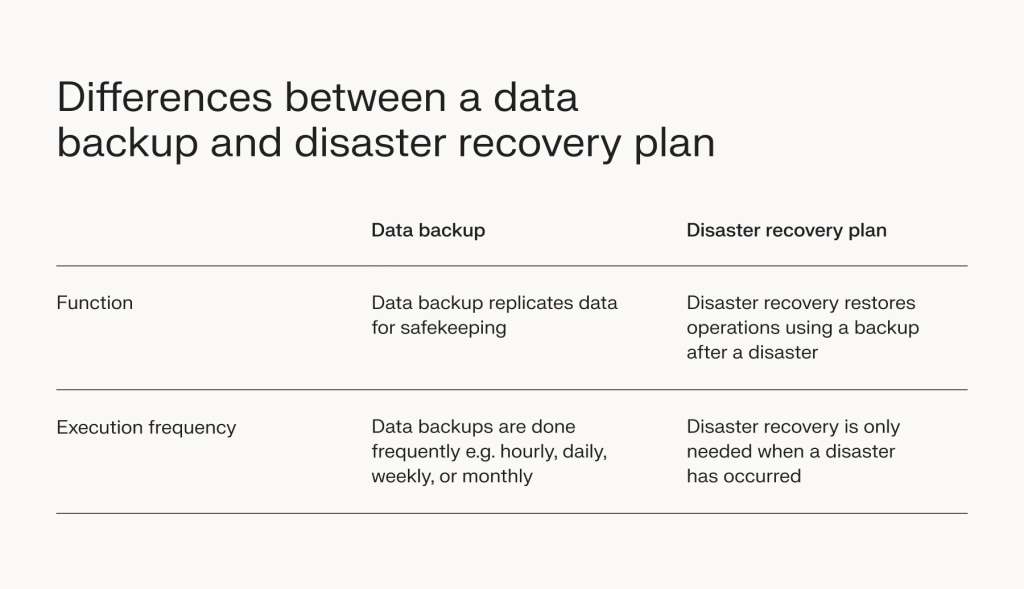
Data backup and disaster recovery are two sides of the same coin. While they both support business continuity in the event of a disaster, they differ in two major ways.
Function
Data backup is the process of replicating your data for safekeeping. Disaster recovery, on the other hand, uses backups to restore business operations in the shortest time possible.
Execution frequency
Backups are more useful when updated frequently. This allows you to recover your most recent data when disaster strikes. So, it’s best to create hourly, daily, or weekly backups and a retention schedule depending on data importance and how often you update it.
Contrastingly, disaster recovery is only necessary when disaster strikes. If a disaster strikes only once in 10 years, you’ll only need to run a recovery operation once. However, as we’ll soon see, you’ll still need to test your disaster recovery plan frequently.
How to create a data backup and disaster recovery plan

Although disaster recovery is executed less frequently than data backup, developing a comprehensive data backup and disaster recovery plan is still crucial. This plan contains detailed instructions on how to respond to a disaster.
The steps below outline how to create a plan suited to your business needs.
1. Group your data and assess your risks
Not all data is created equal. Sensitive data — like credit card information — is more likely to be targeted by malicious actors than less sensitive data.
Knowing the sensitivity level of the data you store can help you assess its associated risks. You can then determine the best data protection mechanisms and tools. And if there are policies on handling that data, you’ll also become aware of them.
For instance, if you store credit card information you’ll need to comply with the Payment Card Industry Data Security Standard (PCI DSS). And if you handle patient medical information, compliance with the Health Insurance Portability and Accountability Act (HIPAA) is mandatory.
2. Create a communication protocol
Prompt crisis response requires effective communication for seamless coordination. In a crisis, all team members and external stakeholders must know their responsibilities, to whom they report, and what channel of communication to use.
Your data backup and disaster recovery plan becomes more effective when you communicate properly.
3. Design a comprehensive backup strategy
A high-quality, up-to-date backup process underpins successful disaster recovery. Designing a comprehensive data backup strategy requires you to define:
- Backup frequency.
- Encryption techniques.
- Types of backup (full or incremental backups).
- Data storage location (off-site or on-premise).
Disaster Recovery-as-a-Service (DRaaS) is a great alternative to implementing your own backup strategy. Using cloud computing technology, DRaaS shifts the role of backup and disaster recovery to a third party on a pay-as-you-go basis.
4. Create extensive recovery documentation
Your data backup and disaster recovery plan must have active and extensive documentation. You must review and update it regularly to reflect changes in business operations and data policies.
Here’s why documentation is crucial:
- It helps train new personnel — When onboarding new employees, documentation provides a quick way to teach them the intricate workings of your backup and disaster recovery plan.
- It enhances and expedites the restoration process — With everything clearly laid out in the documentation, you can prevent further data loss in disastrous situations, even without an on-site IT team.
5. Frequently test and review your backup and disaster recovery plan
Cybersecurity threats, business operations priorities, and regulatory policies are ever-evolving. Things that weren’t important a year ago might be vital to your operations today — the opposite is also true.
To ensure business continuity, constantly review and test your backup and disaster recovery plan. These practices prepare you for potential disasters.
Metrics of measurement in a disaster recovery plan

The performance of your backup and disaster recovery plan is measurable. Below are some of the metrics you should calculate.
Recovery point objective (RPO)
A recovery point objective measures the maximum acceptable data your business can tolerate losing in a data loss event. It’s measured in time.
For instance, if your RPO is five hours, your backup system should be set up to ensure that if a disaster strikes, you won’t lose more than five hours of work. This allows business operations to continue without interruptions.
An RPO of five hours also means you back up your data every five hours.
Recovery time objective (RTO)
The recovery time objective is the maximum amount of time core business applications can be down without extreme consequences. Like RPO, it’s also measured in time.
A recovery time objective of five hours would mean that your business aims to restore operations within five hours after a disruptive event. Any more than that would severely disrupt business operations.
Recovery cost objective (RCO)
A recovery cost objective sets a threshold for the amount of money your business is willing to spend on a data backup and disaster recovery strategy. RCO is measured in currency.
It encompasses the maximum cost of downtime, as well as the storage solutions, staff, recovery efforts, and tools you use. However, other factors like the size and sensitivity of your data also contribute to the amount you spend.
If your RCO is $10,000, you can only spend that much on your data backup and disaster recovery plan.
Mean time to failure (MTTF)
MTTF is an integral part of predictive maintenance. It helps you determine the average lifespan of a system by calculating how long it’s expected to run without failing. Failures, in this case, are non-repairable. MTTF is measured in hours.
Using MTTF, you can prepare for failures and schedule repairs ahead of time.
Considerations for choosing a data backup and disaster recovery solution
With companies like Liquid Web, Microsoft, Oracle, and VMware offering numerous disaster recovery solutions, choosing a provider can be overwhelming. Below are important factors you should consider before making a choice.
Cost
Cost is a major concern for small and medium-sized businesses (SMBs) since most run on a tight budget. Your tool of choice should balance cost-effectiveness and functionality — this way, you’ll stay within your budget and get value for your money.
Policy compliance
Some data types are regulated. You must meet certain policies before being granted permission to process them.
The good news is that some cloud service providers and backup tools provide mechanisms to help you comply. For instance, Liquid Web offers HIPAA– and PCI-compliant cloud hosting, ensuring you don’t run into regulatory issues.
Scalability
As your business grows, so do your data backup and disaster recovery needs. Selecting a tool that can scale along with your business is important. A scalable tool ensures your data is always protected and downtime is minimized at every stage of business growth.
Technical support
Your operating system, apps, backup solution, and even the virtual machine orchestrator (VMO) managing your virtual machines (VMs) should all have reliable technical support. In a crisis, technical support can help you overcome challenges and facilitate recovery.
Final thoughts: Essential guide to data backup and disaster recovery
Data backup and disaster recovery support business continuity. However, they require extensive planning. Setting up a data recovery system takes time. It can also become expensive, increasing your recovery cost objective.
To alleviate this burden, consider Liquid Web. Liquid Web’s data backup and disaster recovery solution, powered by Acronis Cyber Backups, delivers enterprise-grade protection across all our hosting solutions.
With Liquid Web, you get more than just backups, you get peace of mind, including:
- Zero performance impact – Backups run without consuming server resources.
- Built-in ransomware protection – Safeguard your data from malicious threats.
- Faster recovery times – Minimize downtime and get back online quickly.
- 24/7/365 expert support – Our team is always on standby to assist.
- Customizable recovery plans – Tailored solutions to meet your business’s unique needs.
- Compliance-ready infrastructure – Built to support regulated industries.
Don’t wait for disaster to disrupt your operations. Protect your data, minimize downtime, and
ensure business continuity with Liquid Web. Contact our solutions team today to customize a disaster recovery plan that keeps your business resilient — no matter what comes your way.