

◦ Comprehensive security
◦ 24/7 support
WordPress Guide → SEO → Increase Traffic
Increase organic traffic to your WordPress site with technical SEO

When you are building your eCommerce business and want to invest in organic traffic through search engine optimization as a growth and marketing channel, the strategies might seem overwhelming.
Luckily, SEO at its core is not complicated. If you build on a platform that already takes SEO best practices into account, you can focus on the three major areas that can grow your organic traffic and therefore your business consistently over time.
SEO at a high level is comprised of three areas:
- Technical SEO (this article)
- Keyword Research for eCommerce SEO
- Link Building for eCommerce Businesses
In this article I will cover technical SEO for your ecommerce store, and specifically ecommerce stores built on WordPress.
Get fast, reliable hosting for WordPress
Power your site with the industry’s fastest, most optimized WordPress hosting
Technical SEO for eCommerce
Technical SEO is important because it determines how well search engines can access and therefore rank your pages and website overall. While technical SEO due diligence is done proactively as your site grows, setting a solid foundation from the start is the best way to allow your ecommerce site to grow.
When thinking about technical SEO for ecommerce, take all of these into account even if you are not a web developer:
By linking to the contact page from a website landing page, you can make it easier for viewers to quickly contact you instead of using the navigation bar.
- Use search engine friendly URLs like /product/dakine-white-gloves instead of /product/itemnum=1234. This is controlled in your WordPress site’s Permalinks section.
- Think scalable meta content, not one-off page optimization. WordPress coupled with the Yoast WooCommerce SEO plugin allows this control.
- Limit the number of CSS and JavaScript files on your site so that your site loads as quickly as possible. Well-optimized hosts like LiquidWeb handle a lot of this for you out of the box.
- Use the smallest image size possible for your product pages. If you do not have a full screen view for that high resolution image, then cut down the image to the display size on your site to minimize load times.
- Use Google Search Console to monitor your site’s errors (specifically 404s) and control your site’s parameters to minimize duplicate content.
- Monitor your site’s technical issues with a tool like Moz or SEMrush.
Where to start with technical SEO
If you’ve never audited your ecommerce store from an SEO perspective, that is the first step.
Use a tool like Screaming Frog (free up to 500 URLs, above that it’s a 149GBP annual license fee) to crawl your full site to begin understanding where your largest areas of opportunity are. Screaming Frog gives you a lot of data, which you can then couple with technical and on-page SEO best practices:

The team over at SEER Interactive in Philadelphia and San Diego has a great guide to using Screaming Frog for SEO as well – http://www.seerinteractive.com/blog/screaming-frog-guide/
Search Engine friendly URLs
Search engine friendly URLs that contain your main keyword are one of the largest impact SEO-friendly features you can implement on your website. Fortunately, WordPress handles these well natively out of the box through Settings > Permalinks:

URLs like these reduce the chance of page duplication, are easy for search engines to crawl, and are easier for users to remember and type in.
Think scalable meta content
A lot of non-professional SEOs have been told that meta tags matter for SEO. While this is true, once you’ve set the right systems in place, you can give yourself the gift of not thinking about certain SEO elements such as meta tags with a few tools.
WordPress using Yoast allows you to define Title and Meta Description formats so that your pages are automatically put into an SEO-friendly format as you create new categories or products on your site:

Limit CSS and JavaScript files
Page load time has become an increasingly important factor in site rankings. Outside of just SEO considerations, we’ve also learned that we lose 7% of conversions for every second of load time on a page.
Page speed affects both your site’s rankings and your conversions, so working on this is a very high impact undertaking.
The two best ways to do this on WordPress are:
- Minimize the plugins you use, as each plugin will load its own CSS and JavaScript files. Over 7-10 plugins and your site will slow down immensely;
- Use a host like LiquidWeb that either allows you to use WordPress-specific caching plugins like W3 Total Cache, or a host that provides caching themselves.
Optimize Image Sizes for Technical SEO
eCommerce websites are notoriously image heavy and rightfully so – people want to see what they are buying before they buy.
Images can be a challenge for SEO because they can slow down your site. Since your website operates off of templates, like categories and product pages, you should look to only upload images in the sizes in which they are displayed.
For example, maybe you use a thumbnail image on category pages and a 600×800 image on product pages. In that case, instead of resizing one 1200×1800 image to the correct sizes using CSS you should instead save one 125×125 thumbnail and one 600×800 regular size image, then use them in their correct place.
At the scale of a few hundred to thousands of SKUs, this can save you a lot of load time.
Use Search Console to monitor 404s and parameters
Google’s Search Console is a fantastic free tool that helps you identify the errors happening on your website, as well as insight into the keywords driving traffic to your site and some free tools to help you optimize your site.
Search Console should always been installed on your site and connected to your Google Analytics account, because the data is invaluable.
The two main ways you should keep in mind to use Search Console for your ecommerce site are to monitor your site’s errors, especially dead pages appearing as 404s, and the parameters that the search engines discover that could cause you duplicate content issues.
Check for site errors
Crawl > Crawl Errors will show you a graph of errors on your site as well as the top 1,000 affecting your site:
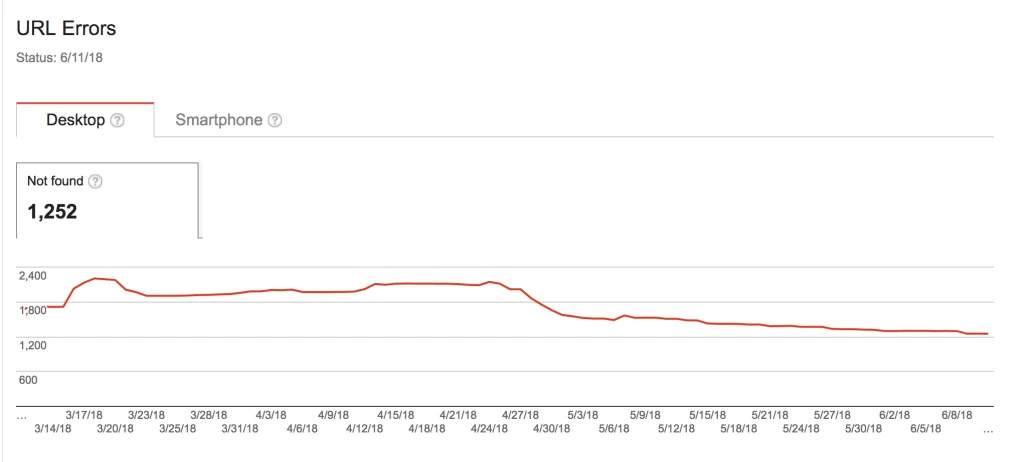
If you have a lot of pages returning a 404 error, fixing them can be a high impact SEO fix as well as a conversion lift because search engines will spend more time on your site, inbound links will be rerouted to pages that should rank, and users will be less likely to land on a broken page.
URL Parameters
Most eCommerce websites use filters to help customers narrow search results to optimize for conversions. While filters can be useful, they can also cause SEO issues.
Most filtering systems use parameters to change the page’s URL to narrow products. In Search Console, you can see the list of parameters that the search engines have discovered on your site:

Within each you can tell Google what the parameter does (sorts, paginates, narrows) and from there how the search engine should treat it. In many cases you can just allow Google to decide, but if you notice that you are getting organic traffic to pages with parameters that then compete with your category pages for rankings, you can direct the search engines to just use one specific URL.
Proactively monitor your site’s technical SEO health
Technical SEO is an ongoing undertaking, and as your site grows you will constantly face new challenges. It is important to have monitoring in place to alert you to issues on your site so that you can fix them, but also so that you can spend your time proactively growing your business instead of looking to see how your technical SEO is doing.
There are two ways to monitor your site, and I recommend implementing both:
- Use Google Analytics custom alerts to alert you when your traffic decreases or increases substantially week on week;
- Use a tool like Moz or SEMrush to monitor your site and report areas of opportunity and growing concern.
Google Analytics custom alerts
Many people do not know that Google Analytics allows you to set up custom alerts that will tell you when something has happened on your website.
To access these, go to Admin > Property > Custom Alerts:

Within here, I set up alerts to notify me when organic traffic either increases or decreases by more than 20% week on week.

These allow you to rest easy and not be required to check often to make sure your traffic is steady and growing:

Tool Monitoring
Alongside Analytics alerts, you should also pay for a subscription to a tool like Moz or SEMrush, which will crawl your website weekly and alert you to new issues on your site that need your attention:
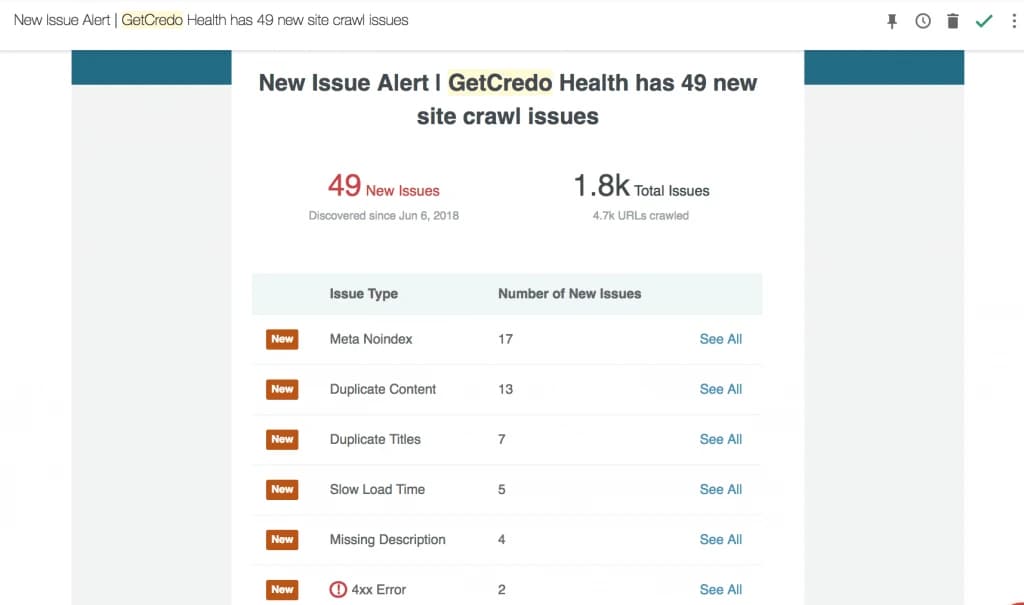
Depending on the scale of these issues, you can either solve them then or wait to fix them until you have dedicated time.
If you choose the latter, implement a schedule of every month or two where you take a day to fix issues that have appeared over time. This will keep your website healthy and continually able to rank.
Getting started with increasing traffic to your WordPress site
I hope this article has helped you understand technical SEO for your ecommerce site at a deeper level than before.
Liquid Web has been leading the industry in WordPress hosting for decades. And if you select managed WordPress hosting, our team of experts will manage server IT for you — so you can focus on growing your brand.
Click below to explore options or start a chat with one of our WordPress hosting experts now to get answers to your questions and further guidance.
Additional resources
Comprehensive guide to securing WordPress with ModSecurity
→
This guide provides a comprehensive overview of how to use ModSecurity to enhance the security of your WordPress site.
Want to find out how to do search engine optimization in WordPress? Keep reading!
Why security matters for WordPress enterprise hosting
→
Use the blog as your guide to attacks to watch out for, security best practices, and steps to improve the WordPress protection you already have.

Leslie Bowman is an Organic SEO Manager at Liquid Web and expert wordsmith. She specializes in driving revenue through organic and paid channels with SEO and CRO. When she’s not bending search algorithms to her will, she’s most likely spending time with animals, reading nonfiction, or marveling at nature’s beauty.