

◦ Comprehensive security
◦ 24/7 support
WordPress Guide → Security → Strong Passwords
Strong password rules: enforcing strong passwords in WordPress

WordPress powers around 40% of the Internet, which makes it a high-priority target for hackers. With brute-force attacks on the rise, using strong passwords for your WordPress website has never been more critical. In this regard, Nexcess has compiled this WordPress password security article to help you harden your overall user password security for the WordPress platform.
Implementing and enforcing strong password rules in WordPress
Liquid Web employs a wide range of robust solutions to secure your WordPress website. These solutions include secure permissions, automated updates, an advanced web application firewall, and Solid Security Pro — the industry-leading security plugin for WordPress.
But even the most advanced security tools can’t guarantee complete protection against malicious attacks if your WordPress passwords are weak. Using a short, easy-to-guess password makes it easy to hack into your website and cause all sorts of damage.
Strong passwords as the cornerstone of WordPress security
As the most popular Content Management System (CMS) in the world, WordPress is also a prominent target for hackers with malicious intent. Constantly searching for vulnerabilities to exploit, attackers use all the tools they have to gain unauthorized access to your website.
Enforcing strong password rules is one of the simplest yet most effective ways to secure your WordPress website.
Why use strong passwords? Configuring passwords that are difficult to guess provides significant protection against brute-force attacks — the most common type of modern network attack.
What are brute-force attacks, and how do they work?
Brute-force attacks are among the most common network attacks and have an astonishingly high success rate. A computer can come up with thousands of combinations per second, granting unauthorized access to the hacker behind it in no time.
As network attacks have become highly automated, attackers don’t necessarily choose what websites to hack by themselves. Instead, malicious programs, such as network scanners, constantly scan servers to identify vulnerabilities to exploit.
Hackers often create huge lists of these vulnerable servers that brute-force attacks will target. A program on a hacker’s machine can then make thousands of web requests per second, connecting to each IP on the list.
The hacker’s computer will establish connections with the victims’ servers, trying to break into the websites or even gain unauthorized root access to the machines hosting them.
Gaining system access to another server, also known as root compromise, leads to the hacker getting more processing power to expand the attack’s reach.
Most of the time, malicious requests will be aimed at your WordPress website’s admin dashboard login. However, attackers can also try to gain access to your website by cracking your SFTP (SSH Secure File Transfer Protocol) user password.
Why use strong passwords?
Since most successful break-in attempts involve password compromise, strong passwords are paramount. Implementing and enforcing strong password rules will help you set up a strong line of defense.
Since you’re competing against a machine that can generate thousands of strings a second, a weak password can be cracked in less than a minute. But if your password can’t be guessed relatively quickly, your website is of no particular interest to the hacker.
That’s because brute-force attacks are large in scale, often targeting hundreds of thousands of websites at once. The hacker has no intention of spending a long time on a single website. If the malicious program fails to hack into one website, there will always be plenty more to try.
What WordPress users need strong passwords?
Strong passwords are essential for the Administrator, Editor, and Author WordPress user groups. In addition, all website users with access to the admin dashboard should have strong password rules enforced to prevent the use of weak passwords. They should also change their password at least once every two to three months.
They should also change their password at least once every two to three months.
Strong password guidelines
A strong password for WordPress must meet the following requirements:
- Contains 15-50 characters.
- Is unique and not used for any other account.
- Doesn’t contain any personal information.
- Includes numbers, small and capital letters, and special characters, such as @, #, or &.
- Gets updated at least every two to three months.
How to generate a strong password
The random password generator helps create a strong, memorable password with a custom length and elements. For example, you can create a password or a passphrase containing a number of words accompanied by numbers. Or the tool can generate a string of random characters.
Choose what you would like to include in the password and its length or what number of words the new passphrase needs to contain. Then, click Enter, and the random password generator will come up with a new, unique combination:

If you need to check whether your password is strong enough, use the Password strength checker. Enter your password and see whether it meets all requirements to guard sensitive data safely:

Leverage Solid Security Pro to enforce strong password rules in WordPress
Liquid Web customers can leverage Solid Security Pro, an award-winning security plugin that protects all critical areas of your WordPress website. Solid Security Pro features tools for update management, advanced vulnerability scanning, and locking down your WordPress website to block unauthorized access attempts with success.
Solid Security Pro lets you enforce strong password rules for all WordPress users. Follow the three steps below to secure your WordPress website with an excellent password policy.
Step #1: Open the Solid Security Pro plugin settings
Open your WordPress admin dashboard and choose Security > Settings from the main menu, as shown below. It will open the Solid Security Pro plugin configuration:

Step #2: Enforce strong password rules for WordPress user groups
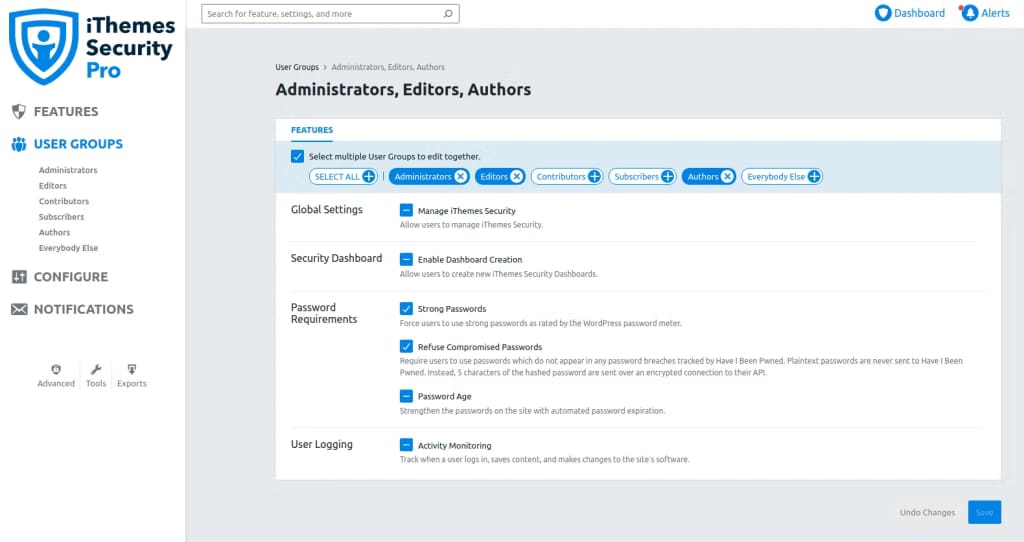
Open the User groups tab from the vertical menu. Here, you can enable various security features for different WordPress user groups. The Select Multiple User Groups to Edit Together option lets you configure the security settings for multiple groups simultaneously.
Choose the user groups for which you’d like to enforce strong password rules and enable the following features:
- Strong passwords: Require WordPress users to configure strong passwords.
- Refuse compromised passwords: Eliminate the possibility of using passwords that have been in any breaches tracked by HIBP (Have I Been Pwned).
- Password age: Enforce automated password expiration.
Save to apply the configuration changes:
Step #3: Configure the password expiration policy
Choose the Configure tab from the plugin’s vertical settings menu and navigate to Login security. Here, you can configure the Password age, which defines the password expiration policy. By default, it is set to 120 days:

Step #4: Verify the new password rules in WordPress
You’ve used Solid Security Pro to enforce strong password rules for WordPress users. Now, you can verify that the new password policy has been set up. First, navigate to Users and try to change the password for one of the existing website users.
If everything was set up correctly, you should only be able to update your WordPress user’s password if meets the new requirements:

Getting started with enforcing strong passwords in WordPress
Strict password rules are the centerpiece of WordPress security. With the increasingly large number of brute-force attacks targeting WordPress websites, you should never take your password policy lightly.
Liquid Web has been leading the industry in WordPress hosting for decades. And if you select managed WordPress hosting, our team of experts will manage server IT for you — so you can focus on growing your brand.
Click below to explore options or start a chat with one of our WordPress hosting experts now to get answers to your questions and further guidance.
Additional resources
Comprehensive guide to securing WordPress with ModSecurity
→
This guide provides a comprehensive overview of how to use ModSecurity to enhance the security of your WordPress site.
Top 10 Password Security Standards →
The term “password policy” refers to the entire password lifespan, which includes how they were created, the complexity criteria, safekeeping, secure transmission, regular review, and more.
Why security matters for WordPress enterprise hosting
→
Use the blog as your guide to attacks to watch out for, security best practices, and steps to improve the WordPress protection you already have.

Kiki Sheldon works as a Security Specialist for Liquid Web. Before joining the Abuse & Security Operations Department, she worked on the Liquid Web Managed Hosting Support Team, where she gained extensive knowledge of Linux System Administration and popular Content Management Systems (CMSs). Kiki’s passion for writing allows her to share her professional expertise and help others. She keeps up with technology and always looks to improve her technical skills. In her free time, she enjoys reading, especially classic books and detective stories.