

◦ Comprehensive security
◦ 24/7 support
WordPress Guide → Security → Cloudflare Firewall
Cloudflare firewall rules for WordPress

Cloudflare firewall rules are part of the Cloudflare Web Application Firewall (WAF) that allows you to create specific rules for filtering out undesired web traffic. All requests sent to your website will be checked against the existing set of configured firewall rules to ensure an automatic response to security threats.
Cloudflare Web Application Firewall (WAF)
A web application firewall or a WAF is a firewall that works as the application layer of the OSI model defense. It helps protect websites and web applications by examining HTTP traffic and filtering out unwanted requests. A WAF can protect against different types of attacks and vulnerabilities, including cross-site scripting (XSS) attacks, file inclusion, and SQL injections, among others.
Web application firewalls work based on a set of rules that all requests are checked against before allowing them to be passed to the web server. There are preconfigured sets of rules that were created taking the common malicious request patterns into account or custom rules created by an administrator that are specific to the application structure and its features.
Cloudflare Web Application Firewall (WAF) was first introduced in 2021 to help administrators protect their websites from various security threats and known vulnerabilities.
The benefits of the Cloudflare Web Application Firewall (WAF)
A web application firewall can run on the server itself, thus using the server’s resources to examine and filter out certain requests. Unfortunately, the server can get overloaded with traffic and not be able to serve legitimate requests, making your website either very slow or totally inaccessible. This occurring can become a huge problem, especially with resource-intensive websites and limited server resources.
Cloudflare WAF is a security shield placed between the Internet and your website, which means that all web requests must pass through the web application firewall before reaching the server. This way, the vast majority of unwanted requests are filtered out before hitting the server, ensuring server resources are used more effectively, and all legitimate requests are served.
Cloudflare Web Application Firewall (WAF) rules
Cloudflare Web Application Firewall (WAF) is designed to secure all components of a website by having a set of rules, sometimes referred to as signatures, that are designed to look for specific patterns that could represent a malicious payload.
Each firewall rule contains a number of patterns that each request is checked against and the appropriate action to take when those conditions are met. For example, requests can be blocked, allowed, or challenged. In addition, Cloudflare Web Application Firewall (WAF) allows users to leverage a number of preconfigured managed rulesets and create custom rules to best suit the needs of a particular website.
Cloudflare WAF managed rulesets
The Cloudflare Web Application Firewall (WAF) offers several managed rulesets that you can enable and configure for immediate protection by providing a wide range of security rules that are regularly updated to provide the best level of web protection. In addition, you can override the default action or disable specific rules included in the Managed Ruleset by defining custom configurations or overrides.
Currently, managed rulesets are only available for paid Cloudflare plans users.
Custom Cloudflare firewall rules
Custom Cloudflare firewall rules are available to all users, but the number of rules to deploy and other specific features included vary depending on the plan. A rule can be created by using several expressions and configuring the appropriate actions.
You can configure five to one thousand custom rules depending on the Cloudflare plan you have. The use of regex is only supported on Business and Enterprise plans. By default, Cloudflare does not retain any HTTP request logs, but Cloudflare firewall logs are available on the Enterprise plan.
| Features | Free | Pro | Business | Enterprise |
|---|---|---|---|---|
| Number of custom CloudFlare firewall rules | 5 | 20 | 100 | 1000 |
| Supported action | All except Log | All except Log | All except Log | All |
| Support for regular expressions | No | No | Yes | Yes |
IP access and rate limiting rules
IP access and rate limiting rules are part of Cloudflare firewall rules that allow an administrator to configure additional traffic checks. These can provide a more convenient way to create less complex rules that do not need multiple conditions specified to be checked against.
IP access rules allow you to filter traffic based on the visitor’s IP address, country, or AS number. In addition, Cloudflare firewall rate limiting rules can help protect your site from malicious traffic by blocking IP addresses that exceed the number of allowed requests to a specific URL.
Cloudflare firewall rules priority order
The Cloudflare Web Application Firewall (WAF) follows the order below when checking requests against the existing rulesets. This sequence below is simplified to give you general information on how Cloudflare WAF filters requests:
IP Access Rules > Custom Firewall Rules > Rate Limiting Rules > Managed Firewall Rules
There are some additional conditions that are taken into account when deciding what individual rules are checked first.
Cloudflare firewall rule expressions and actions
All Cloudflare firewall rules are simple to manage from your Cloudflare dashboard. You are given many options to choose from when creating a custom firewall rule to filter traffic based on whether certain data is present in the request.
To create a rule, you need to choose a field to filter by, select an operator, and set the value for which each request will be scanned. You can create compound expressions by using logical operators.
There are five main types of actions that can be specified in the firewall rule to be performed on a request:
- Allow. The request is allowed to be passed to the server.
- Block. Matching requests are denied access to the site.
- Bypass. Allows users to dynamically disable Cloudflare security features for a request.
- Managed Challenge. Depending on the request specifics, Cloudflare chooses the appropriate type of challenge.
- JS Challenge. Presents a JavaScript challenge which can be useful for preventing spam and malicious bot activity.
The option to log requests is available for the Enterprise plan users and allows saving the information about matching requests in Cloudflare firewall logs.
Useful Cloudflare firewall rules for WordPress
Cloudflare Web Application Firewall (WAF) allows WordPress site owners to protect their site from various threats common to a Content Management System (CMS) like WordPress. Here are some of the most useful Cloudflare firewall rules for WordPress:
- Blocking IP. Blocking IP addresses based on country or reputation score.
- Lockdown. Locking down WordPress.
- Spam/Bots. Preventing spam and blocking bad bots.
You can create Cloudflare firewall rules from Security > Web Application Firewall within your Cloudflare Dashboard. Click on the Create Firewall Rule button to add a new custom rule. IP Access Rules can be configured from the Tools tab.
Blocking IP addresses based on country or reputation score
We can block IP addresses based on the country or continent — or only allow traffic from particular locations. IP Access Rules allow you to configure a certain action that will tell WAF how to handle requests coming from a specific country, an IP range, or an ASN. While you can create this type of rule from Firewall Rules, using IP Access Rules may be easier and more convenient.
For example, you can block traffic from a specific country, like shown below. However, if you choose to allow a country code in IP Access Rules requests from the location you specified, requests coming from that location will still be checked against other Cloudflare rules:

If you would like to configure a more complex rule that checks a request against multiple conditions, it’s best done from the Firewall Rules tab. For example, in the rule below, we are blocking all requests coming from all countries other than the United States, and IP addresses with a Threat Score higher than 0.
Cloudflare allows you to block requests based on IP reputation scores collected from Project Honey Pot. For example, using a Threat Score of 0 in a custom filter is equivalent to setting the Security Level in Security > Settings to High:

Locking down WordPress
Locking down WordPress means restricting access to certain areas of your WordPress website. This blocking action can include blocking requests to xmlrpc.php, WordPress Admin area, and directories that are not supposed to be accessible to the public.
The rule below blocks access to xmlrpc.php, the WordPress content, and includes folders. By making sure requests that have your WordPress website address in the Referrer header field can come through, we only block potentially malicious requests while preserving website functionality.
User interface

Expression snippet
(http.request.uri eq “/xmlrpc.php”) or (http.request.uri.path contains “/wp-content/” and not http.referer contains “yourwordpresswebsite.com”) or (http.request.uri.path contains “/wp-includes/” and not http.referer contains “yourwordpresswebsite.com”)
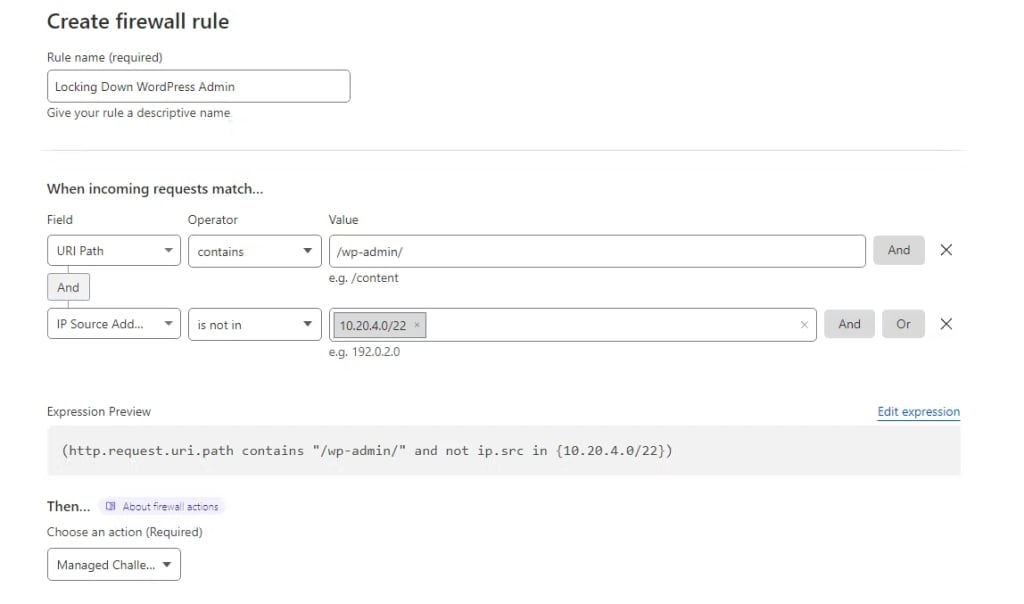
We can also challenge all requests to the WordPress Admin area that are not coming from a specific IP address or an IP range. IP ranges can be specified using the is in or is not in operators.
User interface
Expression snippet
(http.request.uri.path contains “/wp-admin/” and not ip.src in {10.20.4.0/22})
Preventing spam and blocking bad bots
Cloudflare maintains a list of good bots that have been verified and can be allowed access to your website. You can block all or just requests of a certain type coming from bots not present on the list by using the Known Bots option provided by Cloudflare firewall rules. You can also include specific URLs or some other conditions to be checked to make the rule more specific.
User interface

Expression snippet
(not cf.client.bot and http.request.method eq “POST” and http.referer ne “yourwordpresswebsite.com”)
As the firewall rule above is applied to the whole website, it can already provide good protection against spam bots. Please note that the firewall rule above will block any other request except the traffic coming from the list of known bots maintained by Cloudflare.
You need to add more conditions to the firewall rule or have IP access rules in place that will be checked first. For example, we can make the rule more specific by blocking all POST requests to wp-admin/admin-ajax.php that are not sent directly from your website.
User interface

Expression snippet
(not cf.client.bot and http.request.uri.path contains “/wp-admin/admin-ajax.php” and http.request.method eq “POST” and not http.referer contains “yourwordpresswebsite.com”)
Getting started Cloudflare firewall rules for WordPress
Cloudflare WAF is one of the best options for securing your WordPress website to ensure malicious requests do not make it to the server.
You can use a number of preconfigured Cloudflare firewall rulesets or create your own rules that can block unwanted traffic based on the request type, target URL, IP location or its reputation, among other things. A user friendly and intuitive Cloudflare WAF interface will help you configure your own ruleset within minutes.
Liquid Web has been leading the industry in WordPress hosting for decades. And if you select managed WordPress hosting, our team of experts will manage server IT for you — so you can focus on growing your brand.
Click below to explore options or start a chat with one of our WordPress hosting experts now to get answers to your questions and further guidance.
Additional resources
Comprehensive guide to securing WordPress with ModSecurity
→
This guide provides a comprehensive overview of how to use ModSecurity to enhance the security of your WordPress site.
How to add Cloudflare to your website →
In this example, we’ll be setting up a new Cloudflare account for an existing domain that will continue to use its current nameservers.
Why security matters for WordPress enterprise hosting
→
Use the blog as your guide to attacks to watch out for, security best practices, and steps to improve the WordPress protection you already have.

Kiki Sheldon works as a Security Specialist for Liquid Web. Before joining the Abuse & Security Operations Department, she worked on the Liquid Web Managed Hosting Support Team, where she gained extensive knowledge of Linux System Administration and popular Content Management Systems (CMSs). Kiki’s passion for writing allows her to share her professional expertise and help others. She keeps up with technology and always looks to improve her technical skills. In her free time, she enjoys reading, especially classic books and detective stories.