

◦ Optimized configs
◦ Industry-leading support
GPU for AI: How it works and what your organization needs
Remember the day AI was suddenly everywhere? It hasn’t slowed down since. Artificial intelligence is transforming almost every industry, revolutionizing everything from data security, to medical diagnostics, to automobile design, and more.
At the core of the AI revolution is a tiny piece of hardware: the Graphics Processing Unit (GPU).
Designed for rendering graphics (hence its name), GPUs quickly evolved into essential tools for accelerating AI tasks such as deep learning. In months, GPUs went from gaming and video technology to just AI GPU.
Understanding GPUs and their capabilities for AI is crucial for business today. So let’s get into it.
Get premium GPU server hosting
Unlock unparalleled performance with leading-edge GPU hosting services.
Why GPU for AI?
Although GPUs were originally designed and created for graphics processing, they have become the go-to solution for powering AI development and models. The basic, foundational design of a GPU chip, compared to the standard CPU, is what makes them ideal for AI applications.
GPU vs CPU: Parallel processing for training AI models
CPU’s have long been improving but have maintained basically the same architecture over time. Where a CPU features a few powerful cores with high clock speeds and complex control logic, a GPU is made of thousands of smaller, specialized cores that excel at handling massive numbers of simultaneous computations. CPUs prioritize flexibility and low-latency task execution serially, but GPUs focus on high-throughput data processing for specific parallel workloads.
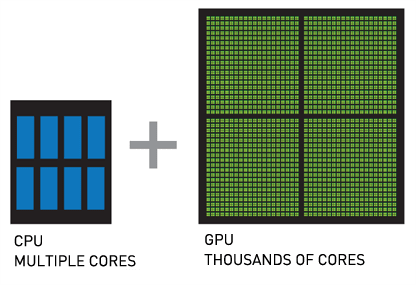
This design is called parallel processing, and it means GPUs are uniquely positioned to quickly process the huge datasets needed for AI training and modeling.
GPU vs CPU: Memory bandwidth for running AI models
Running a sophisticated AI model requires more than just processing power: AI needs a lot of memory to draw from as well. GPUs have a higher memory bandwidth than CPUs, which supports parallel processing and making predictions. This allows AI programs to efficiently process user requests.
Tensor cores
In addition to favoring thousands of parallel, focused cores over fewer, multi-purpose cores, many GPUs are also built with tensor cores. A tensor core is a specialized processing unit within a GPU that accelerates operations, making the GPU even more effective for AI, deep learning, and high-performance computing tasks.
GPU for generative AI
GPUs significantly accelerate AI training and inference, enabling faster development and deployment of advanced models. In generative AI, which creates new data, like images and music, high-performance GPUs are even more essential for handling complex computations and massive datasets.
As AI models grow in complexity, the demand for powerful GPUs will only continue to rise, shaping the future of AI-driven technology.
How to choose GPU hardware for AI
If you’re investing in your own GPU hardware for AI development, shop carefully. Consider:
- CUDA cores or stream processors: CUDA cores are specifically used by NVIDIA GPUs while stream processors are used by AMD GPUs. A higher core count enables faster parallel processing, which is critical for training complex AI models efficiently.
- Tensor cores and AI acceleration: Specialized hardware for matrix operations, such as tensor cores, can dramatically improve deep learning performance.
- Memory bandwidth: A higher GPU memory bandwidth allows faster data transfer between the GPU and memory, improving performance in training and inference tasks.
- FP16 and FP32 performance: Floating-point precision levels impact AI processing speed. For deep learning, look for strong FP16 (half-precision) and FP32 (single-precision) performance.
- Multi-GPU scalability: Some GPUs support NVLink or similar interconnects, allowing multiple GPUs to work together efficiently for large-scale AI workloads.
- Power efficiency and cooling: AI processing generates significant heat; ensure the GPU has effective cooling solutions and is power-efficient to maintain stable performance.
- Software and framework compatibility: Ensure the GPU supports AI frameworks like TensorFlow, PyTorch, and CUDA-based libraries for optimized performance.
- PCIe and NVMe support: A high PCIe generation and NVMe support enable faster data access and communication between storage, CPU, and GPU.
- Form factor and system compatibility: Ensure the GPU fits within your system’s physical space and is compatible with your power supply and motherboard.
AMD vs NVIDIA GPUs
AMD and NVIDIA are the two brand names that always come up when you talk about GPUs. Both brands offer GPUs with advanced architectures optimized for gaming, content creation, and AI-driven workloads. They support key technologies such as ray tracing, high-speed memory, and AI acceleration. Additionally, both manufacturers provide software ecosystems tailored to their hardware, including driver optimizations and support for popular frameworks like TensorFlow and PyTorch.
However, AMD and NVIDIA differ in several key areas.
- NVIDIA has a strong presence in AI and deep learning, with specialized tensor cores and CUDA, a widely adopted parallel computing platform. AMD, on the other hand, focuses on open-source alternatives like ROCm, which provides AI and compute acceleration but has a smaller ecosystem.
- NVIDIA generally leads in high-end AI performance, while AMD offers competitive options with strong price-to-performance ratios, particularly in gaming and general-purpose computing.
Power efficiency, driver support, and proprietary technologies also vary between the two, influencing their suitability for different workloads.
How to choose a GPU server type for AI
GPU hosting services mean that businesses and organizations can access GPU servers without hosting, managing, and maintaining physical machines on-premises. But even within the hosting industry, there are different types of GPU hosting services.
- Bare metal GPU is a complete physical GPU server dedicated to one client. Renting an entire machine eliminates virtualization overhead and ensures maximum performance.
- Cloud GPU provides direct access to a virtualized GPU, allowing users to configure and manage a smaller GPU environment than an entire bare metal server.
- GPU as a Service is a fully managed service that provides access to GPUs on-demand.
Which is best for your AI project depends largely on how much GPU power you need, and how consistently.
In general, a bare metal GPU is the best option for performance, reliability, and security. Your GPU resources are all your own and physical isolation is as secure as a server can get.
But bare metal GPU is also a more expensive option. If you only need GPU resources sometime—for occasionally building smaller AI projects, for example—a cloud GPU or GPUaaS arrangement is a more affordable option. The tradeoff, of course, is less compute power and less reliability, but that’s acceptable for some GPU use cases.
Best GPUs for AI
Here are the top GPUs for AI/ML and deep learning in 2025 and beyond:
- NVIDIA L4 Ada: Optimized for AI inference and video processing, this GPU offers efficient power consumption and strong AI acceleration, making it ideal for applications like video analytics, generative AI, and cloud-based AI workloads.
- NVIDIA L40S Ada: A versatile GPU designed for AI training and inference, the L40S provides high computational power and large memory capacity, making it well-suited for deep learning, generative AI, and high-performance computing (HPC) applications.
- NVIDIA H100 NVL: A powerhouse for large-scale AI model training and inference, the H100 NVL excels in high-throughput workloads such as deep learning, LLM training, and complex AI research, thanks to its high memory bandwidth, tensor core performance, and NVLink support for multi-GPU scalability.
Project ideas for AI GPUs
Looking to learn some LLM tools? Here are a few project ideas to take a look at and get started with.
- The Meta Llama 3.3 multilingual large language model (LLM) is a pretrained and instruction tuned generative model in 70B (text in/text out).
https://ollama.com/library/llama3.3 - OpenWebUI is an extensible, feature-rich, and user-friendly self-hosted AI platform designed to operate entirely offline.
https://github.com/open-webui/open-webui - SillyTavern provides a single unified interface for many LLM APIs https://github.com/SillyTavern/SillyTavern?tab=readme-ov-file
- LM Studio is a desktop application that lets you run LLMs locally. It’s free to use and has a user-friendly interface.
https://lmstudio.ai/
Getting started with AI GPUs
The development and rapid advancement of GPUs has pushed AI/ML and deep learning applications into the mainstream faster than many of us would have expected. But here we are. For many industries, staying competitive means investing in the computing power that GPUs offer.
Start by deciding what kind of hardware power you need and what kind of GPU server arrangement is best for your organization. Weigh your needs now, but consider also where you expect to be in six to 12 months. Some GPU options can scale quickly and easily, but plan for the pricing increase that comes with it.
If you decide that your business needs the privacy, security, and performance of a bare metal GPU server, you’re in the right place. Liquid Web’s NVIDIA GPU servers are optimized for peak performance, meet every compliance standard, are pre-configured for popular AI/ML frameworks, and more.
Click below to explore our GPU hosting options or start a chat to talk to one of our hosting experts.
Additional resources
Best GPU server hosting [2025] →
Top 4 GPU hosting providers side-by-side so you can decide which is best for you
What is GPU as a Service? →
What is GPUaaS and how does it compare to other GPU server models?
Cloud GPU vs GPU bare metal →
Core differences, how to choose, and more

Amy Moruzzi is a Systems Engineer at Liquid Web with years of experience maintaining large fleets of servers in a wide variety of areas—including system management, deployment, maintenance, clustering, virtualization, and application level support. She specializes in Linux, but has experience working across the entire stack. Amy also enjoys creating software and tools to automate processes and make customers’ lives easier.