


 Liquid Web
 Key points
- Virtual IT infrastructure involves using software to create a virtual environment that replicates the functions of physical hardware.
- This virtual setup offers flexibility, scalability, and cost efficiency, making it a popular choice among businesses looking to optimize their IT strategies.
- Some potential drawbacks of a virtual IT infrastructure include performance issues for resource-intensive applications, some security risks, and challenges in managing and integrating legacy systems.
- Key components involved in developing a virtual infrastructure include virtualized computing, storage, and network resources, along with management solutions for overseeing the virtual environment./li>
Virtualization is revolutionizing how companies approach their IT strategies by transforming the traditional physical hardware dependencies into a dynamic, flexible, and highly efficient virtual environment. But what exactly does this entail?
Virtual IT infrastructure is about using software to create a virtual version of physical hardware components. This includes everything from servers and storage devices to networks and beyond. By doing so, businesses can enjoy a virtual environment that mirrors the capabilities of physical hardware and brings unparalleled benefits such as enhanced flexibility, scalability, and remarkable cost efficiency.
This guide will explore the various benefits of transitioning to a virtual infrastructure, delve into its key components, and provide insights into effective planning for such a transition.
What is virtual IT infrastructure?
At its most basic level, virtual IT infrastructure is about creating a divide between physical hardware and the roles these machines play within a business’s IT ecosystem.
This division is achieved through the use of sophisticated software that replicates the functions of physical infrastructure, creating a “virtual” environment. In simpler terms, it’s like moving from a tangible, hardware-centric setup to a more fluid, software-defined space.
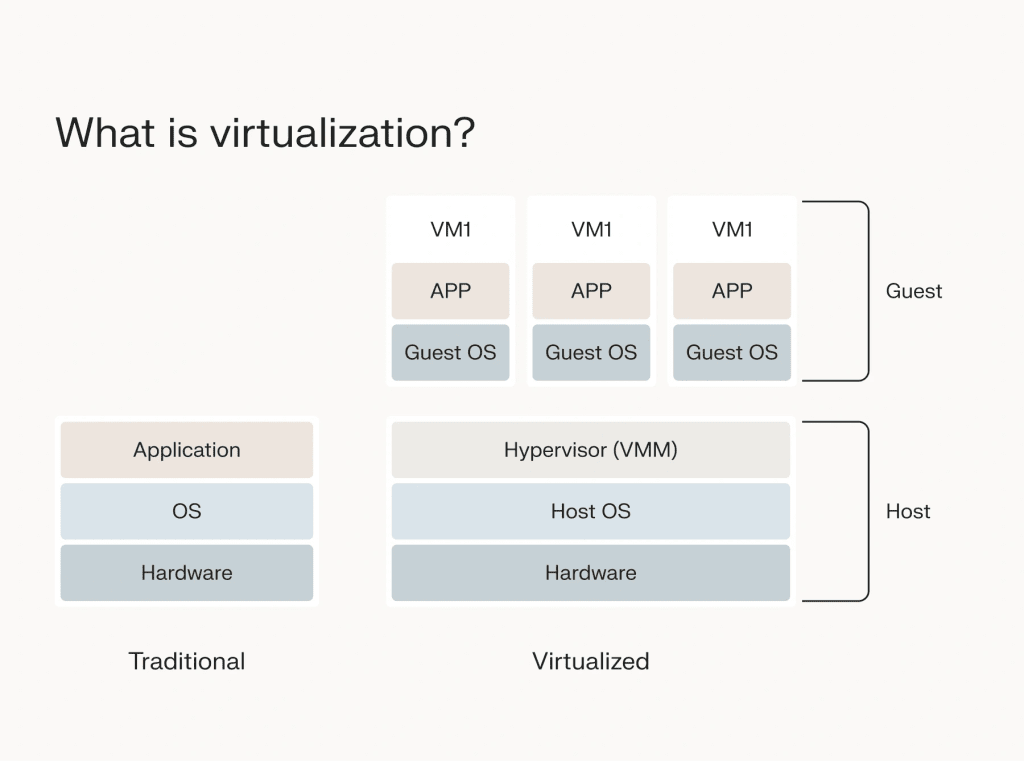
Imagine a traditional office setup with a room full of servers, each serving a specific function crucial for daily operations – one might handle email, another file storage, and so on. In a virtual infrastructure, these physical servers are transformed into virtual machines (VMs) and components, each residing on a single physical server or spread across several, which replicate the functions of their physical counterparts.
This setup provides a layer of abstraction that allows IT administrators to manage and deploy these virtual resources with unprecedented flexibility. Because the virtual setup is decoupled from physical machines, reallocating, scaling, and redeploying resources becomes significantly simpler.
Need more storage or processing power for an application? It can be allocated without the need to purchase and install new hardware. This flexibility is a game-changer for businesses, allowing for rapid adaptation to changing needs or opportunities.
The benefits of a virtualized infrastructure
Transitioning from a traditional physical infrastructure to a virtualized one offers many benefits.
Substantial cost savings
By consolidating multiple VMs on a single physical server, businesses can drastically reduce their need for physical hardware. This cuts down on the upfront investment in hardware and leads to lower power consumption and cooling needs. The reduction in physical servers also means a smaller footprint in data centers, which translates into lower energy bills and cooling requirements.
Scalability and flexibility
You can allocate additional resources to your virtual machines in a matter of minutes. This level of scalability and flexibility is especially crucial in today’s fast-paced business environment, where the ability to quickly adapt to changing workloads and resource requirements can provide a competitive edge.
Efficiency
Routine tasks such as provisioning, scaling, and maintaining systems can be automated, freeing up valuable IT staff time for more strategic initiatives. With fewer physical servers to maintain and manage, the operational costs associated with these activities are significantly reduced.
Security
Through the isolation of VMs, any security breach in one VM is contained, preventing it from spreading to other virtual machines or the underlying physical system. This isolation helps in creating a more secure IT environment where critical applications and data can be segmented and protected more effectively.
Simplified IT management and environmental sustainability
Centralized management tools for virtual environments allow IT administrators to monitor, manage, and deploy resources all from a single console, streamlining operations and reducing the complexity of managing a diverse IT infrastructure. By reducing the number of physical servers and optimizing resource usage, virtualization contributes to energy efficiency and environmental sustainability, aligning with broader corporate social responsibility goals.
Potential drawbacks of virtual infrastructure
While the shift towards virtual infrastructure brings numerous advantages, it’s also essential to address the potential drawbacks that businesses might encounter.
Performance (especially for resource-intensive applications)
Virtualization involves sharing physical resources among multiple virtual machines, which can lead to contention and potentially degraded performance for applications that demand high computational power or memory.
In some cases, a dedicated physical server might provide better performance by offering dedicated resources to such applications. This doesn’t mean virtualization is inherently inferior, but rather that careful planning and resource allocation are key to optimizing performance in a virtual environment.
Security concerns
Although virtualization adds a layer of security through the isolation provided by the hypervisor, the underlying shared infrastructure could potentially be a vector for attacks if one virtual machine is compromised.
This is particularly relevant in multi-tenant environments where virtual machines from different organizations reside on the same physical hardware. It’s important to note, however, that these risks can be mitigated with proper security practices, such as implementing robust access controls and network segmentation.
Fortunately, these challenges can be overcome with careful planning and the right expertise. Proper implementation of virtual infrastructure is key to reaping its benefits while minimizing risks. This is where the support of professional services like Liquid Web becomes valuable.
A seasoned IT professional from Liquid Web can provide the guidance and tools necessary to design, deploy, and manage a virtual infrastructure that meets the performance and security needs of a business. With expert assistance, organizations can navigate the complexities of virtualization, ensuring a smooth transition and optimal operation of their virtual IT environments.
Components of a virtual infrastructure
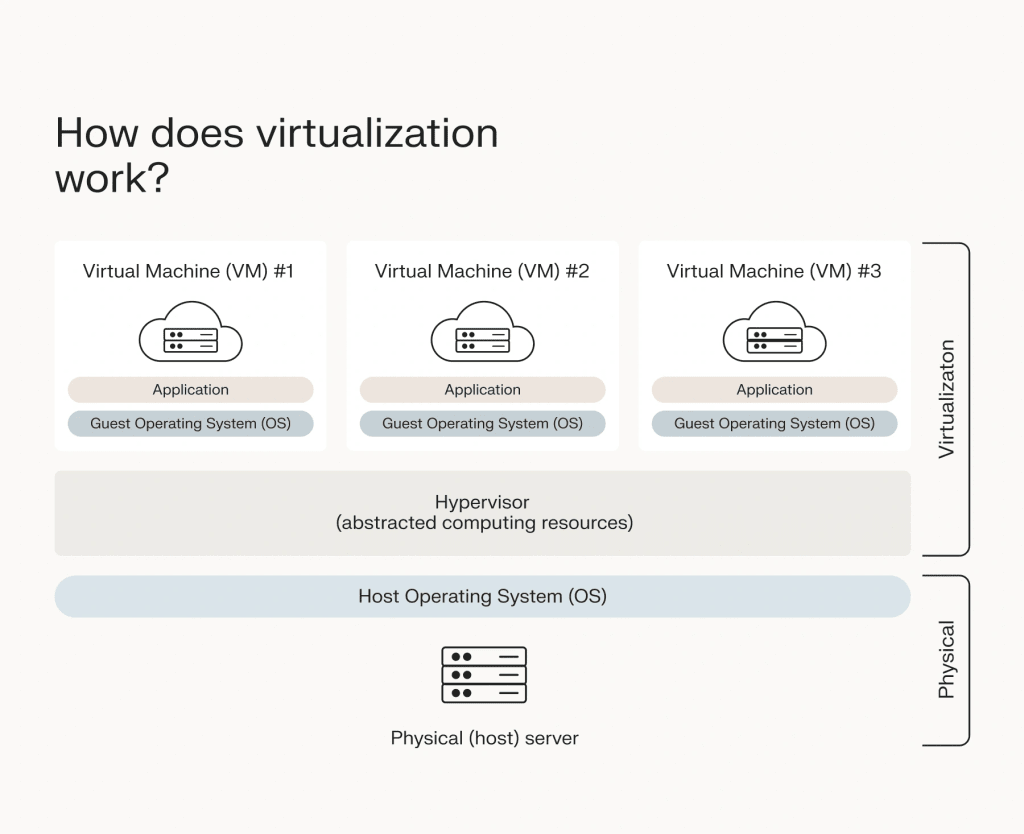
Computing
The concept of computing traditionally relies on physical servers to perform computations, process data, and run applications. In a virtualized environment, however, this function is taken over by virtual servers. Virtualized computing maintains the same capabilities as its physical counterpart but operates in a more efficient manner.
By allowing multiple applications and virtual machines to run on a single physical server, virtualization ensures that computing resources are deployed most effectively, with minimal waste.
This optimizes the use of hardware and reduces the overall footprint of the IT infrastructure. Additionally, virtualized computing is inherently more adaptable to new technologies, such as cloud computing, enabling businesses to leverage the latest advancements with ease.
Storage
Similarly, physical storage systems can be replaced with virtual storage in a virtualized infrastructure. Virtual storage systems offer enhanced efficiency by allowing the combination of multiple storage repositories into a larger, unified storage pool.
This is facilitated through storage networks, which enable the dynamic reallocation of storage resources between applications as needed. Such flexibility ensures that storage can be scaled up or down to match demand, improving the efficiency of data management and access.
Network
A virtualized infrastructure employs a centralized virtual network to manage software applications and virtual machines. Unlike traditional networks that rely on physical hardware, a virtual network operates independently of physical constraints, offering a high degree of flexibility and scalability.
Virtual networks can be equipped with robust security features, supporting safe access and communication between virtual machines. They also allow for the partitioning and efficient management of network resources, ensuring that each application or VM has the connectivity it requires without the complexity and cost of a physical network setup.
Management
At the heart of a successful virtual infrastructure lies a comprehensive management solution. Typically embodied in a software platform, this management layer offers a user-friendly interface through which the various components of the virtual infrastructure can be overseen and controlled.
Effective management tools enable seamless provisioning, resource allocation, and, potentially, automation of routine tasks. By simplifying the complexities of managing a virtualized environment, these tools ensure that IT administrators can focus on strategic initiatives rather than being bogged down by day-to-day operational challenges.
Through careful planning and deployment of these components, organizations can create a virtual environment that meets their current needs and sets them up to adapt to future technological advancements and business requirements.
Planning the transition to a virtual infrastructure
Thorough planning and strategic implementation ensure a smooth and successful transition. Here are in-depth and actionable steps organizations can follow to plan this transformation effectively.
Preparation steps
- Evaluate existing IT infrastructure: Begin by conducting a comprehensive assessment of the current IT setup. This evaluation should identify all physical hardware, applications, and data that could be virtualized, alongside understanding the performance metrics and utilization rates of existing resources.
- Understand the organization’s needs and goals: Clearly define what your organization aims to achieve through virtualization. Whether it’s cost reduction, improved efficiency, scalability, or all of the above, having clear objectives will guide the selection of technologies and the planning process.
- Assess available resources: Consider both the financial and human resources available for the transition. This includes the budget for new software and hardware (if needed) and the expertise available in-house or the need to engage external services.
Implementation strategy
- Technology selection: Choose the right virtualization technologies and platforms based on your organization’s specific needs. This includes selecting the hypervisor, virtual machines, storage, and networking solutions.
- Identify potential challenges: Plan for potential challenges such as downtime, data migration complexities, and integration with legacy systems. Developing a risk mitigation strategy is essential.
- Outline transition steps: Develop a detailed transition plan that outlines each step of the process, including timelines, responsible parties, and milestones. This plan should also include testing and validation phases to ensure that the virtualized environment meets the set objectives.
Choosing a cloud provider and virtualization solution
When choosing a cloud provider, evaluate their virtualization solutions based on their ability to scale, cost-effectiveness, security features, and the support services they offer. Consider the level of support and documentation available. Comprehensive support can significantly ease the transition process and ensure smooth operations post-transition.
Addressing potential challenges
- Dealing with legacy systems: Plan for the integration or replacement of legacy systems that may not be easily virtualized. This might involve phased migrations or maintaining a hybrid environment temporarily.
- Maintaining continuity of operations: Develop strategies to maintain business operations during the transition. This could involve incremental migrations or parallel running of both physical and virtual environments until the transition is complete.
- Managing virtual systems: Establish a management plan for the ongoing operation of the virtual infrastructure. This should include regular monitoring, performance optimization, and security management practices.
Operational efficiency and cost reduction
The transition to a virtual infrastructure can significantly impact workflows and operational efficiency by automating and streamlining processes. This period also presents an opportunity to identify and eliminate redundant physical resources, leading to further cost savings.
Planning and management
It’s vital to have a well-thought-out plan for both the transition and ongoing management of the virtual infrastructure. Having such a plan in place ensures that businesses can hit the ground running post-transition and maximize the benefits of virtualization.
Virtualization services with Liquid Web
For businesses looking to implement virtualization, partnering with a specialized service provider like Liquid Web can be highly beneficial. Liquid Web offers cloud VPS, a dedicated virtualization solution that operates on scalable cloud infrastructure, providing a powerful and reliable option for businesses.
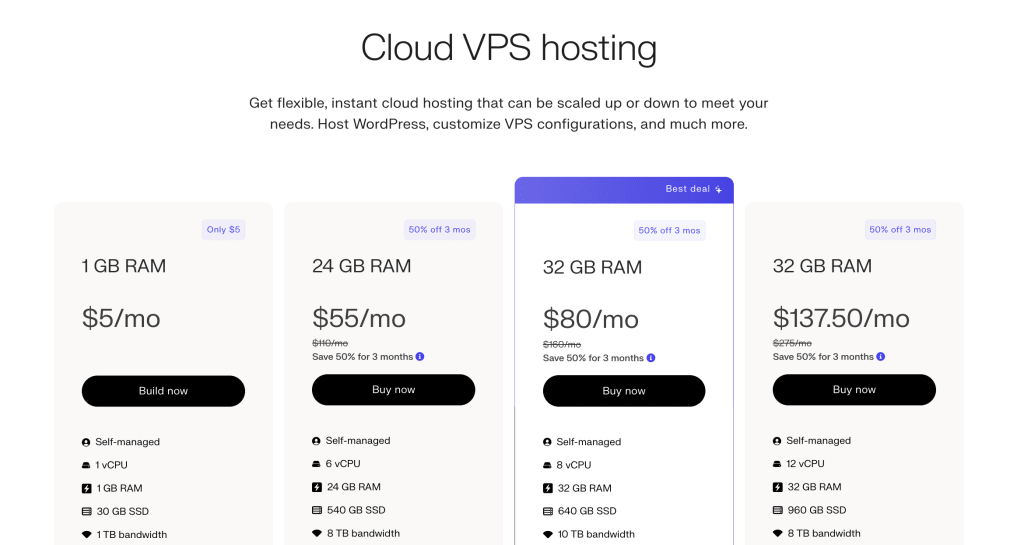
Liquid Web caters to a wide range of business needs through its fully managed VPS solutions to unmanaged options, ensuring that businesses can choose the features that best meet their requirements. With cutting-edge technology, extensive support, and regular updates, Liquid Web stands out as an excellent choice for guiding the virtualization process.
Easily upgrade to virtual IT infrastructure with Liquid Web
Transitioning to a virtual IT infrastructure presents a transformative opportunity for businesses of all sizes. By embracing virtualization, companies can achieve greater flexibility, scalability, and cost efficiency, setting the stage for more agile and competitive operations in today’s fast-paced market.
The benefits of such a shift are clear: from significant cost savings through reduced hardware investments and operational expenses to enhanced operational efficiency and the ability to quickly adapt to changing business needs.
Liquid Web is a premier partner for businesses looking to embark on this journey. With its robust cloud VPS solutions, Liquid Web offers a scalable, secure, and reliable virtualization platform that caters to the diverse needs of modern businesses.
Whether you’re looking for a fully managed VPS solution or prefer an unmanaged option, Liquid Web’s suite of services and expert support can guide you through the process, ensuring a seamless transition and optimal performance of your virtual IT infrastructure.
Experience the benefits of a virtualized infrastructure with Liquid Web’s cloud VPS, or reach out to the Liquid Web team for further assistance. Take the first step towards a more agile, cost-effective, and competitive business model today.