


 Liquid Web
 Businesses worldwide are embracing cloud computing for its versatile and cost-efficient approach to data storage and computing. This shift is backed by several compelling benefits – saving physical space and costs, flexibility, and scalability of IT resources, just to name a few.
However, in order to fully embrace cloud computing, you need to understand its architecture.
In this guide, we will delve into the core components of cloud architecture, explore different service models, and show you the various available options.
What is cloud computing architecture?
Cloud computing architecture refers to the design and structure of systems that deliver cloud computing services, encompassing both the front-end platforms seen by users and the back-end systems that manage and store data. It allows for scalable, flexible, and efficient computing resources, enabling users to access applications and data from anywhere with an internet connection.
This architecture typically consists of:
- Front-end platform: The visible interface the user interacts with, such as user interfaces and client networks that provide access to cloud computing services.
- Back-end platforms: Cloud servers, storage systems, traffic control mechanisms, security mechanisms, deploying models, and virtual machines. Communication between the user-friendly front end and the complex back end is possible using technologies like restful APIs or middleware services.
- Network: A secure, robust network is key to transmitting data between user devices and cloud servers safely and efficiently.
- Cloud-based delivery: All components are tied together by cloud-based delivery — a collection of protocols that dictate how data is sent and received. It includes APIs and web services that permit the transfer and management of data across the cloud network.
These foundational components can further be augmented by different service models such as Infrastructure as a Service (IaaS), Platform as a Service (PaaS), and Software as a Service (SaaS). Each model offers varied levels of cloud resource control to suit specific business needs.
To illustrate, let’s consider the following examples: IaaS is akin to renting an apartment, where you control the interior living space but not the external infrastructure; PaaS is similar to a partially serviced flat, where essentials are provided, and you customize the rest; SaaS is comparable to an all-inclusive resort, where everything you need is available at your fingertips. Companies have the flexibility to choose the service model that best suits their needs.
For instance, Liquid Web’s cloud dedicated servers fall under the IaaS service models and provide instant provisioning and scaling flexibility, mirroring the benefits of a thoughtfully designed cloud architecture.
The benefits of cloud architecture
Cloud architecture can address various business concerns, offer problem-solving strategies, and unlock potential opportunities:
- Cost efficiency: Thanks to its dynamic pricing model, you only pay for the resources you actually use. For instance, a retailer could scale up its resources during a high-traffic holiday sale and then scale back down to reduce costs during slower periods.
- Better speed and efficiency: Cloud architecture is designed to offer high-speed infrastructural components, which can lead to elevated operational efficiency and productivity.
- Scalability and flexibility: Businesses can adjust their IT resources based on demand fluctuations. This means ecommerce businesses can manage Black Friday traffic effortlessly, and startups can expand their infrastructure as their user base grows.
- Increased storage capacity: Cloud architecture provides substantial data storage capacity, ensuring you have ample space to store vital business information securely.
- Solid security measures: Adapting to evolving cybersecurity threats, cloud providers update their security measures dynamically, ensuring top-tier security for your data.
- Innovation-driven: Cloud architecture fosters innovation by providing access to emerging technologies like Artificial Intelligence (AI) and Machine Learning (ML). This allows you to swiftly adapt to market changes with minimal disruption to your operations.
Using cloud architecture also improves collaboration prospects – team members can access shared data and applications anywhere, anytime, fostering an environment of cohesion and unity. Moreover, setting up a cloud-based infrastructure is significantly faster than its physical counterpart, reducing your time to market.
The components of cloud computing architecture
Cloud computing architecture lays the foundation for various models of cloud technology that businesses can leverage, serving as a critical framework that defines the structure of a cloud platform. This architecture is instrumental in delivering, managing, and operating cloud services, ensuring that the resources are scalable, flexible, and accessible.
It consists of two primary structural components – the front end and the back end, interconnected via the internet or a network.
| Component | Front end | Back end |
| Purpose | Facilitates user interaction with cloud services. | Manages and operates cloud services, including computing resources, storage, and security. |
| Includes | User interfaces, client-side applications, and client devices or networks. | Computing resources, storage systems, security mechanisms, databases, and servers. |
| Function | Allows users to access and use cloud services through web browsers or dedicated applications. | Processes data, runs applications, stores information, and maintains the overall health and security of the cloud infrastructure. |
Here’s an overview of some significant cloud components:
- An application: Any application the client or user engages with on the front end must exist in or be compatible with the cloud.
- A service: It could be a managed cloud service, database management, web hosting service, or a different model capable of conducting all tasks within the cloud computing system.
- Runtime cloud: Think of this as the cloud’s operating system, where applications and commands execute. Runtimes could belong to varied domains, including but not limited to Java runtime or .NET runtime.
- Storage: Cloud storage morphs according to demand, offering flexible solutions tailored to specific needs.
- Cloud infrastructure: This is the backbone of the cloud operation, encapsulating all the physical assets necessary for functioning. Such infrastructure typically houses components ranging from CPUs to storage devices, all strategically scalable to align with varying demands.
- Management: DRM (Distributed Resource Management) applications, orchestration tools, cloud OS, and monitoring systems fall under this category, maintaining the critical link of communication between the front end and back end.
- Security features: Prioritizing the safety and integrity of data, various security measures such as encryption and multi-factor authentication are implemented.
Cloud service models: SaaS, PaaS, and IaaS unveiled
The three prime cloud service models – Software as a Service, Platform as a Service, and Infrastructure as a Service – offer unique features, each designed to cater to specific functionalities.
| Aspect | IaaS | PaaS | SaaS |
| Features | Allows for on-demand access to computing infrastructure. | Provides a robust set of software tools on top of foundational computing hardware. | Delivers ready-to-use, cloud-based software applications. |
| Control levels | Offers the highest level of control, ideal for customized solutions. | Elevates control level with preinstalled OS and databases. | Comprehensive yet less control as the provider manages everything. |
| Scalability | Provides scalability with on-demand resource allocation. | Presents a platform primed for scalability without infrastructure concerns. | Offers the most seamless scalability with everything managed by the provider. |
When going through cloud strategies, organizations should consider additional factors like integration capabilities with existing systems, data portability, and considerations around vendor lock-in alongside operational needs and budget.
For instance, PaaS provides a compelling platform for developers, as it saves them from dealing with resource provisioning or managing underlying hardware and software layers.
Types of cloud computing
Choosing a service model is a great start, but you also need to consider the type of cloud service in regard to its structure. You can choose between a private or public cloud.

You can also go for a hybrid or multi-cloud service.
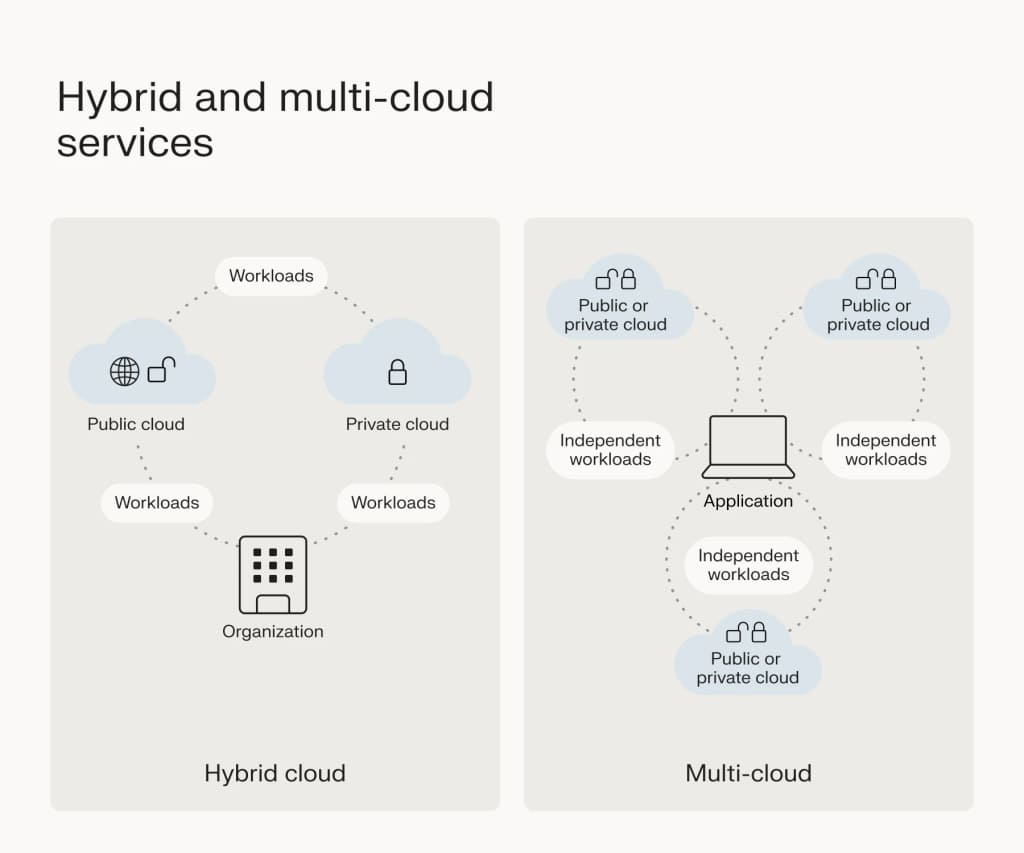
Let’s take a look at the differences between the four options.
| Cloud type | Location | Ownership | Security | Cost | Use case |
| Private cloud | On-premise or virtual private. | Fully owned and managed by the organization. | Highest security and control. | High, due to development and maintenance costs. | Businesses handling sensitive data or requiring exclusive resources. |
| Public cloud | Third-party provider. | Owned and operated by a third-party provider. | Strong security with shared resources. | Cost-effective, scalable, no physical infrastructure investment. | Businesses seeking scalability and cost savings without needing exclusive resources. |
| Hybrid cloud | Combination of on-premise and public. | A mix of private and public ownership. | Flexible and secure. | Cost-efficient with scalable options. | Organizations that need both the security of private clouds and the scalability of public clouds. |
| Multi-cloud | Multiple public clouds or a blend of private and public. | Owned by multiple providers. | Depends on individual cloud security. | Flexible costs that mitigate vendor lock-in risks. | Businesses looking for flexibility, risk mitigation, and specific capabilities across providers. |
Cloud architecture solutions with Liquid Web

Liquid Web is a renowned provider of cloud architecture solutions known for its comprehensive range of services designed to meet diverse business requirements. Its standout offering, cloud dedicated servers, showcases the company’s commitment to scalability, flexibility, and control.
Key features and benefits include:
- Scalability and flexibility: Easily handles traffic spikes, making it perfect for ecommerce and rapidly growing startups.
- Control over server environment: Offers enhanced control with virtualization technologies like VMware, ideal for businesses seeking tailored cloud solutions.
- Efficient site management: Simplifies site management for digital agencies.
- Sturdy security: Provides robust security measures for enterprise-level protection.
- High uptime: Ensures high uptime, which is crucial for SaaS companies.
- Ease of client account management: Facilitates client account management for resellers.
- Bare metal hosting: Combines physical servers with cloud resources for optimal performance and scalability.
Most of all, Liquid Web has become more than just a provider – it’s also a trusted partner you can rely on at any time.

So, if you’re looking for a customized solution that fits your business needs, contact one of Liquid Web’s friendly sales representatives.
Upgrade your servers: Creating your cloud architecture with Liquid Web
Upgrading your servers and creating an efficient cloud architecture brings numerous benefits, including scalability to meet demand, reliability for uninterrupted service, cost-effectiveness by optimizing resources, and enhanced security to protect your data.
It’s important to remember that cloud architecture can be customized in various ways, with service models and computing types tailored to specific business needs.
Liquid Web is a premier provider, offering a diverse portfolio of high-quality cloud architecture solutions that cater to a wide range of requirements. Whether you’re a startup looking for scalability or an enterprise in need of robust security, they have the technology and expertise to support your objectives.
Use this guide as a stepping stone to set up your ideal cloud architecture, and check out Liquid Web to find the best solution for your business’s cloud infrastructure needs.